TB.One > Value Mapping > FAQ - Value Mapping > Components/Attributes are Missing in the Value Mapping
Components/Attributes are Missing in the Value Mapping
Description
You cannot find a component, attribute, or value in the value mapping menu ("Channels > [Your Channel] > Value mapping").
Solution
Components, attributes, and the values assigned to them only appear in the value mapping menu if the product they are assigned to is categorized for the channel in question.
•Go to "Articles > Product list".
•Search for the product that contains the component/attribute you cannot find in the value mapping menu.
TIP: |
•Switch to the tab "Product data".
•Check the channel-specific categorizations. The product must be categorized for the channel where you want to configure the value mapping. The names of drop-down menus for channel-specific categorization may differ depending on the channel. (see Fig. 1)
•Assign a channel-specific category to the product.
ATTENTION: How to Avoid this Error •via clusters. •directly at the product. •via import. |
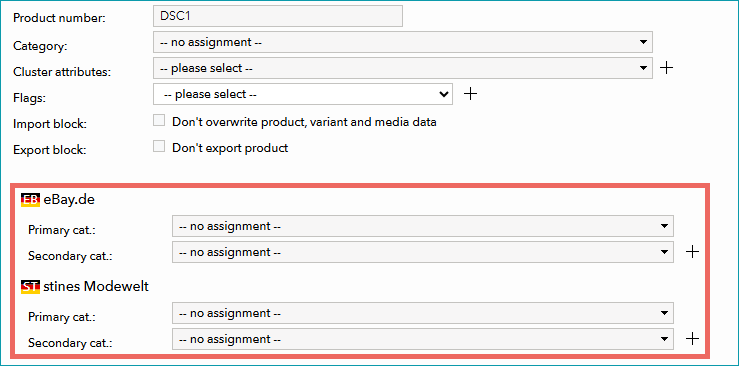
Figure 1: No categories are assigned for "eBay.de" and "stines Modewelt".
For further information, see also:
•What is the Difference Between Global and Category Mapping?