How the FBA process works
Amazon offers the storage of goods in an Amazon warehouse with shipment by Amazon. This option is called Amazon FBA (FBA = "Fulfillment by Amazon") and is activated as an own country-specific channel in TB.One.
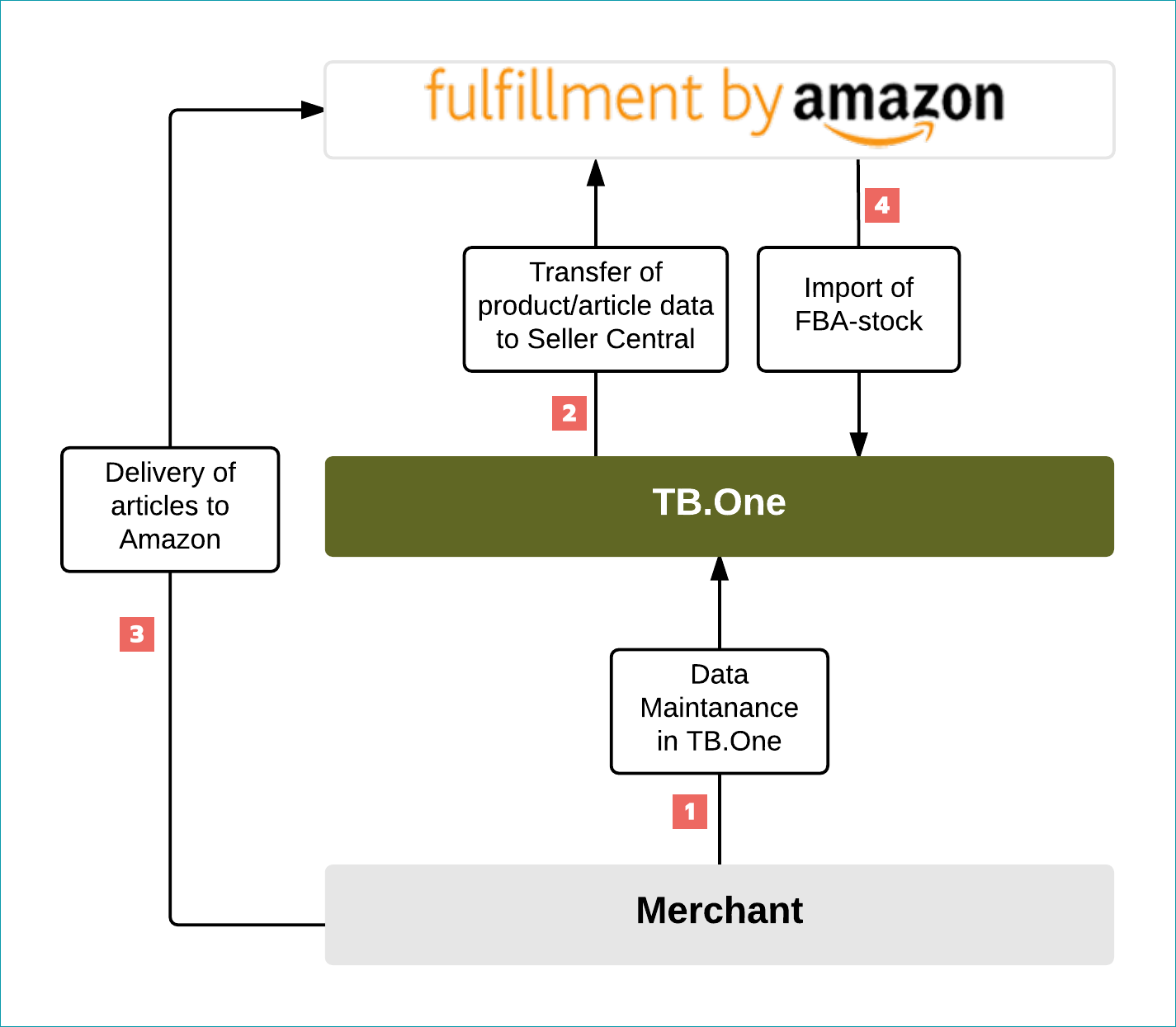
If your data is stored in accordance with the requirements of the respective country-specific Amazon channel in TB.One and via your live connection also in the Seller Central, in collaboration with the channel, you can deliver the desired goods to Amazon for storage. By comparing the Seller Central with your TB.One account, theAmazonstock information will be imported and the identification under which the model was sold will be set accordingly. Please note: if you order the Amazon FBA option for one of the channels in SellerCentral.eu, this channel determines the handling of the inventory in TB.One, i.e. if FBA stock and also the stock specified for the sale of an article via you as the merchant will always be offered via FBA until the inventory is down to zero. Only then will your merchant stock be used and the sale via you as the merchant is shown in the shop. Incoming FBA orders will be managed, processed and concluded entirely by Amazon. In this case, orders for the FBA channel are shown only as information in TB.One, and those of the other EU channels are provided as regular orders. You can obtain detailed information about the processing on pages of the channel directly from Amazon.
How to enable the interface
ATTENTION: Please note that sales via Amazon FBA require an appropriate live connection of the associated country-specific Amazon channel! Please inform us if you wish to sell your goods via Amazon FBA. For the final set up in your account, we require your merchant token, your merchant ID and the token for the MWS authorisation. Send us this information and your Seller Central access data directly by e-mail to integration@tradebyte.com. |
CHANNEL |
SIGN |
ID |
|---|---|---|
Amazon.com FBA |
afco |
68 |
Amazon.com.be FBA |
afbe |
929 |
Amazon.co.uk FBA |
afuk |
56 |
Amazon.de FBA |
afde |
52 |
Amazon.es FBA |
afes |
53 |
Amazon.fr FBA |
affr |
54 |
Amazon.ie FBA |
afie |
927 |
Amazon.it FBA |
afit |
55 |
Amazon.nl FBA |
anlf |
299 |
Amazon.se FBA |
afse |
928 |
Data provision via TB.One
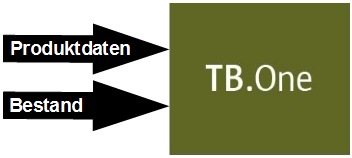
There is no FBA-specific data provision. A functioning data exchange between TB.One and the Amazon Seller Central uses the data of the country-specific Amazon channel. Therefore, you can only sell articles via Amazon FBA which are already specified in the Seller Central. Only then is it possible in a first step to assign the FBA stock in the Seller Central and, in a second step, the automatic transfer of this stock information to TB.One.
ATTENTION: Map the values of your product properties to the values of the following channel properties: •AreBatteriesRequired •SupplierDeclaredDGHZRegulation •CountryOfOrigin |
STEP |
DESCRIPTION |
|---|---|
|
It is only if the master data maintenance for the goods which you wish to sell via Amazon is fully available in TB.One for theAmazon channel (e.g. Amazon.de) that a smooth data exchange between TB.One and Amazon FBA (e.g. Amazon.de FBA) is possible. The activation of the products for the respective Amazon channel is mandatory! By contrast with other channels in TB.One, no Amazon FBA product activation is necessary. However, in order to receive a filter option via all FBA products, as an option you can carry out the product activation for FBA in the "Product data" tab. |
|
After transfer, the master data will be available in your Seller Central. |
|
Ship the goods to Amazon which you wish to have sold by Amazon FBA. The articles are stored in the channel warehouses and the respective inventory recorded in the Seller Central. |
|
The stock entered in the Seller Central is automatically called up at regular intervals by TB.One. After the first importing, you obtain a separate column "FBA stock" in your article data in the "Stock data" tab. This is greyed out, as the stock information may not be edited from TB.One. This serves as an overview of the goods stored at Amazon. |


In the case of stock updates for the normal Amazon channel, TB.One transfers the respective applicable activation for either the shipping by Amazon(FBA stock > 0) or the merchant (FBA stock < 0, inventory for Amazon channel > 0).
You can bypass the described automatic adaptation from "Shipping by Amazon" to "Shipping by merchant" by maintaining the appropriate attribute (e.g. "FBA") on separate articles. In this case, you can choose any attribute value (e.g. "Yes"). In the channel settings, this attribute is saved by your Tradebyte Solution Delivery Manager as an FBA attribute, so that the products and articles marked with this attribute can only then be offered in the shop if there definitely is FBA stock. As a result, there will be no shipping of the articles by you as the merchant.
Order Processing
The order for one of your articles stored at Amazon goes directly to the channel. The entire order processing, i.e. payment processing, packaging, issuing of order documents, invoice creation as well as shipping to the customer takes place directly at Amazon. You do not have to process anything! To obtain an overview of the incoming orders at Amazon and to enable statistical evaluations, the order data can be viewed in your TB.One. Please do not create any messages or edit anything concerning this order data! You can also receive so-called pending orders for Amazon FBA if Amazon either checks the ability to pay of the end customer or the payment state of the order. If the check is positive, the order will be released, processed by the channel and the status correctly updated in TB.One. Otherwise, Amazon will reject the order and the order will be marked in TB.One as withdrawn. During the course of the order processing, the FBA stock is automatically reduced by Amazon and the new inventory imported to TB.One. Consequently, in accordance with the changes made, the activation indicator is updated accordingly.
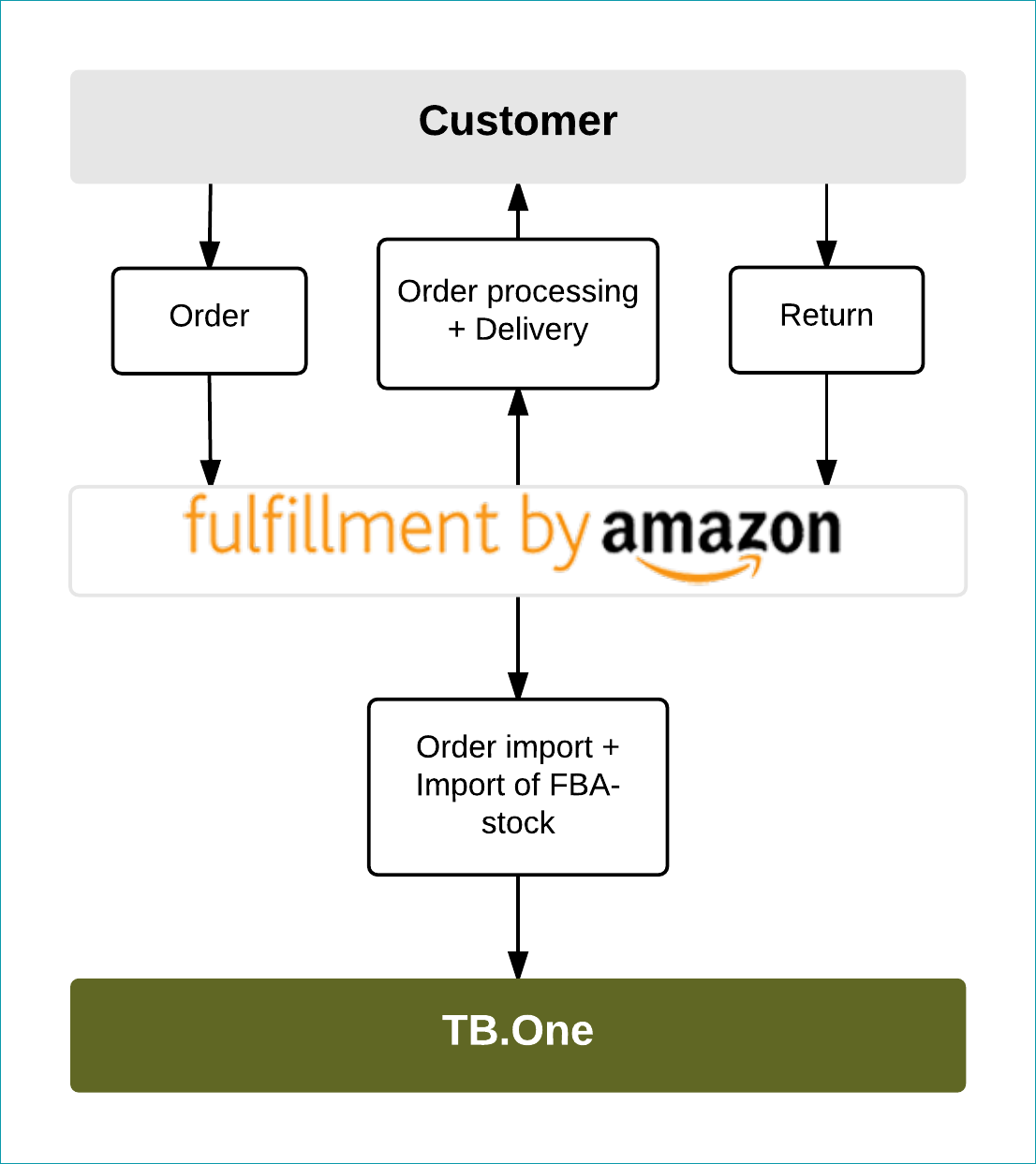
Returns will also be sent directly to Amazon and again recorded by the channel. The returns message will be imported in TB.One. Also here, you do not have to process anything.
Received orders can be found in TB.One under the menu item "Orders > Order list". By default, the list is filtered for open orders. To view orders of an Amazon FBA channel, set the "Distribution channel" filter to the desired Amazon FBA channel and select the required status.
Data Exchange
DATA |
TIMES |
|---|---|
Retrieving and important FBA stock |
Every 30 minutes from 00:20 |
Retrieving and important FBA orders |
Hourly from 00:01 |