Marketplaces > Marketplaces A-F > Amazon > Amazon VSC (VAT Calculation Service)
Amazon VSC (VAT Calculation Service)
ATTENTION: Only use VCS Standard with TB.One! •VCS Standard: Amazon calculates the value-added tax. Additionally, the channel provides invoices and credit notes for end customers in its own invoicing format. •VCS Lite: Amazon only calculates the value-added tax. Sellers have to upload their own invoices and credit notes to the SellerCentral. Currently, you can only use VCS Standard with TB.One. |
Amazon VAT Calculation for Amazon Business
To activate the Amazon VAT Calculation Service, you must ensure your accounting can map the invoicing process. It is mandatory to keep the rate of invoice deficiencies below 5%. Failure to do so may result in the account being deactivated. The invoices created by the channel follow their own number range.
Mandatory requirements for using Amazon VCS standard
To take advantage of Amazon Business, Amazon VCS has to be activated. The VAT calculation service offers you, as an Amazon Business provider, additional benefits. The net prices for your offers are displayed in real time, thereby increasing your visibility and sales opportunities. Once you have activated Amazon VCS, invoices for all your Amazon orders are generated automatically. As a result, you will benefit from additional time and cost savings for transactions in intra-community trade. Also, consider further information about Amazon Business provided by Amazon.
Following mandatory requirements have to be fulfilled before they can configure Amazon VCS Standard:
Step |
Description |
|---|---|
|
A single standard shipping location within the EU for order executed by the seller is mandatory. |
|
At least one identification number for sales tax from one of the EU member states is obligatory. •VAT-ID registered in the country of the sender •VAT-ID registered in the country, where a FBA stock is located |
|
All sale tax identification-numbers must be validated (Number and registered address). |
|
You must have the ability to provide your own billing for all your Amazon orders. |


Configuring Amazon VCS standard
ATTENTION: |
If you would like to use Amazon VCS, please proceed as follows:
Step |
Description |
||
|---|---|---|---|
|
Contact Tradebyte to arrange a date on which the invoicing process will be switched to VCS. |
||
|
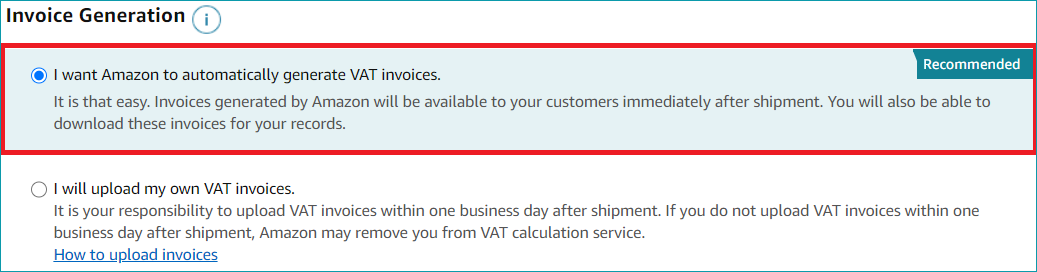
Register for VCS Standard in the SellerCentral (see screenshot). Please also consult the information provided by Amazon. Make sure to allow a sufficient amount of time for this step to ensure that the registration process is complete when the switch of the invoicing process takes place.
|
||
|
On the scheduled date, Tradebyte changes the process for order-related messages. From this point onwards, TB.One uses the taxes calculated by Amazon for messages to the SellerCentral. Based on these messages, Amazon provides invoicing and return documents. |
||
|
After the switch, review your invoices and returns in the SellerCentral.
|
||
|
Ensure compliance with the retention period for invoice documents. |