Marketplaces > Marketplaces A-F > About You > About You Multi Channel Fulfillment
About You Multi Channel Fulfillment
This article covers what you need to know about About You Multi Channel Fulfillment (MCF).
What's About You Multi Channel Fulfillment (MCF)?
About You MCF is your end-to-end solution for shipping processes and logistics.
Store your stock at an About You warehouse and have MCF manage the end customer shipping and return processes in their entirety.
TIP: Benefits of using About You Multi Channel Fulfillment •Your entire fulfillment process is covered •You can focus solely on growing your business across marketplaces, while About You fulfills your orders according to platform requirements and customer expectations •You benefit from About You's prove European-wide carrier network •Use only one stock pool across all channels, stored at About You's warehouse for several sales channels •Save cost by paying for inbound and outbound costs only - all other costs are already covered by your About You FbAY contract |
How does it work?
You'll find below the summary of the About You Multi Channel Fulfillment (MCF) process (see Fig. 1):
1.You send your articles to an About You Warehouse via the FbAY Inbound Process.
2.About You MCF transfers your stock data to TB.One.
3.TB.One transfers your stock data to the marketplaces.
4.Marketplaces transfer incoming orders to TB.One. Then, TB.One forwards them to About You MCF.
5.About You MCF automatically manages orders, shipping, returns, and cancellations where applicable.
6.About You MCF forwards shipping/return/cancellation messages and stock changes to the marketplaces via TB.One.
7.TB.One regularly provides About You MCF sales reports that contain an overview of your About You MCF sales channels.
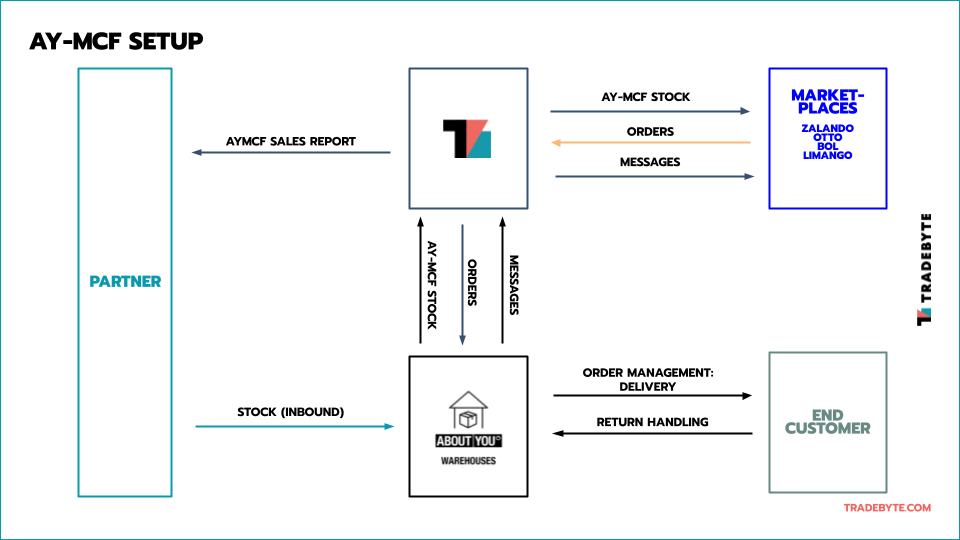
Fig. 1: Summary of the About You Multi Channel Fullfillment (MCF) process
How can I book About You Multi Channel Fulfillment (MCF)?
Contact your About You MCF Sales Manager, your FbAY Account Manger or your Tradebyte Success manager if you want to book About You MCF.
To use About You MCF, you need a connection to Fulfillment by About You (FbAY) first.
Data exchange times for About You Multi Channel Fulfillment (MCF)
DATA |
TIMES |
|---|---|
MCF stock (Delta) |
Every 30 minutes |
Order data |
Every 15 minutes |
Order messages |
Every 10 minutes |
MCF Sales Reports |
As agreed with Tradebyte |
Available channels for About You Multi Channel Fulfillment (MCF)
With About You's logistics network, you can manage orders for the following channels via TB.One:
•bol.nl
•limango.de
•OTTO Market
•Zalando.at
•Zalando.be
•Zalando.de
•Zalando.fr
•Zalando.it
•Zalando.nl
Warehouse configuration
There are two ways to configure your warehouse to fulfill your orders:
•Mono warehouse setup - One warehouse
•Hybrid warehouse setup - If you choose this option, you can prioritize your warehouses for each channel on country channel level
You can either choose to:
•Fulfill orders for these sales channels exclusively with your About You MCF stock (Mono Warehouse Setup), or
•Use your About You MCF stock and your own warehouse as a stock pool (Hybrid Warehouse Setup).
Warehouse settings for About You Multi Channel Fulfillment (MCF)
After booking About You MCF, Tradebyte will configure your settings.
Check your warehouse settings in the menu menu "Basic data > Storage > Warehouse settings" to get familiar with your new stock management options.
ATTENTION: |
TIP: Set a stock reduction of "2" in your warehouse settings! The stock reduction will help you avoid oversales and cancellations even if multiple orders come in simultaneously. Articles that are left over due to the stock reduction are sold via About You MCF. Stock reductions for About You MCF work the same way as they do for any other channel. |
Mono warehouse setup
If you chose the mono warehouse setup, here's how your settings are configured in TB.One (see Fig. 2 below):
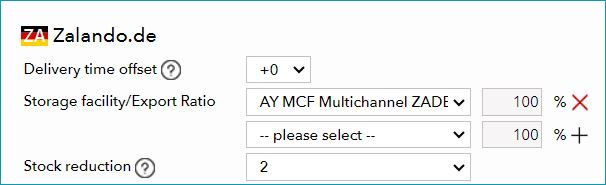
Fig. 2: Configuration of the mono warehouse setup in TB.One
Hybrid warehouse setup
If you chose the hybrid warehouse setup, your settings will be configured in TB.One as follows (see Fig. 3 below):
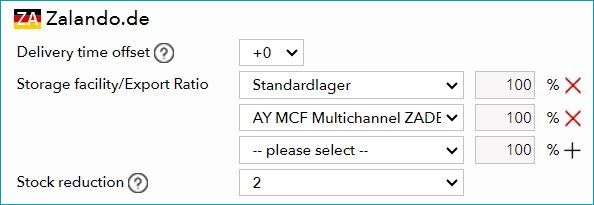
Fig. 3: Configuration of the hybrid warehouse setup in TB.One
Stock management for About You Multi Channel Fulfillment (MCF) in TB.One
•Stock numbers reflect how many articles are currently stored at the warehouse and are not reserved for an order.
•Articles that were handed over to a carrier and are currently not at a MCF warehouse yet are not take into account.
•MCF stock numbers refer to the FbAY-DE warehouse. Other FbAY warehouses are not taken into account.
Order management for About You Multi Channel Fulfillment (MCF) orders
Orders are assigned to the channel from which they originate.
The order status shown in TB.One (dispatch advice/returned) reflects the current status of the order at About You MCF.
TIP: You do not need to send shipping or returns messages to the channels! These orders are therefore deliberately excluded from the regular CSV/XML order export. |
Orders that are shipped via About You MCF are highlighted with the MCF icon next to the name (consignee) in the order list ("Orders > Order list").
To filter for MCF orders only, use the filter "MCF" in the filter section (see Fig. 4 below):

Fig. 4: About You Multi Channel Fulfillment (MCF) in an order list in TB.One
TIP: You can track the fulfillment process and its individual steps in TB.One: |
Reports for About You Multi Channel Fulfillment (MCF)
About You MCF sales reports show an overview of sales and returns on About You MCF channels.
TB.One provides these reports for download regularly:
•Retrieval: Via SFTP (directory "out") or manual download in TB.One ("Data exchange > Directories > Output")
•Naming: "Salesreport_mcf_[channel sign]_[time stamp].csv"
•Frequency: Daily, weekly, or monthly (consult Tradebyte)
•Content: See this article for more information
ATTENTION: Stock reports for About You MCF are not available! |