Marketplaces > Marketplaces T-Z > Zalando > FAQ - Zalando > How does the Zalando Special Description Work?
How does the Zalando Special Description Work?
The Zalando Special Description allows you to transfer additional information from your product data to the channel that is not maintained in the the value mapping.
TIPP: |
What does the Special Description Contain?
The Special Description is generated from your product data automatically. It consists of:
▪Bullet points
▪Special text
▪Product components
How to Configure the Special Description
ATTENTION: |
You can exclude the individual elements of the Special Description from the export to Zalando:
1.Open "Channels > Zalando (main channel) > Settings" and switch to the tab "Product texts".
2.Go to the section "Special Description".
3.Clear the checkboxes to remove individual elements from the export in the Special Description (see Fig.1).
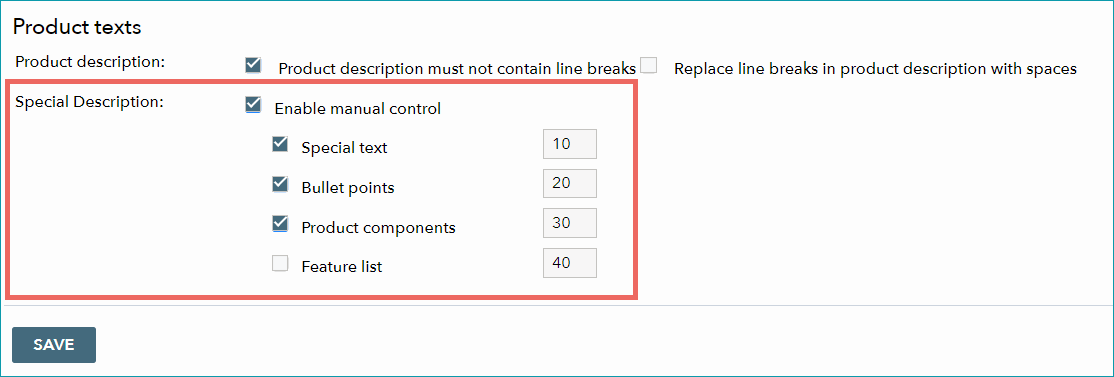
Fig.1: Configuring the Special Description
ATTENTION: |
BEST PRACTICE TIP: ▪Create a product component with a corresponding value for the respective product. TB.One then transfers this product component as part of the Special Description without using it in the value mapping. ▪You can specifically exclude this product component from export to other channels. Go to "Basic data > Properties > Components" and activate the check box "Do not export" for the respective channel. This is useful if the information maintained in the product component is only relevant or required for Zalando. |