Marketplaces > Marketplaces T-Z > Zalando > Prices for Zalando > Price List Configuration for Zalando
Price List Configuration for Zalando
ATTENTION: 1.If you are using multiple Zalando business models (Partner Program, ZFS) the prices must be consistent for each country. Otherwise, the prices of the different business models will overwrite each other. 2.Technical requirements for promotional prices (cross prices) at Zalando: a.The promotional price must be lower than the regular price by at least 0.01 in the respective channel currency. b.The promotional price and the regular price must be in the same currency. c.The promotional price must be greater than 0. |
Assign Zalando price lists
Go to "Channels > [Your Zalando Channel] > Price catalogue" to access your Zalando price lists. There you can assign an unlimited number of price lists to each channel and manage them.
Configure Zalando price lists
Use the drop-down in the section "Default price list" to define a specific price list as the standard for the channel.
TIP: |
Prioritize price lists in the section "More Price lists". If you want to change a price list’s priority, drag and drop it to the target priority level.
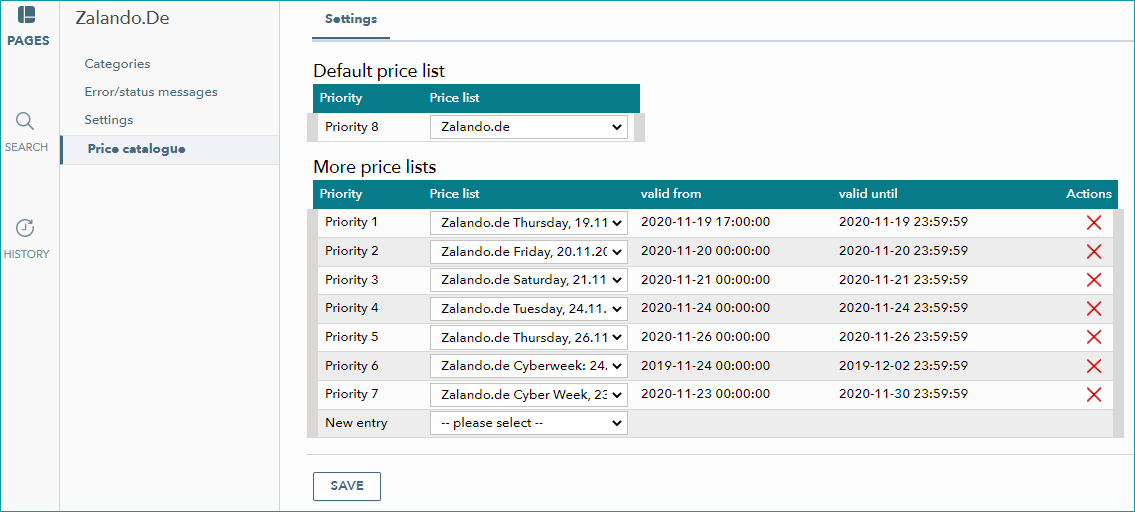
Fig.2: Validity and prioritization for Zalando
ATTENTION: ▪Flag all price lists under "More price lists" as sales price lists. ▪Prioritize Zalando price lists by their starting dates. The price list that becomes valid first takes priority "1". The price list that becomes valid next takes priority "2", and so on (see screenshot Fig.2). ▪Starting dates/times ("valid from") must lie in the future. ▪The periods of validity for Zalando price lists must not overlap. ▪Transmit price lists to the marketplace at least 2 hours before they become valid. ▪Allow a minimum of 60 minutes between the starting times of different price lists. ▪Price lists must be valid for a minimum of 60 minutes (i.e. the "valid from" and "valid until" values must be at least 60 minutes apart). ▪The date specified in the "valid until" field must be later than the date specified in the "valid from" field. ▪Avoid bulk updates! Due to Zalando rate limits you must not update more than 8,000 prices in one file. Allow a few minutes between uploads. If you do not know how to flag sales price lists or configure a price list's period of validity, see the chapter "Create a new price list" in the price catalogue manual. |
TIP: |
Export Zalando price lists
Price data is transmitted to the channels with the regular catalogue export. These exports usually take place at least once a day. You can find the data exchange frequencies for Zalando in the channel manual.
After your price updates have been exported to Zalando, the marketplace will validate them to reduce the risk of mistakes. You may have to adjust your price updates after the validation process.
Check the results of your price validation on the zDirect price updates page:
•Review your prices.
•Download price validation reports (CSV).
•Adjust price rule thresholds to match your pricing strategy.