Marketplaces > Marketplaces T-Z > Zalando > Return Code - Transmission via dispatch advice > Manual Input of Proposed Return Codes
Manual Input of Proposed Return Codes
ATTENTION: With TB.One you can either submit the proposed return code manually by using the GUI of TB.One or via one of the standard interfaces. If you are using a custom interface, please contact your Tradebyte Key Account Manager to find out how to proceed. |
In order to be able to manually input the proposed return codes, please make sure to allow for them to be entered in the order details. You can configure this setting in the menu "Admin > System settings > Order processing".
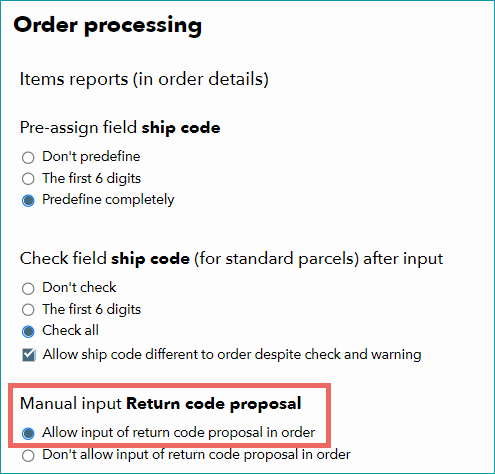
Once you have made the setting, click on "Save".
To submit the proposed return codes, navigate to the order list ("Orders > Order list") and select an order by clicking on the order number. A new menu will open. Here, navigate to the tab "Delivery & Cancellation". In the lower part of the window, you can submit the ship code and the proposed return code, both of which will be transmitted to the channel in the dispatch advice.
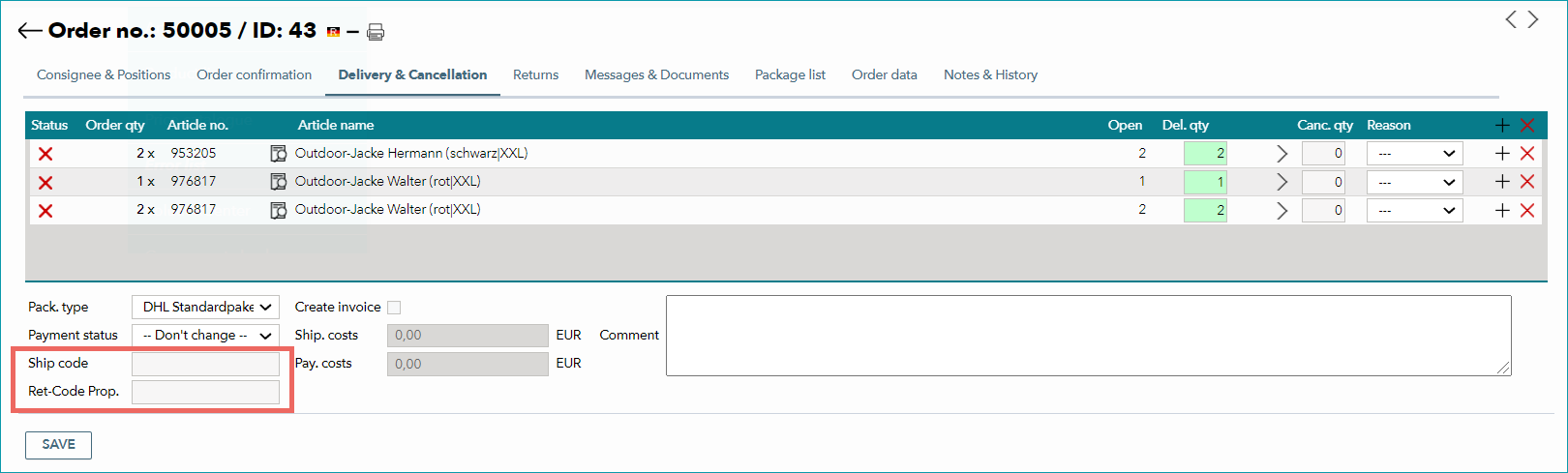
Confirm by clicking "Save".
If you create ship and return labels via TB.One (for example labels for the carrier DHL), there is no need to input the proposed return code manually. In that case TB.One will detect and automatically export the return code in dispatch advices. You can view the code in the tab "Order data".