TB.One > Order Data and Order Processing > Data Privacy and GDPR > How to Restrict Access to Personal Data
How to Restrict Access to Personal Data
This page shows where personal data is located in TB.One and how to restrict employees' access to it.
Personal Data in TB.One
Personal data can mainly be found in the order data and in the user management.
Here is an overview of the main TB.One menu items where personal data can be found:
•"Home > Statistics" (and sub-menus)
•"Orders > [all menu items]"
•"Admin > User > Users" / "Mailing lists"
ATTENTION: |
Who has Access to Personal Data?
The following default user roles have access to menus that contain personal data:
•Administrator: Full access to all menus mentioned above without restriction.
•All rights except user management: Access to all menus mentioned above except "Admin".
ATTENTION: |
How to Restrict Access?
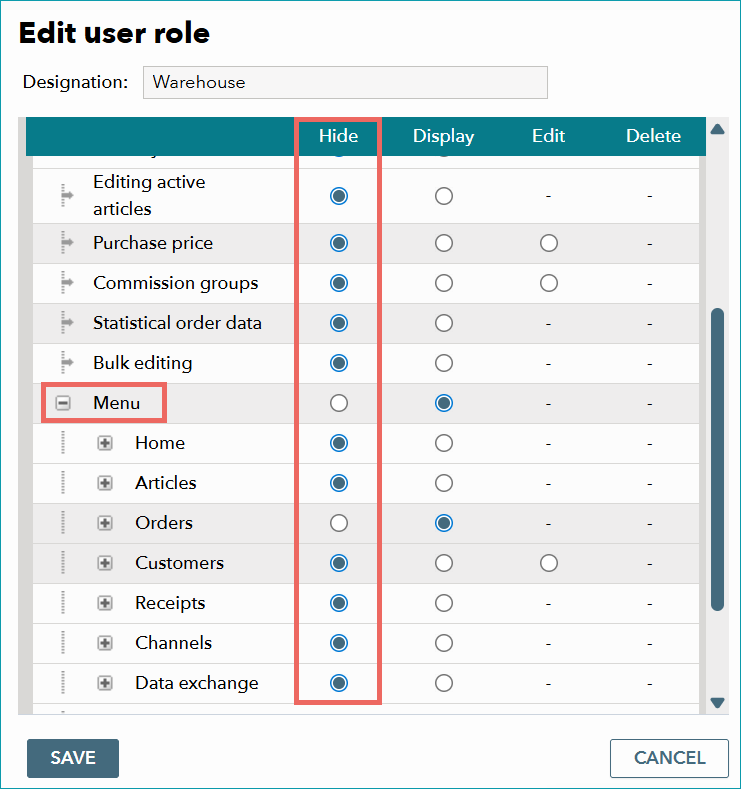
Use TB.One's role management system under "Admin > Users > Roles". Note that you cannot edit the default roles.
•Select a role from the list.
•In the table on the right, look for the entry "Menu" and expand it by clicking  .
.
•TB.One now shows an entry in the list for each of the main menu items. You can expand them further with the icons.
•Select "Hide" for any menu items you wish not to show to users with the selected role.
•Save your settings