TB.One > Order Data and Order Processing > Order Management - Basics and Setup > Export Settings for openTRANS 1.0
Export Settings for openTRANS 1.0
At "Admin > Export > openTRANS 1.0", you can configure the settings for the export of order data in the openTRANS format (XML). This is only relevant if your system is not able to process the format "TB.Order". Otherwise, it is strongly recommended to use "TB.Order".
1. CHANNEL ASSIGNMENT
You can specify an indicator for each channel. An entry for "Supplier_party_ID" is not necessary. Without this value, the SUPPLIER_ID node in the openTRANS output will look like this:
<SUPPLIER_PARTY> <PARTY> <PARTY_ID type="supplier_specific">null</PARTY_ID> </PARTY> </SUPPLIER_PARTY> |
|---|
2. ASSIGNMENT ADDRESS FIELDS
Here you define in which tags the supplied address data is delivered.
<NAME>Herta Mustermann</NAME> <NAME2>Mustermann</NAME2> <NAME3>Herta</NAME3> |
|---|
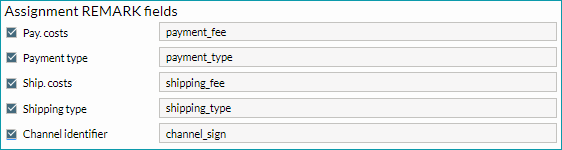
3. ASSIGNMENT REMARK FIELDS
The fields listed here will be displayed as remarks in the openTRANS file.
<REMARK type="payment_fee">0.00</REMARK> <REMARK type="payment_type">paypal</REMARK> <REMARK type="shipping_fee">3.95</REMARK> <REMARK type="shipping_type">STANDARD</REMARK> <REMARK type="channel_sign">rade</REMARK> |
|---|
For further information, see also: