TB.One > Order Data and Order Processing > Order Processing via XML > XML-Structure: TB.Order > XML Field Descriptions: Order Data > ORDER_LIST / ORDER > HISTORY / EVENT
HISTORY / EVENT
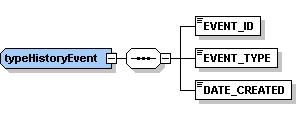
NODE |
REQ |
DESCRIPTION |
|
|---|---|---|---|
EVENT_ID |
Y |
INT |
ID of the event |
EVENT_TYPE |
Y |
CHAR |
Type of event (see list below) |
DATE_CREATED |
Y |
DATE |
Date of event |
Your system must be able to interpret the following event types:
KEY |
DESCRIPTION |
|---|---|
ORDER_CREATED |
Order created |
ORDER_CHANGE_ROUTING_CODE |
Change of DHL routing code |
ORDER_CHANGE |
Change of order data |
ORDER_SEEN |
Order seen |
ORDER_EXPORTED |
Order export (to merchant) is done |
ORDER_EXPORTED_CLEARED |
Order export reset |
ORDER_APPROVED |
Order is confirmed (by channel) |
ORDER_WITHDRAWN |
Order withdrawn (by channel) |
PAYMENT_STATE_OPEN |
Payment status is "open" |
PAYMENT_STATE_PAID |
Payment status: "order paid" |
PAYMENT_STATE_SHORTFALL |
Payment loss |
PAYMENT_STATE_PARTIAL |
Payment status is: "partly paid" |
CUSTOMER_CHANGE_SELLTO |
Change of billing address |
CUSTOMER_CHANGE_SHIPTO |
Change of shipping address |
MESSAGE_CREATED |
Message created |
MESSAGE_DELETED |
Message deleted |
PRINT_DELIVERY_NOTE |
Delivery note printed |
PRINT_ORDER_SHEET |
Order data sheet printed |
Example:
<HISTORY> <EVENT> <EVENT_ID>48011</EVENT_ID> <EVENT_TYPE>ORDER_SEEN</EVENT_TYPE> <DATE_CREATED>2012-11-30T10:15:05</DATE_CREATED> </EVENT> </HISTORY> |
|---|
For further information, see also: