TB.One > Setup, Configuration & User Accounts > FAQ - Setup, Configuration & User Accounts > How to Log Out Users as an Admin
How to Log Out Users as an Admin
Every user can only have one login instance on the system. Sessions with unsuccessful logouts can be terminated by any administrator with user management rights for that user. At "Admin > User > Users" an x will be displayed in the right column for all users who are currently logged in. By clicking this icon you can log out a user and terminate their session.
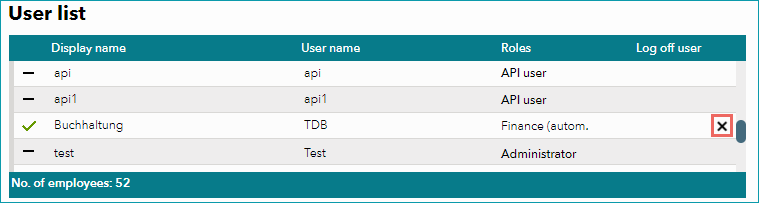
If a user is logged out by an administrator, a 15 second timer will run out before the actual logout and a corresponding message will be displayed to inform the user.
For further information, see also:
•Overview: creating and configuring user accounts