TB.One > Setup, Configuration & User Accounts > FAQ - Setup, Configuration & User Accounts > How to Switch Between Different TB.One Systems?
How to Switch Between Different TB.One Systems?
If you are using more than one TB.One, you still need only one email address to sign in to your accounts. During sign in, you will be prompted to pick which TB.One system to sign into.
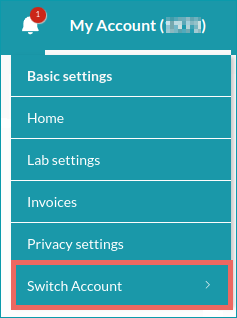
Once you're signed in, you can still switch to another account:
1. Go to "My Account" in the top right corner of the main navigation.
2. Select "Switch account" to open the list of your accounts.
3. Click on the account's name in the list to access it.