TB.One > Import & Export > Master Data Import via TB.Cat/XML > TB.Cat - XML Structure > TBCATALOG > PRODUCTDATA > PRODUCT > ARTICLEDATA / ARTICLE > A_ACTIVEDATA (TB.Cat 1.4 Only)
A_ACTIVEDATA (TB.Cat 1.4 Only)
ATTENTION: |
The nodes <A_ACTIVEDATA> and <A_ACTIVE> define which articles will be exported to a channel and will be listed there. This provides a more granular control for the export of each article variant. Via these nodes it is possible to activate individual articles on specific channels without splitting the corresponding product.
Example: You offer a fashion product which contains articles from sizes XXS to 5XL. You could configure the export in such a way, that sizes from XS to L are offered on one channel and sizes from L to 5XL on another.
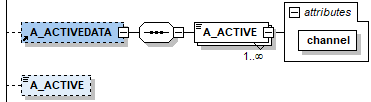
NODE |
REQUIRED |
DESCRIPTION |
|
|---|---|---|---|
A_ACTIVEDATA |
N |
Node for channel-specific article activation |
|
A_ACTIVEDATA / A_ACTIVE |
Y |
INT(0/1) |
0 = deactivated |
A_ACTIVEDATA / A_ACTIVE[channel] |
Y |
CHAR(12) |
Channel sign of the corresponding channel, usually 4 characters |
A_ACTIVE |
N |
INT(0/1) |
Node for cross-channel article activation |
ATTENTION: In the example below, the article would be exported to the channel "ch_1" but not to "ch_2". If the value in the <A_ACTIVE> at the bottom were "0", the article would not be exported to either channel. |
EXAMPLE:
|
For further information, see also:
•Master data import via XML - overview
•XML structure overview - TB.Cat 1.4
•Examples: XML for TB.Cat 1.4