TB.One > Import & Export > Master Data Import via TB.Cat/XML > TB.Cat - XML Structure > TBCATALOG > PRODUCTDATA > PRODUCT > ARTICLEDATA / ARTICLE > A_STOCK
A_STOCK
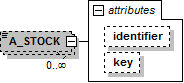
In TB.One, stock can either be assigned to one central warehouse or to several storage facilities. The storage facilities, in turn, are connected to individual channels.
NODE |
REQUIRED |
DESCRIPTION |
|
|---|---|---|---|
A_STOCK |
N |
INT |
|
A_STOCK[identifier] |
N |
CHAR(20) |
Only use this node if you work with multiple storage facilities! |
A_STOCK[key] |
N |
CHAR(50) |
Only use this node if you work with multiple storage facilities! Import key of the storage facility. |
EXAMPLE:
Multiple storage facilities
|
TIP: The REST call and file structure for stock updates are described here. Stock updates via REST API are only viable if stock numbers are changed with that method exclusively. |
For further information, see also:
▪Master data import via XML - overview
▪XML structure overview - TB.Cat 1.4
▪XML structure overview - TB.Cat 1.2/1.3
▪Examples: XML for TB.Cat 1.4 or TB.Cat 1.2/1.3