TB.One > Medien > Medien über Import hinzufügen und verwalten > Löschen von Medien via Import
Löschen von Medien via Import
Nach Anlegen des Mediums "pic2_new" als Artikelbild der roten Varianten der "Jacke Herrmann" soll nun das niedriger aufgelöste Bild "pic2" für die beiden roten Varianten gelöscht werden.
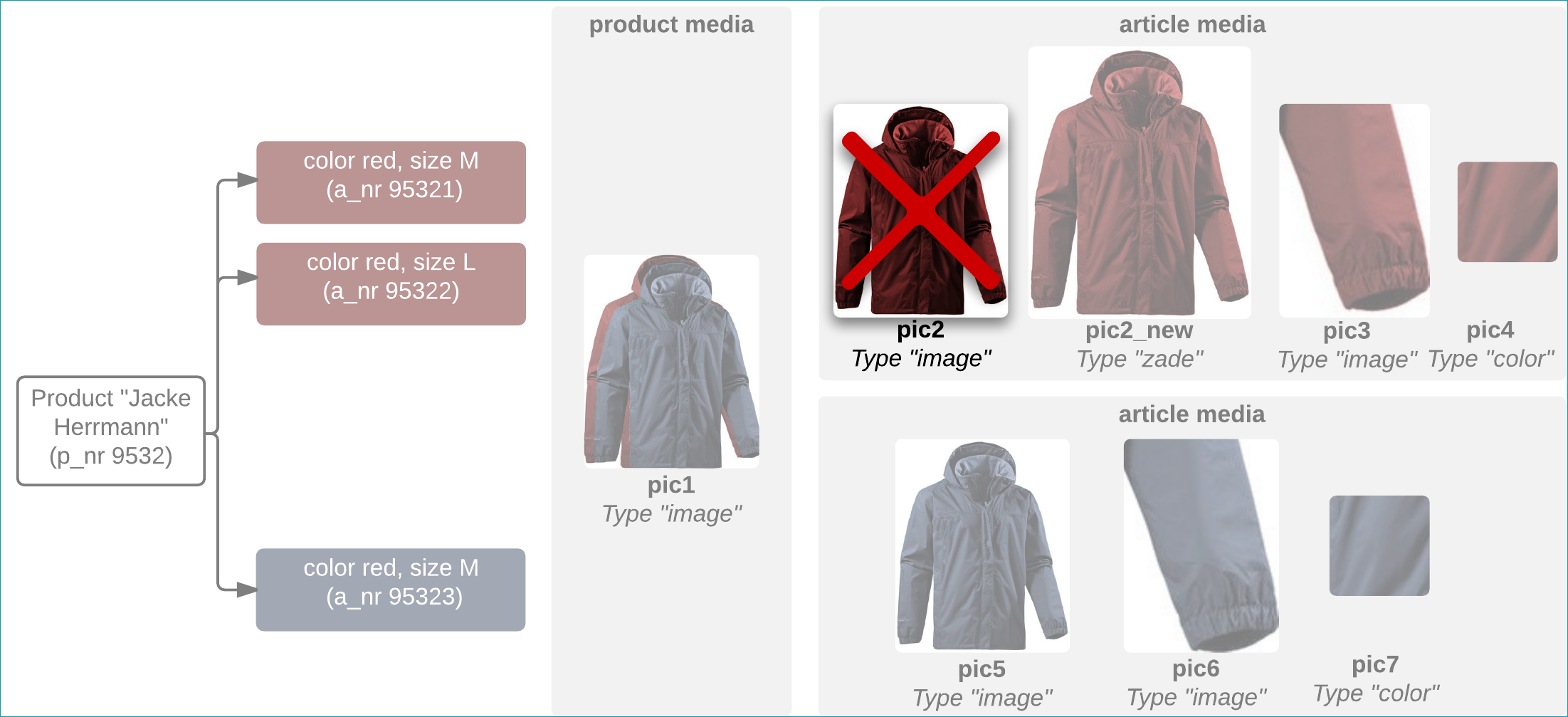
Wenn du Bilder mithilfe des Imports löschen möchtest, muss zwingend die Import-Einstellung "Nicht mehr gelieferte Inhalte beim Import löschen – Medien" aktiv sein. Das zu löschende Medium "pic2" wird entfernt, indem es in der entsprechenden Spalte nicht mehr in der Datei referenziert wird.
PANDA_URL_delete_20150414_1100.csv:

TBCAT_URL_delete_20150414_1100.xml:
<TBCATALOG> <PRODUCTDATA> <PRODUCT> <P_NR>9532</P_NR> <P_MEDIADATA> <P_MEDIA type="image" sort='1'>http://www.serverxy.com/pic1.jpg</P_MEDIA> </P_MEDIADATA> <ARTICLEDATA> <ARTICLE> <A_NR>95321</A_NR> <A_MEDIADATA> <A_MEDIA type="zade" sort='1'>http://www.serverxy.com/pic2_new.jpg</A_MEDIA> <A_MEDIA type="image" sort='2'>http://www.serverxy.com/pic3.jpg</A_MEDIA> <A_MEDIA type="color" sort='3'>http://www.serverxy.com/pic4.jpg</A_MEDIA> </A_MEDIADATA> </ARTICLE> <ARTICLE> <A_NR>95322</A_NR> <A_MEDIADATA> <A_MEDIA type="zade" sort='1'>http://www.serverxy.com/pic2_new.jpg</A_MEDIA> <A_MEDIA type="image" sort='2'>http://www.serverxy.com/pic3.jpg</A_MEDIA> <A_MEDIA type="color" sort='3'>http://www.serverxy.com/pic4.jpg</A_MEDIA> </A_MEDIADATA> </ARTICLE> <ARTICLE> <A_NR>95323</A_NR> <A_MEDIADATA> <A_MEDIA type="image" sort='1'>http://www.serverxy.com/pic5.jpg</A_MEDIA> <A_MEDIA type="image" sort='2'>http://www.serverxy.com/pic6.jpg</A_MEDIA> <A_MEDIA type="color" sort='3'>http://www.serverxy.com/pic7.jpg</A_MEDIA> </A_MEDIADATA> </ARTICLE> </ARTICLEDATA> </PRODUCT> </PRODUCTDATA> </TBCATALOG> |
PANDA_ZIP_delete_20150414_1100.csv:

TBCAT_ZIP_delete_20150414_1100.xml:
<TBCATALOG> <PRODUCTDATA> <PRODUCT> <P_NR>9532</P_NR> <P_MEDIADATA> <P_MEDIA type="image" sort='1'>sync/media/pic1.jpg</P_MEDIA> </P_MEDIADATA> <ARTICLEDATA> <ARTICLE> <A_NR>95321</A_NR> <A_MEDIADATA> <A_MEDIA type="zade" sort='1'>sync/media/pic2_new.jpg</A_MEDIA> <A_MEDIA type="image" sort='2'>sync/media/pic3.jpg</A_MEDIA> <A_MEDIA type="color" sort='3'>sync/media/pic4.jpg</A_MEDIA> </A_MEDIADATA> </ARTICLE> <ARTICLE> <A_NR>95322</A_NR> <A_MEDIADATA> <A_MEDIA type="zade" sort='1'>sync/media/pic2_new.jpg</A_MEDIA> <A_MEDIA type="image" sort='2'>sync/media/pic3.jpg</A_MEDIA> <A_MEDIA type="color" sort='3'>sync/media/pic4.jpg</A_MEDIA> </A_MEDIADATA> </ARTICLE> <ARTICLE> <A_NR>95323</A_NR> <A_MEDIADATA> <A_MEDIA type="image" sort='1'>sync/media/pic5.jpg</A_MEDIA> <A_MEDIA type="image" sort='2'>sync/media/pic6.jpg</A_MEDIA> <A_MEDIA type="color" sort='3'>sync/media/pic7.jpg</A_MEDIA> </A_MEDIADATA> </ARTICLE> /ARTICLEDATA> </PRODUCT> </PRODUCTDATA> </TBCATALOG> |