TB.One > Import & Export > REST Calls & the API > How to Create API Credentials
How to Create API Credentials
ATTENTION: |
•Go to "Admin > User > API Credentials".
•Open the left navigation bar on the tab "Pages" and select the Page Action "New API access". The menu "Create user" opens on the right (see Fig.1).
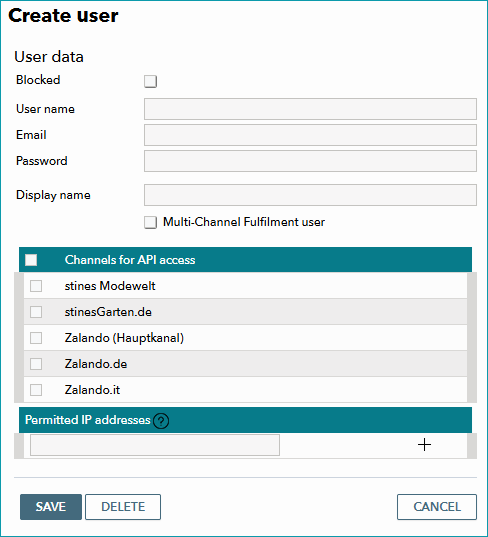
Fig.1: Set up API credentials in the "Create user" window.
Configure the settings as follows:
Option |
Description |
|---|---|
Blocked |
While this checkbox is selected, the credentials configured here can not be used to communicate with the API. |
User name |
Select the user name for your API credentials. |
Select an email address connected to this set of API credentials. |
|
Password |
Select a password for your API credentials following the password rules. |
Display name |
Choose how to call this set of credentials in TB.One. To access the API you have to input the "User name" not the "Display name". |
Multi-Channel Fulfilment user |
Only select this checkbox if you are explicitly instructed to do so by your Tradebyte contact. Do not select the checkbox to indicate that you will provide data for multiple channels using this set of API credentials. |
Channels for API access |
Select all channels for which the API user is allowed to change/access orders and data. To activate all channels simultaneously, select the checkbox in the header. |
Permitted IP addresses |
If you add one or more IP addresses here, only these IP addresses will be able to use the credentials to communicate with the API. Only IPv4 addresses are permitted. If you leave this field empty, there will be no restriction regarding IP addresses. |
TIP: |