TB.One > Setup, Configuration & User Accounts > User Accounts > Define Password Rules
Define Password Rules
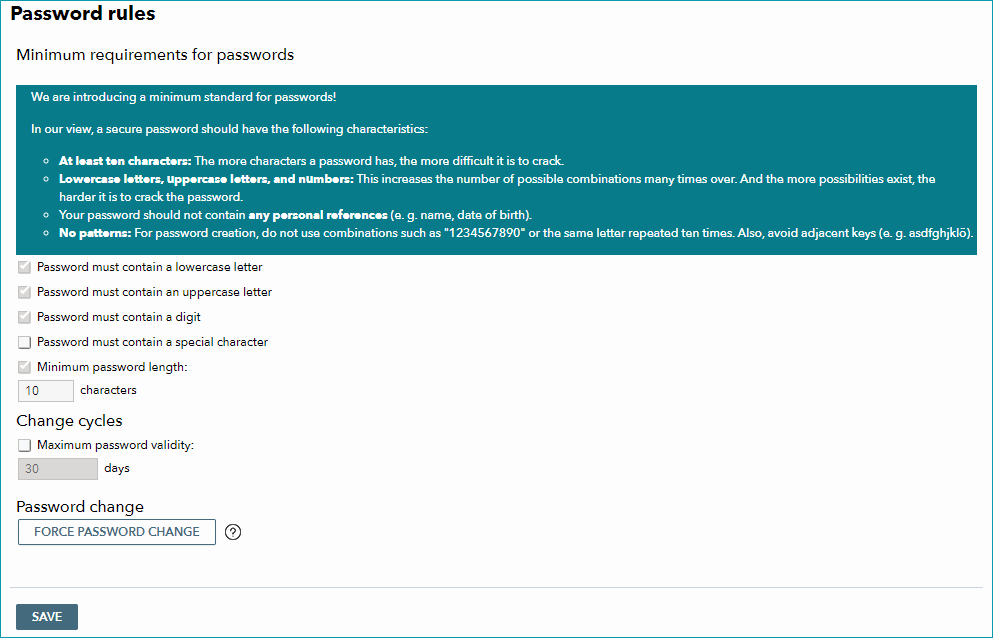
At "Admin > User > Password rules" you can globally manage password requirements. Some of these settings cannot be deactivated since they are essential for the security of your account.
ATTENTION: |
The password rules are only enforced when users change their passwords. Existing passwords will not be affected and remain valid. The maximum duration counts from the day the rule was set. When the defined time has elapsed, users have to change their passwords. The timer will also reset for individual users if they change their passwords of their own volition.
The menu also allows you to force users to change their passwords on their next login. This way administrators can control the starting date of password rules.
The users listed at "Admin > Users > User" are affected as well as API users (for REST) by password rules and forced password changes.
Some rules may be deactivated for individual users. If a user has to change their password on the next login (core.tradebyte.com) they will be prompted to do so after logging in but before the user account becomes accessible. This may either happen because the password has expired or because the password change was forced via the "Password rules" menu. The new password must meet the requirements set in the password rules. The user account will not be accessible unless the user changes their password.
For further information, see also:
•Overview: creating and configuring user accounts