TB.One > Media > Providing and Managing Media via Import > Deleting Media via Import
Deleting Media via Import
We have saved "pic2_new" as an article image for the red variant of "Jacke Herrmann" and now want to delete the lower resolution image "pic2" for both red variants.
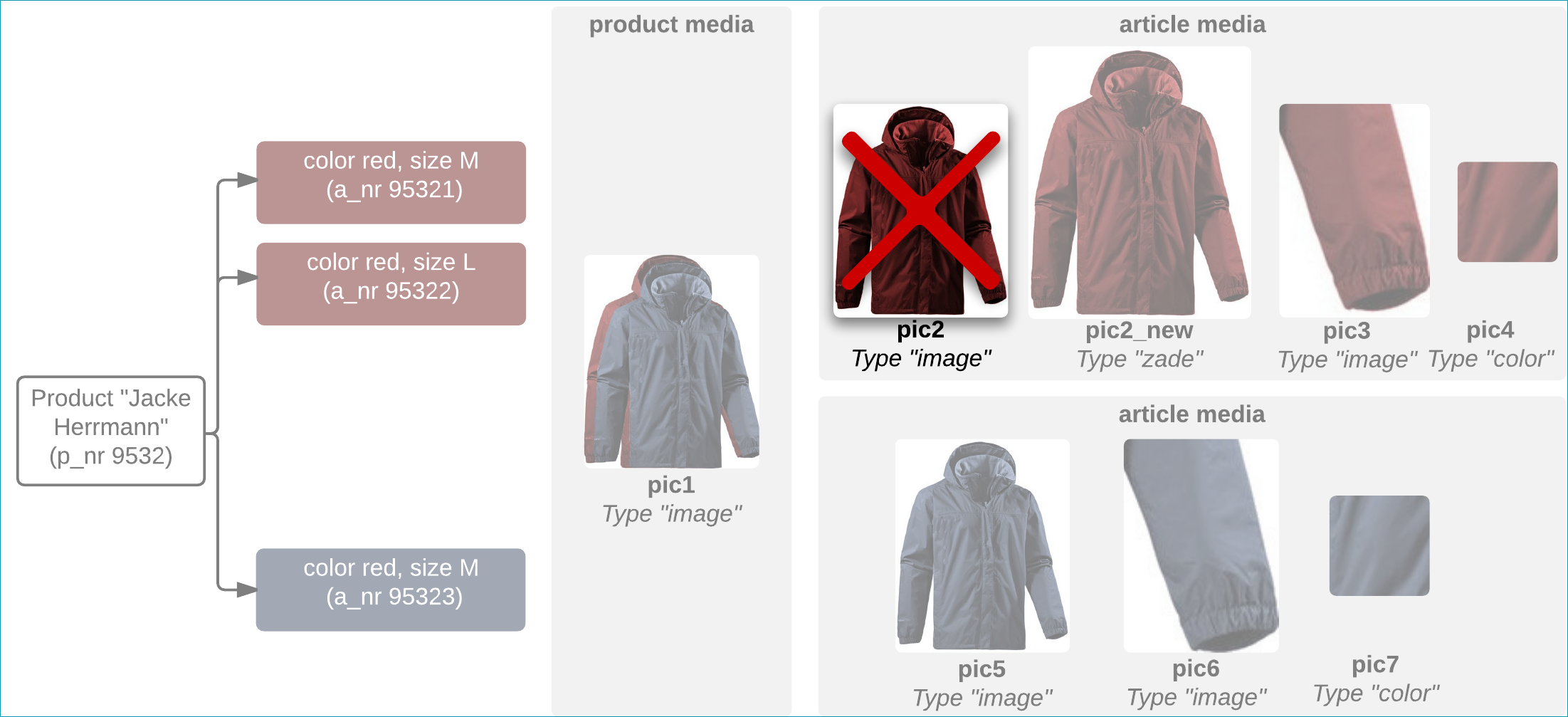
To delete images using the import, the option "Delete no longer delivered contents during import – media" in the import settings must be active. To delete the "pic2" image, remove it from the imported file.
PANDA_URL_delete_20150414_1100.csv:

TBCAT_URL_delete_20150414_1100.xml:
<TBCATALOG> <PRODUCTDATA> <PRODUCT> <P_NR>9532</P_NR> <P_MEDIADATA> <P_MEDIA type="image" sort='1'>http://www.serverxy.com/pic1.jpg</P_MEDIA> </P_MEDIADATA> <ARTICLEDATA> <ARTICLE> <A_NR>95321</A_NR> <A_MEDIADATA> <A_MEDIA type="zade" sort='1'>http://www.serverxy.com/pic2_new.jpg</A_MEDIA> <A_MEDIA type="image" sort='2'>http://www.serverxy.com/pic3.jpg</A_MEDIA> <A_MEDIA type="color" sort='3'>http://www.serverxy.com/pic4.jpg</A_MEDIA> </A_MEDIADATA> </ARTICLE> <ARTICLE> <A_NR>95322</A_NR> <A_MEDIADATA> <A_MEDIA type="zade" sort='1'>http://www.serverxy.com/pic2_new.jpg</A_MEDIA> <A_MEDIA type="image" sort='2'>http://www.serverxy.com/pic3.jpg</A_MEDIA> <A_MEDIA type="color" sort='3'>http://www.serverxy.com/pic4.jpg</A_MEDIA> </A_MEDIADATA> </ARTICLE> <ARTICLE> <A_NR>95323</A_NR> <A_MEDIADATA> <A_MEDIA type="image" sort='1'>http://www.serverxy.com/pic5.jpg</A_MEDIA> <A_MEDIA type="image" sort='2'>http://www.serverxy.com/pic6.jpg</A_MEDIA> <A_MEDIA type="color" sort='3'>http://www.serverxy.com/pic7.jpg</A_MEDIA> </A_MEDIADATA> </ARTICLE> </ARTICLEDATA> </PRODUCT> </PRODUCTDATA> </TBCATALOG> |
PANDA_ZIP_delete_20150414_1100.csv:

TBCAT_ZIP_delete_20150414_1100.xml:
<TBCATALOG> <PRODUCTDATA> <PRODUCT> <P_NR>9532</P_NR> <P_MEDIADATA> <P_MEDIA type="image" sort='1'>sync/media/pic1.jpg</P_MEDIA> </P_MEDIADATA> <ARTICLEDATA> <ARTICLE> <A_NR>95321</A_NR> <A_MEDIADATA> <A_MEDIA type="zade" sort='1'>sync/media/pic2_new.jpg</A_MEDIA> <A_MEDIA type="image" sort='2'>sync/media/pic3.jpg</A_MEDIA> <A_MEDIA type="color" sort='3'>sync/media/pic4.jpg</A_MEDIA> </A_MEDIADATA> </ARTICLE> <ARTICLE> <A_NR>95322</A_NR> <A_MEDIADATA> <A_MEDIA type="zade" sort='1'>sync/media/pic2_new.jpg</A_MEDIA> <A_MEDIA type="image" sort='2'>sync/media/pic3.jpg</A_MEDIA> <A_MEDIA type="color" sort='3'>sync/media/pic4.jpg</A_MEDIA> </A_MEDIADATA> </ARTICLE> <ARTICLE> <A_NR>95323</A_NR> <A_MEDIADATA> <A_MEDIA type="image" sort='1'>sync/media/pic5.jpg</A_MEDIA> <A_MEDIA type="image" sort='2'>sync/media/pic6.jpg</A_MEDIA> <A_MEDIA type="color" sort='3'>sync/media/pic7.jpg</A_MEDIA> </A_MEDIADATA> </ARTICLE> /ARTICLEDATA> </PRODUCT> </PRODUCTDATA> </TBCATALOG> |