TB.One > Media > Providing and Managing Media via Import > Initial Media Import
Initial Media Import
It may be necessary to make adjustments regarding the media types (changes to existing import key, adding of new media type etc.) before the first media import. For import, every medium must have a media type. For example, the following types are available by default in TB.One:
Media Type |
Description |
File Format |
|---|---|---|
image |
image |
jpg, png |
colour |
colour tile |
jpg |
manual |
user guide |
|
energy |
energy efficiency information |
pdf, jpg |
Media referencing is done in CSV format in the "p_media" or a_media" columns.
The sequence of the various columns is not relevant, however, please note the sort value in curly braces "{seqno}": the value begins in the columns "p_media" or "a_media" with the value "0" and is incremented independently of the media type (p_media[image]{0}, a_media[image]{0}, a_media[colour]{1}, ...), which can also be seen in the following example file.
Referencing via URL Please note that the default media import uses the complete path (URL). A media URL is accessed only once during import into TB.One. You can reference product article/media by adding the appropriate URL in the column "p_media" or "a_media" taking the sorting into account. For the "Jacke Herrmann" example product, the following file "PANDA_URL_20150413_0929.csv" would be imported:  Referencing via ZIP Upload The link to the products and articles is established by specifying "sync/media/[file name]" in the column "p_media" or "a_media". For the "Jacke Herrmann" example, we transfer the media via the file "PANDA_zip_20150413_0929.csv" as follows:  |
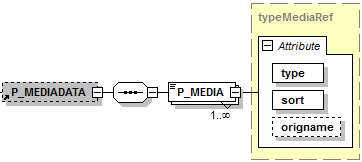
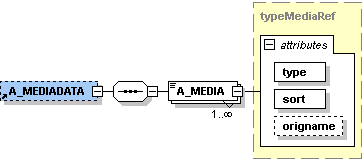
The link to the products and articles is established in the media nodes "P_MEDIA" or "A_MEDIA". If no media type is indicated, the type "image" is assumed. The file must be saved in the format TBCAT_[*].xml. PRODUCT MEDIA: P_MEDIA
ARTICLE MEDIA: A_MEDIA
Referencing Media on a Server via URL
For our "Jacke Herrmann" example, the file "TBCAT_URL_20150413_0929.xml" contains the following:
Referencing Media Uploaded in a ZIP File
The link to the products and articles is indicated in the media nodes "P_MEDIA" or "A_MEDIA" by entering "sync/media/[file name]". If no media type is given, the type "image" is assumed. The media for "Jacke Herrmann" will be entered in the file "TBCAT_ZIP_20150413_0929.xml" as follows:
|