Marketplaces > Marketplaces N-S > OTTO WHSA > FAQ - OTTO WHSA > The Otto Whitelisting Process
The Otto Whitelisting Process
This article covers what you need to know about the Otto whitelisting process, including how to release blacklisted EANs so they can be reassigned.
What's the Otto whitelisting process?
Each EAN must only be assigned to one article offered on the channel Otto.de (INTEG, DOSS, KOOP) and Otto-owned shops, such as Baur and Schwab.
Whenever data is transferred to the channel, the EAN for each article is tied to an Otto article number.
The EANs are then blacklisted, to prevent them from being used for other articles. The image below (Fig. 1) summarizes how EANs work at Otto:
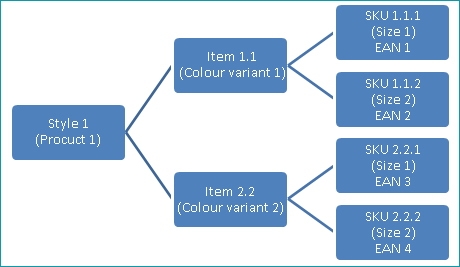
Fig. 1: Overview of the EAN assignment process at Otto
ATTENTION: This restriction regarding EANs does not apply to Otto Market! |
TIP: In the channel's own terminology, products are referred to as "Styles", while articles are called "SKUs". However, whitelisting always affects the entire product. |
As soon as your product data is exported to Otto for the first time, TB.One will save its structure. During any following exports, the software will then check if that structure is still valid.
If an EAN that's already in use at Otto is transferred to the channel, a corresponding message will be displayed in the error and status messages ("Channels > Channel > Error/status messages").
When that happens, Otto will no longer list the affected product in the shop. The channel's blacklist prevents any (and potentially contradictory) duplicate offers from being shown, and can only be edited by the channel.
Sometimes, product data that's been previously exported requires to be restructured and re-exported to Otto. This may happen when:
•Previously used EANs from deactivated articles are being used again to create new articles
•Products are deleted and then re-created (even if some of the corresponding articles remain unchanged)
•Adjustments of variant dimensions lead to structural changes in the product data
•New EANs are assigned to articles that are already listed at the channel - In this case, both the new and old EANs are affected
In any of these scenarios, the EANs require whitelisting.
How does whitelisting work?
The process of releasing an EAN from Otto's blacklist must be coordinated between you, Tradebyte, and the channel:
•First, basic data changes must be made to the affected articles.
•Once that's done, the list of affected EANs should be sent to Tradebyte for review in case any EAN is missing from the list, due to their product affiliation: this is required because Otto can only deactivate entire products, and not individual articles.
•The list is then sent back to you for approval along with a price quotation for those services. The coordinate of the whitelisting process will then take place.
A complete guide on how to request the whitelisting of an EAN can be found here.
TIP: Any EAN whitelisted by Otto remains available until claimed by someone (whether it's you, or a third party). |
ATTENTION: During the whitelisting process, the affected products will go offline in the Otto shops and lose their ranking and any customer reviews! |
How to request the whitelisting of an EAN
1.Send the list of affected EANs to Tradebyte.
2.Tradebyte will check the list and include any related EANs affected due to product affiliation.
3.You'll received the updated list for approval, with the price quotation.
4.Once approved, Tradebyte will deactivate the export of the product catalog.
5.Otto deactivates the products and whitelists the corresponding EANs on the channel's side.
6.Tradebyte whitelists the products in TB.One, reactivates the export of the product catalogue, then transfers it to Otto.
7.You will be informed you once the whitelisting process is done - Make sure to keep an eye on possible error messages after whitelisting.
TIP: To ensure that your products will be live on the following weekend, the whitelisting process must start between Monday and Wednesday. |