Marketplaces > Marketplaces T-Z > Tiktok > FAQ - Tiktok > How to maintain GPSR information
How to maintain GPSR information
To comply with the requirements of the Product Safety Act (GPSR), you must specify a responsible person and provide the manufacturer’s information. To do this, you must first enter your details in your TikTok Seller Center and retrieve the corresponding IDs. You then enter these in TB.One as an attribute.
The following guide explain how to do this.
1. Enter information in the TikTok Seller Center:
a.Open your TikTok Seller Center.
b.Go to Account Settings and create your responsible person.
c.Optional: Enter the manufacturer information.This is important if you ship internationally.
d.Note down the IDs so you can enter them in TB.One in Step 2.
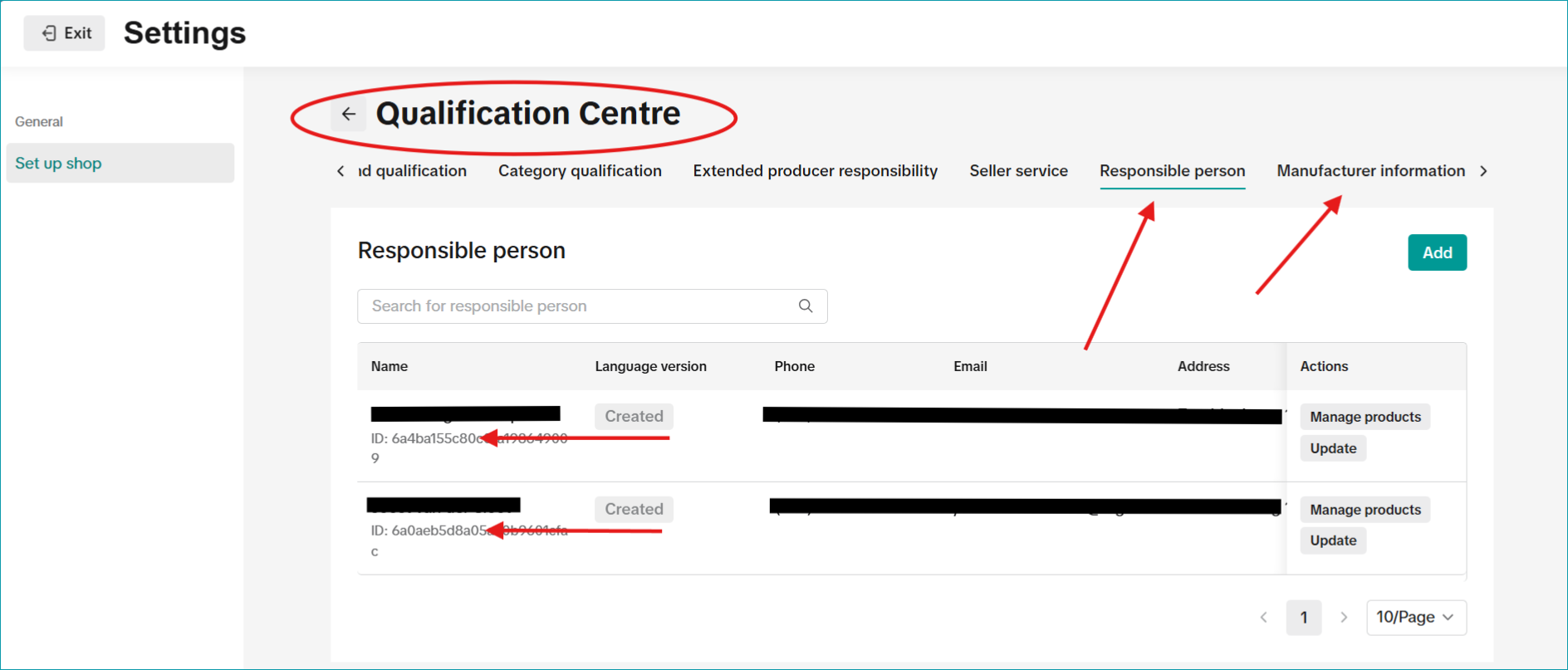
Fig. 1: Your TikTok Seller Center
2. Enter information in TB.One:
The process for creating the responsible person and manufacturer information is the same. We recommend to manually create the attribute in TB.One and assign it to your products via CSV/XML import. Use the key as defined here:
a.Create a product attribute for your GPSR information in TB.One (“Basic data > Properties > Attributes”) manually in TB.One.
b.Enter “responsible_person_id” (responsible party) or “manufacturer_id” (manufacturer information) as the TikTok export key.
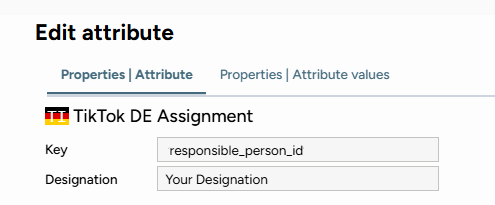
Fig. 2: Edit your attribute
Tip: If you don’t assign attribute values via CSV/XML import, change to the “Properties | Attribute values” tab. Input the TikTok ID there. If you skip this step, you won’t be able to assign the attribute to your products.
3. Assign the attributes to your products via CSV or XML with the keys from Step 2.
Import GPSR-related data via CSV
Enter your TikTok identifiers in a new column:
P_tag[key] – Replace “key” with the export key for your GPSR information, and add your TikTok identifiers as values within that column.
Import GPSR-related data via XML
Add the following nodes to your XML file:
<P_TAGS>
<P_TAG identifier=”key” key=”attribute_name” name=”attribute_name”>
<VALUES>
<VALUE identifier=”key” key=”TikTok Identifier” name=”TikTok Identifier“/>
</VALUES>
</P_TAG>
</P_TAGS>
Note: It is not possible to provide GPSR information via value mapping.
4. Check the error report
•Open “Data Exchange > Directories > Output.”
•Open “TikTok_Product_Upload_Messages” report.
•Search for the error message: “missing responsible person ID”
For further information, see also: