Marketplaces > Marketplaces T-Z > Zalando > Value Mapping for Zalando > How to Find a Property or Attribute (Zalando Value Mapping)
How to Find a Property or Attribute (Zalando Value Mapping)
Zalando often uses technical identifiers called keys. To find a missing property using its key, switch the display from "Name" to "Key" 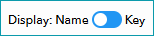 above the value mappping.
ATTENTION: |
How to Find the Property Key
The Key is the technical identifier. For example, the property 'Outer fabric material' is often referred to by the Key "upper_material_clothing".
•Go to your Zalando value mapping ("Channels > [Your Zalando channel] > Value mapping". Above the list of properties, you will find a toggle/slider. Switch the slider from "Name" to "Key" to display the technical property identifiers.
•You should now be able to locate the specific property using its Key.
TIP: |
What if the Property is Still Missing?
If you still cannot find a required property or a necessary value within an existing property, contact Zalando directly. They are responsible for updating the value mapping data within TB.One via an updated Classification file (“Master Data”).
For further information, see also:
•Article Detail View - Article Properties