TB.One > Order Data and Order Processing > Data Privacy and GDPR > Automatic Anonymization of Order Data (GDPR)
Automatic Anonymization of Order Data (GDPR)
TIP: Set up and configure this feature under "Admin > System settings > Order processing".
The following order data will be made illegible: •Customer number •Name & name's suffix •Street and house number •Address suffix •Telephone numbers •Email address •Date of birth •Billing address (also on invoice documents) |
ATTENTION: Note that TB.One is not suitable for the legally required storage of documents such as invoices. If a storage regulation is legally applied, you must download the documents in question and store them in your own systems. |
How to Set Up Automatic Data Anonymization?
•Go to "Admin > System settings > Order processing".
•Find the menu section "Anonymization of personal data" (see Fig. 1). You may need to scroll down.
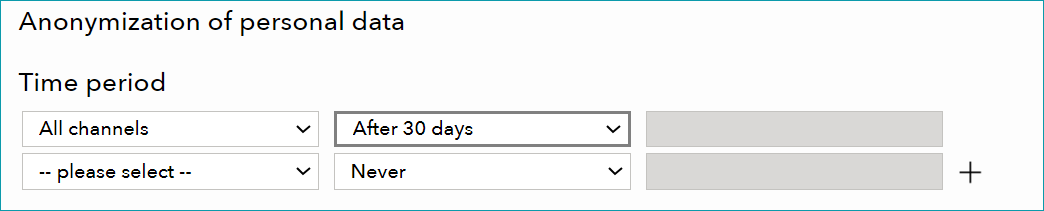
Figure 1: Configure the automatic data anonymization in this menu.
1. Set Up a Global Anonymization Period for All Channels
TB.One automatically deletes order data older than the global anonymization period. If necessary, you can additionally define channel-specific anonymization periods (see step 2). Channel-specific anonymization periods override the global setting.
•Use the first row ("All channels"), to set up a global anonymization period.
•Do not change the content of the drop-down menu in the left column ("All channels").
•Select an anonymization period in the middle column.
•If you have selected the value "Customized" in the middle column, enter a custom anonymization period in the right column.
oThe minimum for custom periods is 6 months.
oEnter the anonymization period in months (m) or years (y).
oExample: For an anonymization period of 9 months, enter "9m".
•Save your settings.
2. Set Up Channel-Specific Anonymization Periods
Channel-specific anonymization periods override the global setting. Define the first channel-specific anonymization period in the menu's second row.
TIP: |
 .
. •Select the channel for which you want to set up an anonymization period from the drop-down menu in the first column ("--please select--")
•Select an anonymization period in the middle column.
•If you have selected the value "Customized" in the middle column, enter a custom anonymization period in the right column.
oThe minimum for custom periods is 6 months.
oEnter the anonymization period in months (m) or years (y).
oExample: For an anonymization period of 9 months, enter "9m".
•Save your settings.
For further information, see also:
•How to Anonymize Order Data for GDPR Compliance (Individual Orders)