TB.One > Product and Article Data > Data Quality & Error Management > Article Error Hub > Function of the Article Error Hub
Function of the Article Error Hub
The Article Error Hub is your central tool within TB.One to support you with swift error recognition; resolution and overall data maintenance. It allows you to catch errors early and to take action so that your articles can go live on marketplaces without further issues.
How to Access the Article error hub
1. Go to "Articles > Article error hub (new)" or switch directly from the article list.
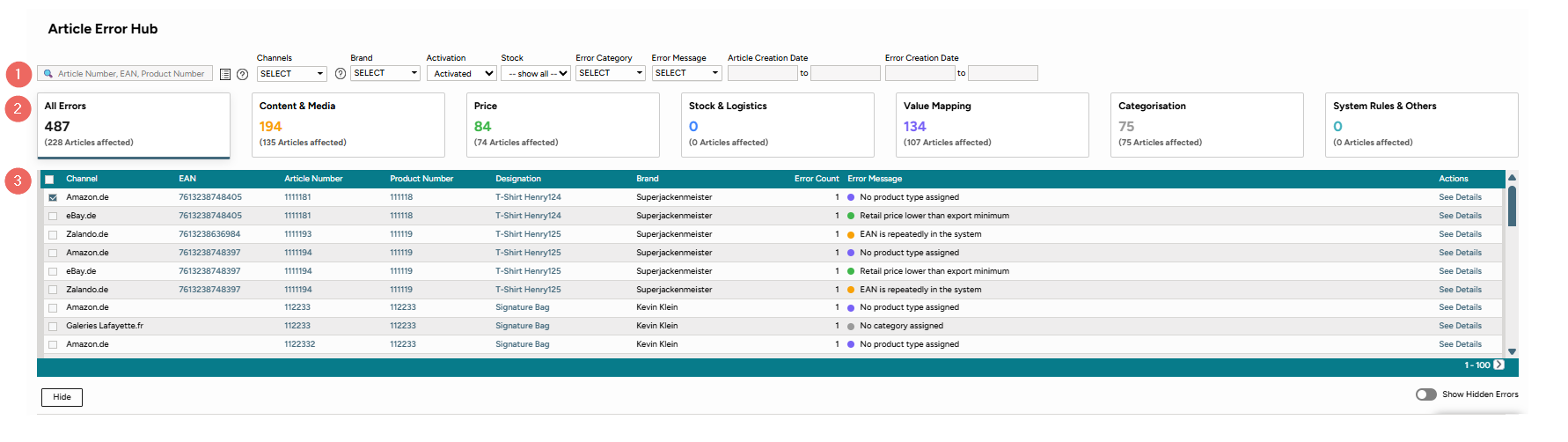
Fig 1.: The Article Error Hub
The article error hub is your tool to review and manage errors. It is divided into three sections:
▪ The filter section: filter for certain characteristics in the error list and prioritize certain errors in your error lists.
Tip: You can also search in bulk. Add your values in to the search field via commas as a separator.
▪ A color coded dashboard: Errors are grouped by error category. Find the count of errors and affected articles that need your attention before onboarding.
▪ The error list and details: Find more error details and take necessary actions.
How to work with the filter section
The filter section allows to filter for articles with errors per channel and brands. The error list will update according to your filter settings.

Fig. 2: The Filter Section
1. Filter for article number, EAN, or product number. Enter your values separated by commas.
2. Filter for a specific channel.
3. Filter for a specific brand.
4. Filter for active or inactive items.
5. Filter for whether an item is in stock or not.
6. Filter for specific error categories.
7. Filter for specific error messages.
8. Filter for the item’s creation date. You can specify a date range using the date selector.
9. Filter for the error’s creation date. You can specify a date range using the date selector.
How to read the article error hub dashboard
The dashboard is split into 6 error categories. They are color coded for quicker assessment on how many errors there are per error category for a certain article/product. This will help you to see at a glance where you can improve your data and solve errors.
TIP: |

Fig. 3: The dashboard
Available error categories:
▪All Errors
▪Content & Media
▪Price
▪Stock & Logistics
▪Value Mapping
▪Categorisation
▪System Rules & Others
For further information, see also: