TB.One > Product and Article Data > Translations and Multilinguality > TRANSLATION OF COMPONENT/ATTRIBUTE DESIGNATORS
TRANSLATION OF COMPONENT/ATTRIBUTE DESIGNATORS
Components and attributes define the properties of your products. Their designations are not considered text modules and are therefore not available for translation via the translation desktop. The translation of component and attribute designators is done directly in the menus where the components/attributes are created and configured ("Basic data > Properties > Components" or "Basic data > Properties > Attributes").
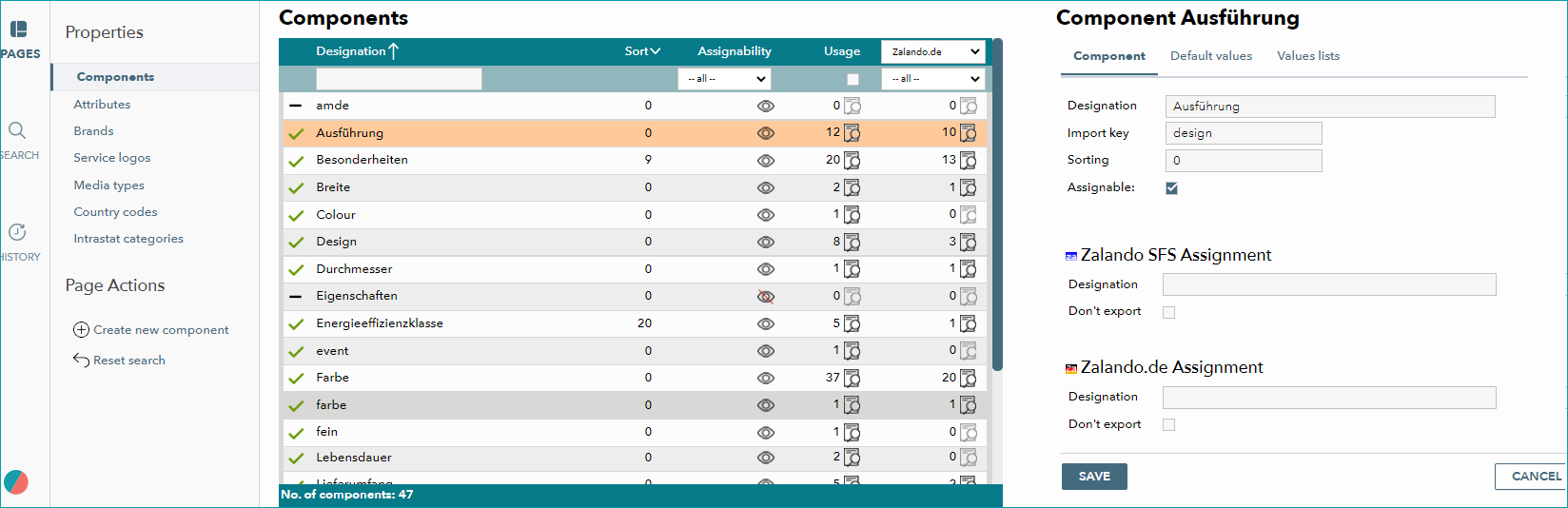
Select a component to translate. In the list on the right side, look for the channel for which you want to translate the designator. Enter your translation in the corresponding "Designation" field and save your data. The translation of attribute designators is done accordingly under "Basic data > Properties > Attributes".
VALUES
The values of components can be inherited as text modules for translation. Translating them is relevant for the correct display in foreign-language shops. Otherwise, errors will occur, such as "colour: bleu".
ATTENTION: |
For further information, see also:
•Overview: Translations in TB.One