TB.One > Prices > FAQ - Price Data & Price Lists > How to Adjust Value Added Tax Rates
How to Adjust Value Added Tax Rates
In order to enable TB.One to calculate the correct net prices for each channel from the gross prices that were assigned to the articles, the VATs of the corresponding channel-countries have to be deducted. You can manage tax rates centrally at "Basic data > Prices > VAT rates". Here, you can assign three VAT percentages for each channel. A "regular" tax rate, a "reduced" tax rate for articles with a reduced VAT (e.g. books and staple foods in Germany) and "free" for articles which are exempt from VAT.
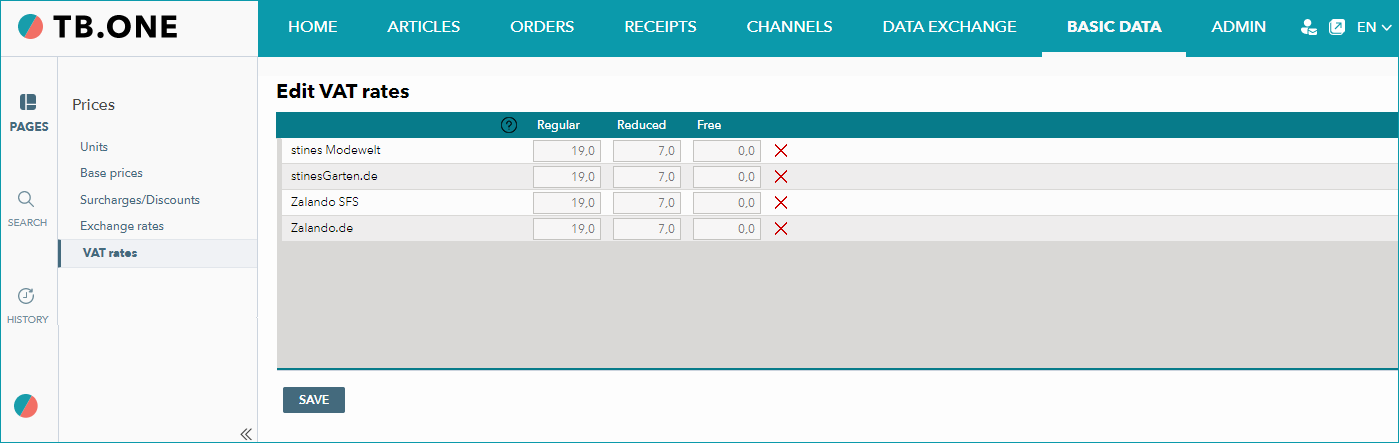
If you have not explicitly specified VAT rates for a channel, TB.One will use basic tax rates, which shown in gray in the input fields. You can overwrite these rates by clicking into a text box and specifying a tax rate (with one decimal place) and then saving your entry.
ATTENTION: |
The usage fee for TB.One is calculated based on the RP less the tax. It is, therefore, always mandatory to provide the retail price, even if a channel does not require it. If no RP is provided, it will be determined from the order.
ATTENTION: |
For further information, see also: