TB.One > Setup, Configuration & User Accounts > Configuring Documents > How to customize channel delivery documents
How to customize channel delivery documents
This guide shows you how to customize delivery documents for all the channels you’re connected to in TB.One.
Which delivery documents can be customized in TB.One?
Delivery documents can be customized for each channel you’re connected to.
Depending on the channel, not all the documents listed below will be available for customization. For more information, please refer to the channel sheets.
Document Type |
Customization Options |
|---|---|
All documents |
Upload your own logo to all documents of a channel |
Delivery note |
•Additional text: Add text on delivery notes (e.g. "Thank you for your purchase!" or parting sentences) •Media type: Choose which article image to print on delivery notes. •Add your own logo to delivery notes |
Shipping label |
Print your logo on shipping labels or disable it |
Return labels |
Choose to print return labels on an extra sheet or prevent return labels from being printed |
Invoice |
•Change the language of invoices •Suppress VAT on invoices •Manage consignor information for a channel (consignor information and footer) |
Order data sheet |
•Change the language of order data sheets •Add your own logo to order data sheets |
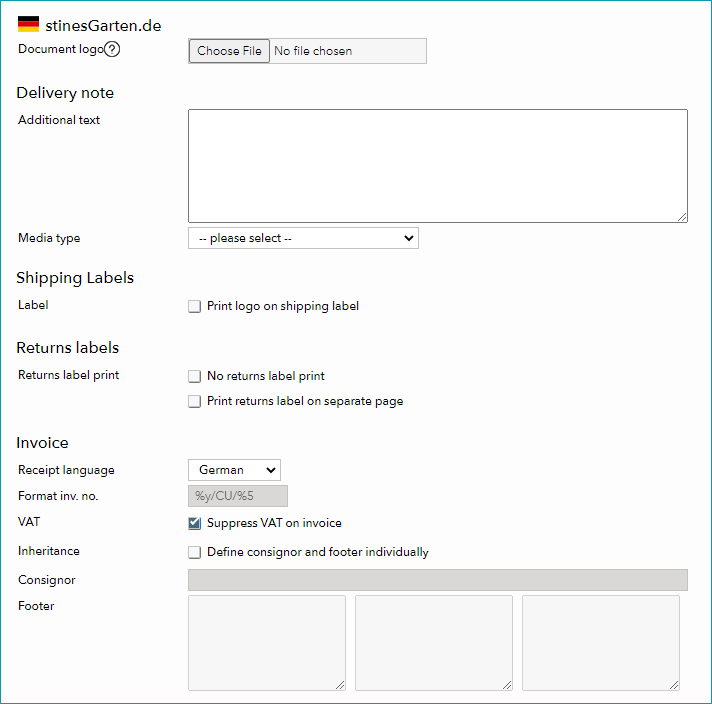
Fig. 1: Overview of the delivery documents customization page in TB.One
TIP: Additional documents may be customized for certain channels Depending on the channel, you may be able to customize more documents (e.g. Zalando return notes). These extra documents are available in each channel configuration section under "Admin > System settings > Documents". For more information, check point 8 of this article. |
Customizing delivery documents in TB.One
ATTENTION: •Administrators only can customize delivery documents. •Images must be provided in jpg or png format. |
To customize delivery documents in TB.One:
1.Go to “Admin > System settings > Documents“.
2.Open the section for the channel you want to customize delivery documents for.
3.From there, you’ll get access to all customization options. The guides below contain detailed step-by-step instructions for each of these options.
Upload a logo to channel delivery documents
1.Go to “Admin > System settings > Documents“. 2.Open the section for the channel you want to customize delivery documents for. 3.Scroll down to the “Logo” section and upload your image to the order data sheet or delivery note. 4.Click “Save“ to finish. |
Add a logo to all your channel delivery documents
1.Go to “Admin > System settings > Documents“. 2.Open the section for the channel you want to customize delivery documents for. 3.Upload your image in the “Document logo” field. This logo will overwrite the company logo on all channel documents, except for already customized delivery slips. 4.Click “Save“ to finish. |
Add additional text to delivery notes
1.Go to “Admin > System settings > Documents“. 2.Open the section for the channel you want to customize delivery documents for. 3.In the “Delivery note” section, enter your text in the “Additional text” field. 4.Click “Save“ to finish. |
Select media types for delivery notes
1.Go to “Admin > System settings > Documents“. 2.Open the section for the channel you want to customize delivery documents for. 3.In the “Delivery note” section, pick a media type from the “Media type” drop-down menu. 4.Click “Save“ to finish. |
Allow or prevent logos from being printed on shipping labels
1.Go to “Admin > System settings > Documents“. 2.Open the section for the channel you want to customize delivery documents for. 3.In the “Shipping Labels” section, select “Print logo on shipping label” to allow logos to be printed or deselect it to disable them. 4.Click “Save“ to finish. |
Manage return label printing options
1.Go to “Admin > System settings > Documents“. 2.Open the section for the channel you want to customize delivery documents for. 3.In the “Returns labels” section, select one of the following checkboxes accordingly:
•“No returns label print” - To prevent return labels from being printed •“Print returns label on separate page” - To print return labels on a separate sheet
4.Click “Save“ to finish. |
1.Go to “Admin > System settings > Documents“. 2.Open the section for the channel you want to customize delivery documents for. 3.In the “Invoices” section, you can manage different settings for your invoices: •“Receipts” - Use the drop-down menu to pick a language for your invoices •“VAT” - Select or unselect this checkbox to display or disable VAT information on invoices •“Inheritance” - Select or unselect this checkbox to choose if consignor information and footers should be defined individually •“Consignor” - Enter the consignor information of your choice in this text field (e.g. company address) •“Footer” - In the text fields, enter business or financial details as required (e.g. company information, bank account details or legal details such as VAT number) 4.Click “Save“ to finish. |
Change the language of your order sheets
1.Go to “Admin > System settings > Documents“. 2.Open the section for the channel you want to customize delivery documents for. 3.In the “Order sheet data” section, pick a language from the “Language” drop-down menu. 4.Click “Save“ to finish. |
TIP: What else can you customize? |
For further information, see also: