TB.One > Setup, Configuration & User Accounts > FAQ - Setup, Configuration & User Accounts > What are TB.One's Technical Requirements
What are TB.One's Technical Requirements
To ensure an optimal user experience, you should fulfill the following minimum hard- and software requirements:
HARDWARE
•Screen resolution: min. 1024 x 768 px; opt. 1280 x 720 px (Scan Desktop: 1024 x 768 px)
•Keyboard and mouse
•If you want to start print jobs in TB.One, you will also need:
oLabels: EPL-ready label printer (recommended: Zebra GK420d) with direct network connection
oOrder related documents: PCL-6 or PCL-5e-ready network printer (e.g. Brother HL-5370DW, Brother HL-5350DN) with direct connection (no print server). If you already have a printer, you need to test whether it is compatible.
•Optional for the Scan Desktop: barcode scanner with linefeed option
SOFTWARE
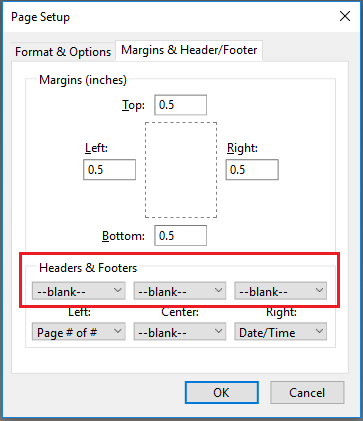
•PDF reader for displaying documents (e.g. Adobe or Evince). It is also possible to use a browser-integrated PDF reader. Please make sure to suppress the printing of header and footer in the printer settings, because they usually contain the page's URL. Another option is to deactivate the plugin and use the external reader.
•Current desktop version of Google Chrome (recommended) or Mozilla Firefox. Alternatively, the current ESR version is supported.
•Java Script must be enabled.
•Cookies must be enabled.
•An application for creating/editing spreadsheets which supports CSV and XLS files.
GENERAL
•Internet access is required
•The following label sizes can be printed: 101 x 38 mm, 101 x 152 mm
•If you preview printouts on a tablet, we recommend you use the page orientation "portrait"