At "Admin > User > IP restrictions" you may restrict access to TB.One to certain IP addresses and can activate protective measures against external attempts at taking over user sessions. The settings affect all users created at "Admin > User > Users". Decide, whether the restrictions should also apply to API users. If so, check the box "Use this restriction for the REST API".
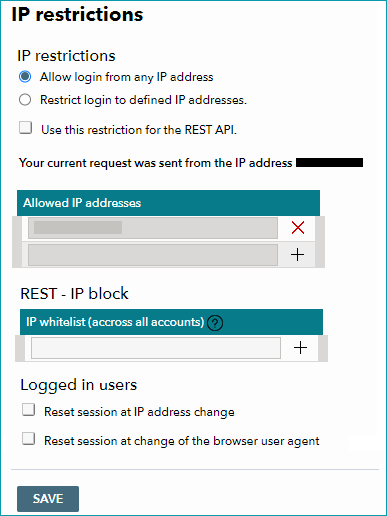
The protective measures regarding IP addresses and user sessions work independently from each other. Only administrators can change these settings. Use these features in accordance with your own security guidelines.
1. TB.ONE LOGIN
The access rights for login via the user interface and for API users can be restricted to a group of predefined IPv4 addresses. In this menu you can enter the fixed IP addresses of your company's network to prevent login attempts from external sources. By default, no IP restrictions are in place.
When the option is activated, the interface automatically enters the current user's IP address and forces it to be saved. This will prevent users from locking themselves out. Once the restrictions are in place, the user interface will validate IPv4 addresses. If there is a log in attempt via an IP address that is not part of the white list, the attempt will fail and an error message will be displayed in the browser. Access attempts by restricted IP addresses are logged on the server.
2. ACTIVE SESSIONS
Additionally, active sessions can be protected. Whenever a user logs in, the server creates a unique session. This session is used, for example, to save filter configurations even if the user switches to a different menu. A session exists until the user logs out. Attackers who manage to invade a session will have the same access to the system as the original user.
The following measures can be taken to make it harder to invade sessions:
•Reset session at IP address change: If the IP address which sends requests changes during a session, the session will be blocked both for the first and second IP address. The user will be logged out and the login screen will be displayed. If a user uses different networks (e.g. an additional mobile connection) during one session, activating this option may cause problems.
•Reset session at change of the browser user agent: By default, browsers send a so-called user agent. It contains the browser's name, version, language and the name of the user's operating system. If the user agent of a session changes, the session will be terminated. The user will be logged out and return to the login screen.
For further information, see also:
•Overview: creating and configuring user accounts