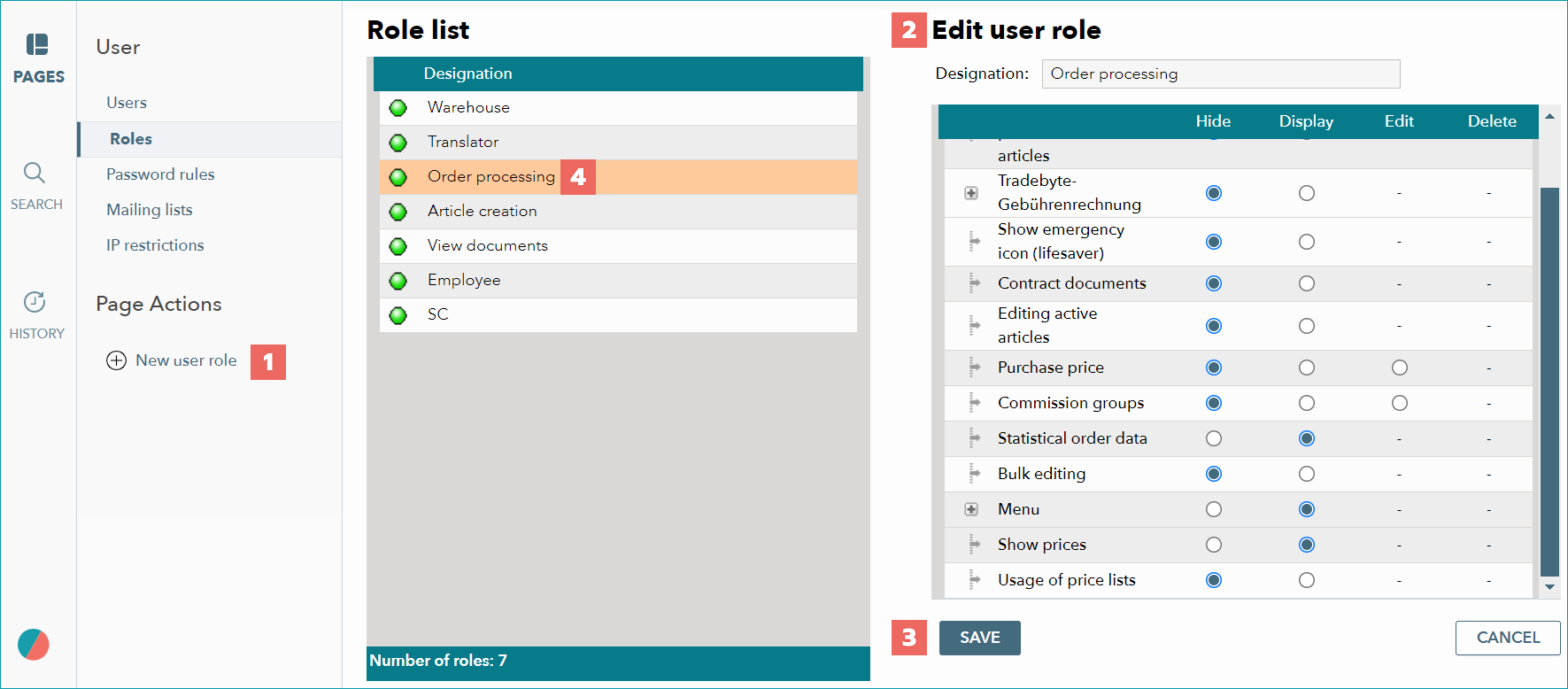
Four types of users are predefined and their set of authorizations can't be changed. These are "administrator", "all rights except user mangagement", "finance" and "API users (no rights)". They do not appear in the role list, but can be selected instead of one of the custom roles during user account creation. As an example for a changeable role, a new account already contains the custom role "Lagermitarbeiter" (warehouse clerk). To create new roles, open the menu "Admin > User > Roles".
NUMBER |
DESCRIPTION |
|---|---|
|
Open the role configuration menu by clicking "New user role" (tab "Pages" in the left navigation bar). |
|
Enter a name for the role in the popup window and save. On the right side, you will see a menu titled "Edit user role". Here you can define the rights for the new role. |
|
Save the entry. |
|
The green icon next to the name indicates that this role is assigned to at least one user. If the role is not assigned to a user account, the icon is gray. In that case, it is possible to remove the role by clicking "Delete". |


For further information, see also:
•Overview: creating and configuring user accounts