TB.One > Order Data and Order Processing > Order Processing via XML > XML-Structure: TB.Order > XML Field Descriptions: Order Messages
XML Field Descriptions: Order Messages
You need to create the files described below and import them in TB.One to inform the channel about the current processing status of your orders.
ATTENTION: Example: |
ATTENTION: Example: Order quantity ("POS_QUANTITY") = 10; delivery in two packages with five units each. |
MESSAGES_LIST / MESSAGE
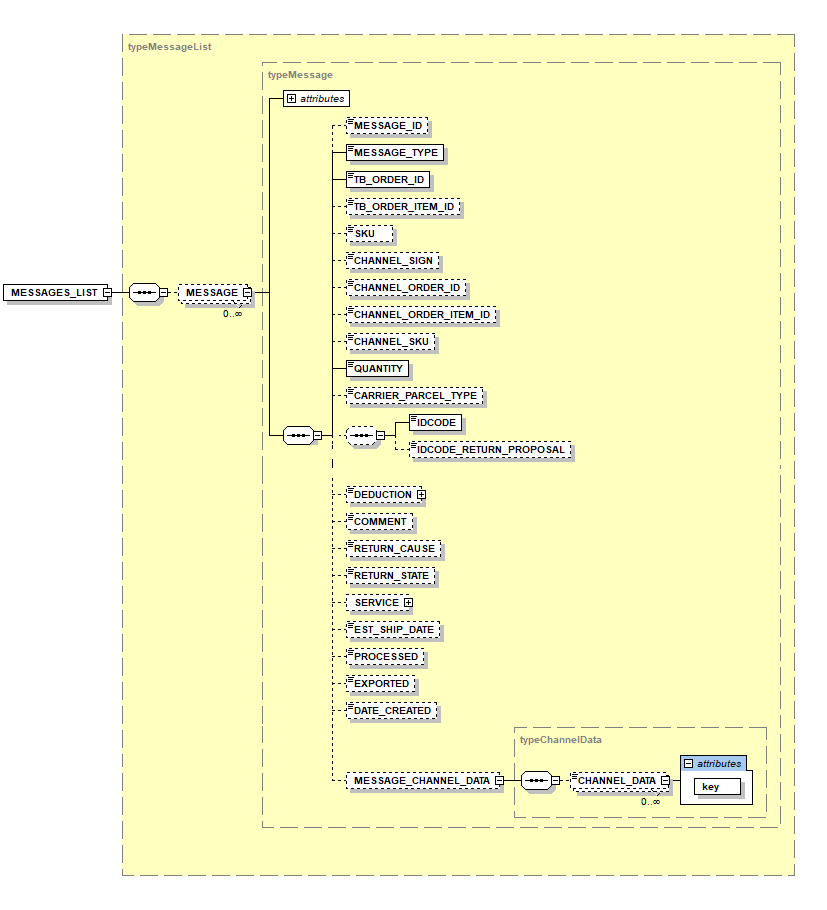
NODE |
REQUIRED |
DESCRIPTION |
|
|---|---|---|---|
MESSAGES_LIST |
Y |
XML |
Root node |
MESSAGE |
Y |
XML (typeMessage) |
Message |
MESSAGE_TYPE |
Y |
ENUM |
Message type (possible contents are listed below) |
TB_ORDER_ID |
Y |
INT |
Order ID; unique number assigned by TB.One that can be found in the order file |
TB_ORDER_ITEM_ID |
N |
INT |
Unique number TB.One assigns to each order item |
SKU |
N |
CHAR(50) |
Article number from TB.One |
CHANNEL_SIGN |
N |
CHAR(12) |
Channel sign (usually 4 characters) |
CHANNEL_ORDER_ID |
N |
CHAR(50) |
The channel's order number (if available) |
CHANNEL_ORDER_ITEM_ID |
N |
CHAR(50) |
The channel's item number (if available) |
CHANNEL_SKU |
N |
CHAR(50) |
The channel's article number (if available) |
QUANTITY |
Y |
INT |
Quantity (relates to the message type) |
CARRIER_PARCEL_TYPE |
N |
CHAR(50) |
Import key of one of the package types stored at "Basic data > Shipping > Package types" |
IDCODE |
(Y) |
CHAR(50) |
Ship/tracking code Here, you can indicate whether an order item should be shipped in multiple packages via multiparcel shipping |
IDCODE_RETURN_PROPOSAL |
N |
CHAR(50) |
Proposed ship/tracking code for the returns package (e.g. if the package contains a return label) Only for dispatch advices! For return messages, the ship code must be provided in the node "IDCODE" |
DEDUCTION |
N |
FLOAT |
Price reduction for returns (this value is subtracted from the price to determine the amount that is reimbursed) |
COMMENT |
N |
TEXT |
Comment |
RETURN_CAUSE |
N |
CHAR(50) |
Return cause (for return messages) |
RETURN_STATE |
N |
CHAR(50) |
Return state (for return messages) |
N |
XML |
Corresponds to the service type of the order |
|
EST_SHIP_DATE |
N |
DATE |
Estimated delivery date (for order confirmations) |
PROCESSED |
N |
INT(0/1) |
"Processed" flag; indicates that the message has been transferred from TB.One to the channel (export only) |
EXPORTED |
N |
INT(0/1) |
"Exported" flag; indicates that the message has been exported to the merchant (export only) |
DATE_CREATED |
N |
DATETIME |
Timestamp of the message's creation in TB.One (export only) |
MESSAGE_CHANNEL_DATA |
N |
XML (typeChannelData) |
Parent node of "CHANNEL_DATA". The sub nodes are used to transfer various additional data to a channel, if needed. |
CHANNEL_DATA[key] |
N |
CHAR(50) |
These nodes are used to transfer various additional data to a channel, if needed. Ensure to provide the correct key if you use this node, so that the channel can identify the information. |
MESSAGE / MESSAGE_TYPE
The following message types are possible:
KEY |
DESCRIPTION |
|---|---|
ORDER_ACKNOWLEDGE |
Order confirmation |
SHIP |
Dispatch advice |
NO_INVENTORY |
Cancellation message due to stock |
CUST_CANCEL |
Cancellation message due to customer |
RETURN |
Returns notification |
DEDUCT_SHIPPING_COSTS |
Shipping cost discount |
DEDUCT_SERVICE_PRICE |
Service cost discount |
DEDUCT_PAYMENT_COSTS |
Payment cost discount |
PAYMENT_STATE_OPEN |
Payment state: Order not paid yet |
PAYMENT_STATE_PAID |
Payment state: Payment received |
PAYMENT_STATE_SHORTFALL |
Payment state: Payment loss |
REFUND |
Reimbursement (not caused by a return) |
EXAMPLE: LIST OF MESSAGES TO TB.ONE
<?xml version="1.0" encoding="utf-8"?> |
|
|---|---|
<MESSAGES_LIST> |
<!-- Start of the message list --> |
<MESSAGE> |
<!--Start of the first message--> |
<MESSAGE_TYPE>ORDER_ACKNOWLEDGE</MESSAGE_TYPE> |
<!-- Message type --> |
<TB_ORDER_ID>2</TB_ORDER_ID |
<!-- Unique TB.One order number --> |
<TB_ORDER_ITEM_ID>1</TB_ORDER_ITEM_ID> |
<!-- Unique item number within the order --> |
<SKU>4711</SKU> |
<!--SKU of the position--> |
<QUANTITY>1</QUANTITY> |
<!-- Notification quantity --> |
<COMMENT>Auftragsbestätigung</COMMENT> |
<!-- Comment --> |
<EST_SHIP_DATE>2013-04-10</EST_SHIP_DATE> |
<!-- Estimated delivery date --> |
</MESSAGE> |
<!-- End of message 1 --> |
<!--For each order item, a new dispatch advice with the according TB_ORDER_ITEM_ID must be created--> |
|
</MESSAGE> |
<!-- Start message 2 --> |
<MESSAGE_TYPE>SHIP</MESSAGE_TYPE> |
<!-- Message type --> |
<TB_ORDER_ID>3</TB_ORDER_ID> |
<!-- Unique order number --> |
<TB_ORDER_ITEM_ID>1</TB_ORDER_ITEM_ID> |
<!-- Unique item number --> |
<SKU>4711</SKU> |
<!--SKU of the position--> |
<QUANTITY>1</QUANTITY> |
<!-- Shipped quantity --> |
<CARRIER_PARCEL_TYPE>DHL_STD_NATIONAL</CARRIER_PARCEL_TYPE> |
<!--Shipping type --> |
<IDCODE>123456789</IDCODE> |
<!-- Ship code --> |
<IDCODE_RETURN_PROPOSAL>987654321</IDCODE_RETURN_PROPOSAL> |
<!-- Proposal for the ID-code on the returns label. If the returns label is included in the shipment, this number is reserved. --> |
</MESSAGE> |
<!-- End message 2 --> |
<MESSAGE> |
<!-- Start message 3 --> |
<MESSAGE_TYPE>NO_INVENTORY</MESSAGE_TYPE> |
<!-- Message type --> |
<TB_ORDER_ID>4</TB_ORDER_ID> |
<!-- Unique order number --> |
<TB_ORDER_ITEM_ID>1</TB_ORDER_ITEM_ID> |
<!-- Unique item number --> |
<SKU>4711</SKU> |
<!-- SKU of the position --> |
<QUANTITY>1</QUANTITY> |
<!-- Canceled quantity (stock) --> |
<COMMENT>Nachlieferung in 14 Tagen</COMMENT> |
<!-- Comment --> |
</MESSAGE> |
<!-- End message 3 --> |
<MESSAGE> |
<!-- Start message 4 --> |
<MESSAGE_TYPE>CUST_CANCEL</MESSAGE_TYPE> |
<!-- Message type --> |
<TB_ORDER_ID>5</TB_ORDER_ID> |
<!-- Unique order number --> |
<TB_ORDER_ITEM_ID>1</TB_ORDER_ITEM_ID> |
<!-- Unique item number --> |
<SKU>4711</SKU> |
<!-- SKU of the position --> |
<QUANTITY>1</QUANTITY> |
<!-- Canceled quantity (customer) --> |
<COMMENT>Kundenstorno</COMMENT> |
<!-- Comment --> |
</MESSAGE> |
<!-- End message 4 --> |
<MESSAGE> |
<!-- Start message 5 --> |
<MESSAGE_TYPE>RETURN</MESSAGE_TYPE> |
<!-- Message type --> |
<TB_ORDER_ID>6</TB_ORDER_ID> |
<!-- Unique order number --> |
<TB_ORDER_ITEM_ID>1</TB_ORDER_ITEM_ID> |
<!-- Unique item number --> |
<SKU>4711</SKU> |
<!-- SKU of the position --> |
<QUANTITY>1</QUANTITY> |
<!-- Returns quantity --> |
<CARRIER_PARCEL_TYPE>DHL_STD_NATIONAL</CARRIER_PARCEL_TYPE> |
<!-- Package type --> |
<IDCODE>123459876</IDCODE> |
<!-- Returns ship code --> |
<RETURN_CAUSE>zu groß</RETURN_CAUSE> |
<!-- Return cause --> |
<RETURN_STATE>ohne Mängel</RETURN_STATE> |
<!-- Returns state --> |
</MESSAGE> |
<!-- End message 5 --> |
<MESSAGE> |
<!-- Start message 6 --> |
<MESSAGE_TYPE>RETURN</MESSAGE_TYPE> |
<!-- Message type --> |
<TB_ORDER_ID>6</TB_ORDER_ID> |
<!-- Unique order number --> |
<TB_ORDER_ITEM_ID>2</TB_ORDER_ITEM_ID> |
<!-- Unique item number --> |
<SKU>4712</SKU> |
<!-- SKU of the position --> |
<QUANTITY>1</QUANTITY> |
<!-- Returns quantity --> |
<CARRIER_PARCEL_TYPE>DHL_STD_NATIONAL</CARRIER_PARCEL_TYPE> |
<!-- Package type --> |
<IDCODE>123459876</IDCODE> |
<!-- Returns ship code --> |
<RETURN_CAUSE>zu groß</RETURN_CAUSE> |
<!-- Returns cause --> |
<RETURN_STATE>ohne Mängel</RETURN_STATE> |
<!-- Returns state --> |
</MESSAGE> |
<!-- End message 6 --> |
<MESSAGE> |
<!-- Start message 7 --> |
<MESSAGE_TYPE>DEDUCT_SHIPPING_COSTS</MESSAGE_TYPE> |
<!-- Message type --> |
<TB_ORDER_ID>7</TB_ORDER_ID> |
<!-- Unique order number --> |
<QUANTITY>1</QUANTITY> |
<!-- Notification quantity (always 1 for DEDUCT_SHIPPING_COSTS) --> |
<DEDUCTION>3.95</DEDUCTION> |
<!-- Price deduction to shipping costs (only if shipping costs were calculated in original order) --> |
<COMMENT>Preisnachlass Versandkosten</COMMENT> |
<!-- Comment --> |
</MESSAGE> |
<!-- End message 7 --> |
<MESSAGE> |
<!-- Start message 8 --> |
<MESSAGE_TYPE>DEDUCT_SERVICE_PRICE</MESSAGE_TYPE> |
<!-- Message type --> |
<TB_ORDER_ID>7</TB_ORDER_ID> |
<!-- Unique order number --> |
<QUANTITY>1</QUANTITY> |
<!-- Notification quantity --> |
<DEDUCTION>3.95</DEDUCTION> |
<!-- Price deduction service costs --> |
<COMMENT>Preisnachlass Servicekosten</COMMENT> |
<!-- Comment --> |
</MESSAGE> |
<!-- End message 8 --> |
<MESSAGE> |
<!-- Start message 9 --> |
<MESSAGE_TYPE>DEDUCT_PAYMENT_COSTS</MESSAGE_TYPE> |
<!-- Message type --> |
<TB_ORDER_ID>7</TB_ORDER_ID> |
<!-- Unique order number --> |
<QUANTITY>1</QUANTITY> |
<!-- Quantity --> |
<DEDUCTION>3.95</DEDUCTION> |
<!-- Price deduction payment costs --> |
<COMMENT>Preisnachlass Zahlkosten</COMMENT> |
<!-- Comment --> |
</MESSAGE> |
<!-- End message 9 --> |
<MESSAGE> |
<!-- Start message 10 --> |
<MESSAGE_TYPE>PAYMENT_STATE_PAID</MESSAGE_TYPE> |
<!-- Message type --> |
<TB_ORDER_ID>8</TB_ORDER_ID> |
<!-- Unique order number --> |
<QUANTITY>1</QUANTITY> |
<!-- Notification quantity (always 1 for PAYMENT_STATE_PAID) --> |
<COMMENT>Zahlstatus ist "bezahlt"</COMMENT> |
<!-- Comment --> |
</MESSAGE> |
<!-- End message 10 --> |
<MESSAGE> |
<!-- Start message 11 --> |
<MESSAGE_TYPE>PAYMENT_STATE_SHORTFALL</MESSAGE_TYPE> |
<!-- Message type --> |
<TB_ORDER_ID>7</TB_ORDER_ID> |
<!-- Unique order number --> |
<QUANTITY>1</QUANTITY> |
<!-- Notification quantity (always 1 for PAYMENT_STATE_SHORTFALL) --> |
<COMMENT>Zahlstatus ist "Zahlungsausfall"</COMMENT> |
<!-- Comment --> |
</MESSAGE> |
<!-- End message 12 --> |
</MESSAGES_LIST> |
<!-- End of message list --> |
For further information, see also: