TIP: This Channel Sheet contains all channel-specific information for Farfetch. |
CHANNEL BASICS
The following channels are available for Farfetch:
CHANNEL |
SIGN |
ID |
CURRENCY |
|---|---|---|---|
Farfetch (main channel) |
ffmc |
852 |
EUR |
PRELIMINARY INFORMATION
•New to TB.One? Our webinars help you find your way around the software.
•Send your supplier/access data for the channel to your Solution Delivery Manager at Tradebyte.
•Tradebyte offers several integration solutions in TB.One to connect with Farfetch's backend system (Storm). Determine during the integration phase which one you'll use to fulfill orders.
•Provide your product data in English. To use other languages for your product data, please contact the channel.
•Go to the menu "Basic data > Storage > Warehouse settings" and check your settings for the channel (for more information, click here). If you wish to use more than one warehouse for Farfetch, reach out to Tradebyte.
•Use the channel's branded packaging when packing and shipping your orders.
•All delivery documents are generated by Farfetch.
CHANNEL-SPECIFIC SETTINGS, FEATURES, AND PROCESSES
REFERENCE NUMBER |
CHANNEL-SPECIFIC INSTRUCTIONS |
|
|---|---|---|
B-01: Payments |
Find your payment methods at "Basic data > Payment > Payment methods". Payments are managed by Farfetch. When the channel is activated or, at the latest, when the first order comes in, a payment method with the channel name is created automatically. For the export to an ERP-system, you can freely select an export key. |
|
D-01: Product designation |
•The length of the product designation is not limited. •You can use the title configurator for the designation. |
|
D-02: Special text |
Farfetch does not use the field "Special text". |
|
D-03: Description |
The length of the product description is not limited. Bulletpoints: Not used |
|
D-04: Components |
The following components are mandatory at Farfetch: •Collection ID •Colour •Customs Data Material Composition •Customs Data Product Details •Designer Info •Gender ID •Global Category •Item - Country of Origin •Item Detail •Item Material Description •Season ID •Size •Styling Notes |
|
D-05: Attributes |
Use the recommended attributes listed under "Product Properties - Attributes" in the article "Product Description". |
|
E-01: Article numbers |
Provide the following article numbers: •Article number •EAN (13-digit) EAN codes must be absolutely unique. Within one account, multiple identical codes are not permitted. The validity of the EANs provided is checked. |
|
E-02: Shipping information |
Provide the following mandatory shipping information via the value mapping: •Country of origin - Via the value mapping |
|
E-03: Variant dimensions |
Based on your agreement with the channel, follow the guidelines for variant creation accordingly. |
|
F-01: Media |
•Number: Min. 1 product and article image •Follow the requirements provided in the channel's image guide.
|
|
G-01: Carrier |
•Carriers are managed by Farfetch. They are indicated on shipping labels. •Shipping surcharges are not permitted. |
|
G-02: Delivery note |
The delivery notes are transmitted to TB.One by the channel. They are attached to the orders. To print them, open the order via the order list and click on "external documents". If you don't manage your orders in TB.One, ensure your system can process the attachments and print PDFs. |
|
G-03: Invoice |
Invoices are generated by the channel. Include them in your packages, if so directed by the channel. |
|
G-04: Proposed return code |
You don't have to send return codes to the channel with your dispatch advices. |
|
G-05: Delivery documents in package |
•Delivery note, invoice, return label •All delivery documents are generated by the channel directly. •If you want to provide delivery documents differently (e.g. paperless) reach out to Farfetch directly. |
|
G-06: Refund deduction |
Farfetch automatically refunds returned articles in full. If the condition of a return is not acceptable or item are missing, open a support case with Farfetch directly |
|
G-07: Return causes |
Farfetch does not process return causes and states. |
|
X-01: Size grid |
Farfetch does not require size grids. We recommend to maintain size information via the property "scale Id" in the value mapping. |
|
X-02: Base prices |
No base prices are required at Farfetch. |
|
X-03: Categories |
Provide your own categories under the "Global Category" property in the value mapping via "Channels > Farfetch (Mainchannel) > Value mapping". •At Farfetch you can not create links between your products. |
|
X-04: Value mapping |
You can map values at both the global and category level. The following values are mandatory in the value mapping: •Colour •Gender ID •Global Category •Season ID •Size |
|
X-05: Pending orders |
Farfetch transmits pending orders. |
|
X-06: Partial deliveries |
Partial cancellations and partial deliveries on item level. The item quantity is always 1. |
|
X-07: Commission group |
Farfetch does not use commission groups. |
|
X-08: Service logos |
Farfetch will not display service logos you transfer in the shop. |
|
X-09: Error and status messages |
Find the channel's error and status messages at "Channels > Farfetch (Mainchannel) > Article status". |
|
X-10: Templates |
At Farfetch you cannot use templates. |
|
X-11: Text configurator |
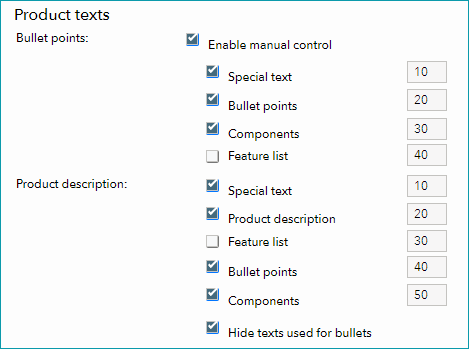
You can use the text configurator to customize the product descriptions shown at the channel (you can add information like components and bullet points, and configure the order in which these elements are displayed). •Go to "Channels > Farfetch (Mainchannel) > Settings" and switch to the tab "Product texts". •Select the checkbox "Enable manual control". •You can now choose, which elements to include in the bullet points and in the product description. •To define an order in which the elements are displayed, assign a number to each element (the element with the lowest number is displayed first; number the elements in increments of 10, i.e. 10, 20, 30, etc.).
Text Configurator |
|
X-12: Product text profile |
You can use the product text profile to customize the product descriptions shown in the channel's shop (you can add information like components and bullet points, and configure the order in which these elements are displayed). ▪Go to "Basic data > Templates > Product text profiles" to create a profile. ▪Click on "Create new product text profile" in the left navigation bar (tab "Pages"). Enter a designation and click "Create". ▪Click on your profile's designation in the list and select which elements should be part of the product description. ▪Go to "Channels > Farfetch (Mainchannel) > Settings" and switch to the tab "Product texts". ▪Select the option "Use configurable product text". ▪Select an assignment base (for example an attribute). All products containing this attribute will use the product text profile. ▪In the drop-down "Default value" choose the product text profile you want to use. ▪If you want to use different product text profiles for the different values of your assignment base, you can select them in the table below. |
|
X-13: Title profile |
You can use title profiles to configure the product titles shown in the channel's shop. For more information on title profiles, click here. |
|
X-14: Cross prices |
Farfetch currently only allows the sharing of ‘discount prices' (i.e. Cross prices) via their support team. |
SPECIAL REQUIREMENTS
Order management for Farfetch
The channel requires you to follow specific requirements when fulfilling orders:
•Technical setup: Tradebyte offers several integration solutions in TB.One to connect with Farfetch's backend system (Storm).
•Use the Farfetch branded packaging: All orders must be packed using branded packaging provided by the channel. Always pack orders using the channel's branded packaging.
•Delivery documents are generated by the channel directly: Documents are generated in Storm, and automatically retrieved and attached to your orders in TB.One.
•The channel assigns carriers to your orders: Farfetch manages carriers for every order. Check the shipping labels to confirm which carrier is used to ship your orders.
DATA EXCHANGE TIMES
DATA |
TIME/FREQUENCY |
|---|---|
Catalogue (Full) |
Daily |
Stock (Full) |
Daily |
Stock (Delta) |
Every 15 min. |
Media |
With catalogue |
Retrieve and import orders |
Event-driven, Just-in-time |
Order messages |
Every 5 min. |
Error and status messages |
Daily |