TIP: This Channel Sheet contains all channel-specific information for Miinto. |
CHANNEL BASICS
Your Miinto setup consists of two channels:
•A main channel managing stock numbers,
•One sub-channel, determined by your preferred currency - this channel handles orders and prices.
The following channels are available for Miinto (depending on your preferred currency, several sub-channels are available):
CHANNEL |
SIGN |
ID |
CURRENCY |
|---|---|---|---|
Miinto (main channel) |
mint |
258 |
- |
Miinto.EUR |
mieur |
902 |
EUR |
Miinto.DKK |
midkk |
603 |
DKK |
Miinto.SEK |
misek |
904 |
SEK |
Miinto.NOK |
minok |
905 |
NOK |
Miinto.PLN |
mipln |
906 |
PLN |
Miinto.CHF |
michf |
907 |
CHF |
PRELIMINARY INFORMATION
•New to TB.One? Our webinars help you find your way around the software.
•Send your supplier/access data for the channel to your Solution Delivery Manager at Tradebyte.
•Provide your product data in the language of the country channel.
•Go to the menu "Basic data > Storage > Warehouse settings" and check your settings for the channel (for more information, click here).
CHANNEL-SPECIFIC SETTINGS, FEATURES, AND PROCESSES
REFERENCE NUMBER |
CHANNEL-SPECIFIC INSTRUCTIONS |
|
|---|---|---|
B-01: Payments |
Find your payment methods at "Basic data > Payment > Payment methods". Payments are managed by Miinto. When the channel is activated or, at the latest, when the first order comes in, a payment method with the channel name is created automatically. For the export to an ERP-system, you can freely select an export key.
|
|
D-01: Product designation |
•The product designation is mandatory for Miinto. •The length of the product designation is not limited. •Use the title profile. •Provide information about common noun/proper name. |
|
D-02: Special text |
Miinto does not use the field "Special text". |
|
D-03: Description |
•The product description is mandatory for Miinto. •The length of the product description is not limited. •Bullet points: Not used. We recommend 5 to 8 bullet points. |
|
D-04: Components |
Use the recommended components listed under "Product Properties - Components" in the article "Product Description". |
|
D-05: Attributes |
Use the recommended components listed under "Product Properties - Attributes" in the article "Product Description" and comply with the channel's requirements if applicable. |
|
E-01: Article numbers |
Provide the following article numbers: •Article number •EAN (13-digit) EAN codes must be absolutely unique. Within one account, multiple identical codes are not permitted. The validity of the EANs provided is checked. |
|
E-02: Shipping information |
Provide the following mandatory shipping information: •Package type
•Shipping type The shipping information listed below is optional: •Weight (in kg) •Country of origin and Intrastat category •Pack sizes (height, length, width in cm) •Number of packing pieces •Delivery time (in days) |
|
E-03: Variant dimensions |
The following requirements apply for variant dimensions: •Variant creation via size and color •Max. 2 variant dimensions |
|
F-01: Media |
•Provide images in a commonly used format such as png or jpg. •Number: 1-4 images •Size: No size requirement •Resolution: No DPI requirement
|
|
G-01: Carrier |
•Available carriers depend on the sub-channel •Shipping surcharges are not permitted. |
|
G-02: Delivery note |
You cannot configure the delivery notes for Miinto. |
|
G-03: Invoice |
Miinto sends invoices to the end customer. Do not create invoices in TB.One. Any invoices you need for your own accounting will be forwarded to you by the channel on a monthly basis. |
|
G-04: Proposed return code |
You don't have to send return codes to the channel with your dispatch advices. |
|
G-05: Delivery documents in package |
No specific requirements apply to documents in shipped packages. |
|
G-06: Refund deduction |
At Miinto you always reimburse customers for returned articles in full. If you have complaints about the condition of a returned article, consult the channel directly. |
|
G-07: Return causes |
Miinto does not process return causes and states.
|
|
X-01: Size grid |
Miinto does not use size grids. |
|
X-02: Base prices |
No base prices are required at Miinto. |
|
X-03: Categories |
For a complete list of all categories, go to "Channels > Miinto (main channel) > Categories". •At Miinto you can not create links between your products. |
|
X-04: Value mapping |
Map at the category level for Miinto. The available channel values may differ from category to category. Mandatory mappings: •Standard components/attributes (color, material, season, target group, gender, ...) |
|
X-05: Pending orders |
Miinto transmits pending orders.
|
|
X-06: Partial deliveries |
Partial cancellations and partial deliveries on item level. |
|
X-07: Commission group |
Miinto does not use commission groups. |
|
X-08: Service logos |
Miinto will not display service logos you transfer in the shop. |
|
X-09: Error and status messages |
Miinto does not provide error and status messages. |
|
X-10: Templates |
At Miinto you cannot use templates. |
|
X-11: Text configurator |
The text configurator cannot be used for Miinto. |
|
X-12: Product text profile |
Product text profiles cannot be used for Miinto. |
|
X-13: Title profile |
You can use title profiles to configure the product titles shown in the channel's shop. For more information on title profiles, click here. |
|
X-14: Cross prices |
You can indicate cross prices for Miinto by filling in the field MSRP. MSRPs are mandatory in all currencies.
|
SPECIAL REQUIREMENTS
How to provide prices in multiple currencies for Miinto
1.Assign a price list that contains prices in the preferred currency as the "Default price list".
2.Create price lists for non-preferred currencies by going to "Articles > Price catalogue" and select "Create new price list" in the left navigation bar.
3.Configure the following settings (see Fig. 1):
•Select "Active".
•Do not select "Sales".
•Assign import keys to the price lists as listed in the table below.
•The validity period must be “unlimited to unlimited”.
•Select the price list’s currency.
•Use these price lists to upload prices for non-preferred currencies.
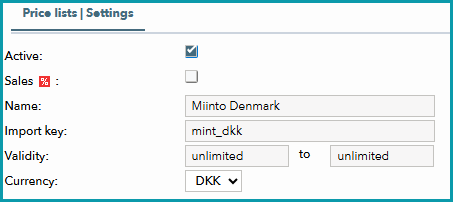
Fig. 1: Example of a price list creation for Miinto DKK
4.Go to “Channels > [Your Miinto sub-channel] > Price catalogue”.
5.Assign the new price lists under “More price lists” (the priority ranking is irrelevant).
CURRENCY |
IMPORT KEY |
|---|---|
EUR |
mint_eur |
DKK |
mint_dkk |
SEK |
mint_sek |
NOK |
mint_nok |
PLN |
mint_pln |
CHF |
mint_chf |
TIP: When an order comes in, Miinto sells the articles using the prices you have defined. |
DATA EXCHANGE TIMES
DATA |
TIME/FREQUENCY |
|---|---|
Catalogue (Full) |
01.30 a.m. |
Stock (Delta) |
Every two hours in minute 30 |
Media |
With catalogue |
Retrieve and import orders |
Every 30 minutes |
Order messages |
Every 30 minutes |