Marketplaces > Marketplaces A-F > Douglas > FAQ > Douglas Error: "numberContentUnits"
Douglas Error: "numberContentUnits"
This guide shows how to resolve the following Douglas error message: Value not set - "numberContentUnits is a mandatory attribute".
Description
This is a Douglas-specific error message. At Douglas, it is mandatory to indicate base prices for all articles.
Solution
Enter a base price and the unit of measure for the affected GL_Product-Article.
•Open the article on the "Article data" tab.
•Check "Base price and "Quantity in" settings (see Fig.1).
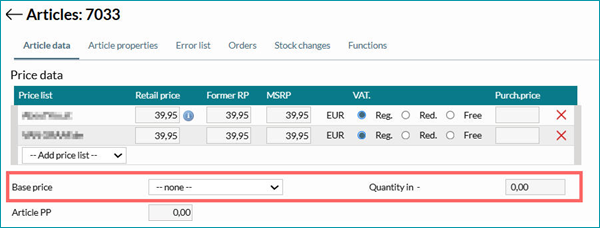
Fig.1: Base price settings at the article
A base price unit is missing?
•Go to "Basic data > Prices > Units" to check whether the unit you need exists.
•Create any missing units and enter the Douglas export keys.
•Go to "Basic data > Prices > Base prices" and configure the base prices with the new units.
TIP: If you want to use other units, request that the channel include them. •"pieces" → jewelry and accessories. •"ml" and "g" (alternatively "l"/"kg") → beauty products (like perfume and lipstick). •"m", "cm", and "pair" → currently not in use. Export Keys for Base Prices •The channel-specific export key for base price units with quantities up to 250 g/ml is "100". •For higher quantities use the export key "1000". •The unit "pieces" requires the export key "1". In general, the channel only accepts the following export keys for base prices: "1", "10", "100", and "1000". |
For further information, see also: