TB.One > Setup, Configuration & User Accounts > Dynamic Storage Management > CREATING DYNAMIC BIN LOCATIONS (SHELVES)
CREATING DYNAMIC BIN LOCATIONS (SHELVES)
Storage shelves (or bin locations) define the exact position of articles within a storage facility. They may contain any number of articles. For dynamic warehouse management, it is required to configure bin locations.
Only bin locations in the corresponding channel's storage facility are taken into account for incoming orders and the retrieval of goods.
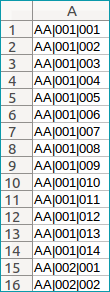
Provide a list of your bin locations to your Tradebyte contact, who will import the bin locations into your system. This list has to be a CSV file which lists the names of the bin locations in its first column (no column header). Use the character set "UTF-8" and the separator ";". There are no rules regarding the file name. The bin locations created during the import will be listed at "Basic data > Storage > Dynamic bin locations". They are sorted by storage facility.
Excerpt from sample CSV |
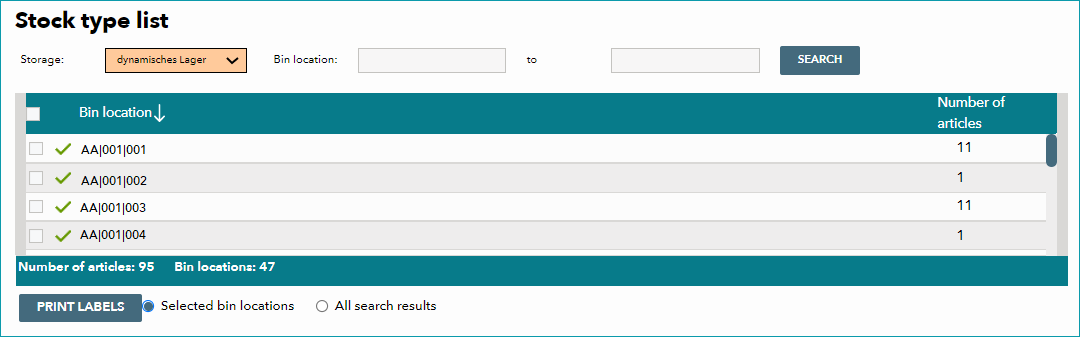 Bin locations as created during the import |
Generally, you can configure the names of bin locations to fit your needs. It is, however, important for designations to be unique across all storage facilities, since any bin location can only be assigned to one storage facility at a time. If, for example, the bin location "AA|001|001" is assigned to the storage facility "München", you must not use a bin location with the same name for the storage facility "Stuttgart". Therefore, you need to provide a separate CSV file for each storage facility.
TB.One sorts the bin locations in alphanumerical order. If any leading zeros are missing, this may cause problems during the consignment of goods. To ensure that bin locations are sorted in a meaningful way, you need to extend their numbering by adding a sufficient amount of leading zeros and use designators that are similar in structure and length.
TIP: |
ATTENTION: |
Creation of bin locations:
•One CSV file for each storage facility
•CSV rules: UTF-8, separator ";", free choice of names, one-column file without header, one row per bin location
•Bin location names are structured identically and are of the same character length
•Continue the configuration by creating labels for bin locations
For further information, see also: