TB.One > Setup, Configuration & User Accounts > Dynamic Storage Management > DEFINING DYNAMIC STORAGE FACILITIES
DEFINING DYNAMIC STORAGE FACILITIES
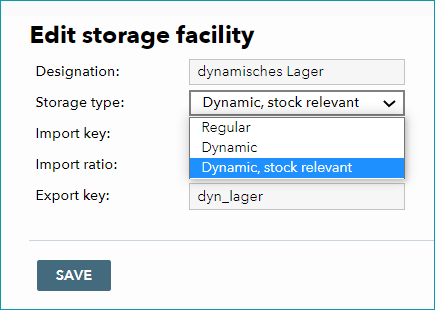
At "Basic data > Storage > Storage facilities" you can create new storage facilities and manage preexisting ones. For the dynamic warehouse management it is vital to set the correct storage type for each warehouse. To configure a storage facility for dynamic warehouse management, select it from the list and choose "Dynamic, stock relevant" from the drop-down menu "Storage type". Confirm with "Save".
ATTENTION: |
It is possible to assign channels to certain storage facilities (orders from that channel will be fulfilled by the specified storage facility). This setting can be configured at "Basic data > Storage > Warehouse settings". Once a storage facility has been assigned to a channel, it will be used for consignment for that specific channel. Warehouses without a channel assignment are treated as exclusively internal. They have no direct consignment purpose. Such internal warehouses are often used as neutral transfer warehouses or for reception of goods/returns.
•Continue the configuration by creating bin locations
For further information, see also: