TB.One > Import & Export > Master Data Import via TB.Cat/XML > TB.Cat - XML Structure > TBCATALOG > PRODUCTDATA > PRODUCT > ARTICLEDATA / ARTICLE > A_MEDIADATA
A_MEDIADATA
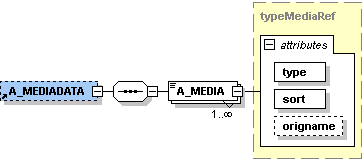
Media on the article/variant level usually contains media that directly refers to the respective article (e.g. an image showing a specific color variant). For product media, see P_MEDIADATA.
ATTENTION: |
NODE |
REQUIRED |
DESCRIPTION |
|
|---|---|---|---|
A_MEDIADATA |
N |
XML |
Article media |
A_MEDIA |
Y |
CHAR(255) |
References a piece of article media. If one image is applicable for multiple variants, the URL must be repeated for each variant. |
A_MEDIA[type] |
Y |
CHAR(50) |
Media type (see table below) |
A_MEDIA[sort] |
Y |
INT |
Sorting within the article media |
A_MEDIA[origname] |
N |
CHAR(255) |
Original name of the file. Do not use this attribute for media uploaded via SFTP. |
For the import, each piece of media needs to have a media type. If no media type is provided, the type "image" is assumed. Additional media types can be individually created in TB.One as needed.
MEDIA TYPE |
DESCRIPTION |
FILE FORMAT |
|---|---|---|
image |
(Image) |
jpg, png |
color |
Color tile |
jpg |
manual |
User guide |
|
energy |
Energy efficiency information |
pdf, jpg |
EXAMPLE:
|
For further information, see also:
▪Master data import via XML - overview
▪XML structure overview - TB.Cat 1.4
▪XML structure overview - TB.Cat 1.2/1.3
▪Examples: XML for TB.Cat 1.4 or TB.Cat 1.2/1.3