TIP: This Channel Sheet contains all channel-specific information for BonPrix. |
CHANNEL BASICS
The following channels are available for BonPrix:
CHANNEL |
SIGN |
ID |
CURRENCY |
|---|---|---|---|
BonPrix (main channel) |
bphk |
304 |
EUR |
BonPrix.de |
bpde |
305 |
EUR |
BonPrix.Retoure |
bpre |
306 |
EUR |
ATTENTION: The purpose of each of these channels differ! •BonPrix (main channel) - For the value mapping •BonPrix.de - For master data exports •BonPrix.Retoure - Used to handle orders only If you only offer products with 1ManHandling, the sub-channel BonPrix.Retoure is not relevant to you. |
PRELIMINARY INFORMATION
•New to TB.One? Our webinars help you find your way around the software.
•The channel provides a test system (sandbox). While you're in the integration phase, use it to check how your content will look.
•Provide your product data in German.
•Go to the menu "Basic data > Storage > Warehouse settings" and check your settings for the channel (for more information, click here).
•The channel purchase price (PP) and retail price (RP) are mandatory for BonPrix.
•Return processes differ between 1ManHandling and 2ManHandling shipments. Please read this section for more information.
CHANNEL-SPECIFIC SETTINGS, FEATURES, AND PROCESSES
REFERENCE NUMBER |
CHANNEL-SPECIFIC INSTRUCTIONS |
|
|---|---|---|
B-01: Payments |
Find your payment methods at "Basic data > Payment > Payment methods". Payments are managed by BonPrix. When the channel is activated or, at the latest, when the first order comes in, a payment method with the channel name is created automatically. For the export to an ERP-system, you can freely select an export key. |
|
D-01: Product designation |
General information: •The product designation is mandatory for BonPrix. •The length of the product designation is not limited. •BonPrix refers to product names and titles as "style names" (Stylebezeichnungen). •TB.One's components and title profiles may help you create product designations for BonPrix. General channel requirements for the product designation: •The classification for the shop must be included - "Classification" refers to the last word in channel's respective category name (e.g. "Sideboard" would be the classification of the category "Schränke / Kommoden / Sideboard" ("Wardrobes / Dressers / Sideboard")) •No special characters (no quotes, emoticons, ...) •No proper names - For example, the name for a wardrobe (in German, Schrank) should be "Schrank", not "Schrank 'Moskau'" •Add product-specific characteristics (max. 2) after the classification term and use the word "mit" ("with") to connect them to the classification term (e.g. with adjustable headrest, with bedding box, with foil printing). If the product has more that 2 relevant characteristics, use the most important ones •Always place specific and noteworthy traits ahead of the classification term (e.g. Sofa) - For example, the correct designation would be "Ecksofa" (corner sofa) and not "Sofa mit Ecke" (sofa with corner) •Always indicate specific qualities ahead of the classification term - For example, the correct designation would be "Samt Ecksofa" (velvet corner sofa), and not "Ecksofa mit Samtbezug" (corner sofa with velvet cover) Channel requirements for product designations of packs and sets: •A pack consists of several identical products (e.g. five identical cup coasters) - Pack terminology: write (2er Pack) in brackets after the style designation (2-pack) •A set consists multiple different components, e.g. a table and a chair, or a large and a small vase - Set terminology: write (2-tlg. Set) in brackets after the style designation (2-pcs. set) Exceptions for furniture and garden furniture sets ("Möbelsets / Gartenmöbelset"): •The classification term is not used here. Instead, use the style designation (Stylebezeichnungen) "Möbelset" (furniture set) or "Gartenmöbelset" (garden furniture set) and indicate the number of pieces in the set as described above. •Example: The classification term is "Gartenmöbel / Gartenmöbel Set / Gartentisch und Gartenstühle (2-tlg. Gartenmöbel Set)" / in English "Garden furniture / Garden furniture set / Garden table and Garden chairs (2-pcs. set Garden furniture)".
|
|
D-02: Special text |
BonPrix does not use the field "Special text". |
|
D-03: Description |
•The product description is mandatory for BonPrix. •The length of the product description is not limited. •The text configurator is optional. •Bullet points: Optional. We recommend 3 to 8 bullet points. |
|
D-04: Components |
The following components are mandatory at BonPrix: •All relevant product properties •All mandatory properties for the value mapping Components can also be used to create product titles. |
|
D-05: Attributes |
The following attributes are mandatory at BonPrix: •All relevant product properties •All mandatory properties for the value mapping |
|
E-01: Article numbers |
Provide the following article numbers: •Article number |
|
E-02: Shipping information |
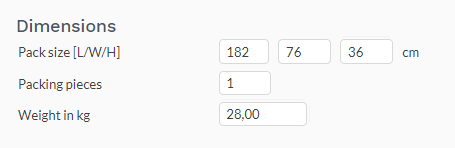
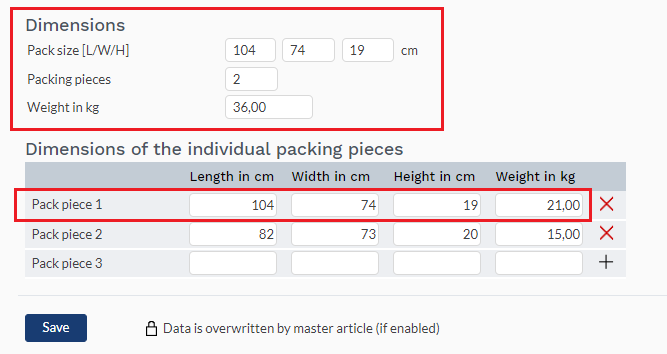
Provide the following mandatory shipping information: •Package type •Shipping type •Weight (in kg) •Delivery time (in days) - Max. 14 days •Number of packing pieces •Pack sizes (height, length, width in cm) The shipping information listed below is optional: •Country of origin and Intrastat category •Energy efficiency class
|
|
E-03: Variant dimensions |
BonPrix does not limit the number or type of variant dimensions. |
|
F-01: Media |
Image requirements: •Provide images in a commonly used format such as png or jpg. •Number: Min. 1 to max. 8 product and article images •Size: Min. 3000 px, max. 4800 px, min. height 2000 px •Resolution: 72 DPI •Motive size: image filling •Width-to-height ratio: 5:7 •File format JPG: max. quality •Provide unsharpened, uncropped, and unedited images (without applying "Picture Styles" / "Presets") Recommendations: •White balance: 5,500 Kelvin •Exposure: do not overexpose bright areas and do not underexpose dark areas (i.e. pay attention to a balanced histogram) •Camera colour space: ECI-RGB_v2_ICCv4
|
|
G-01: Carrier |
•Depending on the shipping's handling requirements (1ManHandling / 2ManHandling), choose one of the predefined carriers listed below: o1ManHandling: DHL Standardpaket, DPD Standardpaket, HERMES Standardpaket, UPS Standardpaket, GLS Business Parcel o2ManHandling: DHL 2-Mann-Handling, Hermes Einrichtung Service (HES), Rhenus Home Delivery •Shipping surcharges are not permitted.
|
|
G-02: Delivery note |
The delivery notes are transmitted to TB.One by the channel. They are attached to the orders. To print them, open the order via the order list and click on "external documents". If you don't manage your orders in TB.One, ensure your system can process the attachments and print PDFs. At BonPrix, 3 different delivery note variants are used: 1.Delivery note with a return note for 1ManHandling (sub-channel BonPrix.de) - You enclose the returns label, and your customer will send the returns directly to you 2.Delivery note for 2ManHandling (sub-channel BonPrix.de) with the returns information sheet 3.Note with returns slip for 2ManHandling (sub-channel BonPrix.Retoure) - Based on the customer's return prompt, you'll receive this document from the channel Your Solution Delivery Manager will provide you with more information during the integration. |
|
G-03: Invoice |
It is not possible to print invoices. Payments and invoicing are managed by the channel. |
|
G-04: Proposed return code |
You don't have to send return codes to the channel with your dispatch advices. |
|
G-05: Delivery documents in package |
Delivery note, return label (only for 1ManHandling), returns information sheet (only for 2ManHandling). If you don't want to use the delivery documents provided through TB.One, you will need to obtain the channel's approval for the documents created by your system.
|
|
G-06: Refund deduction |
At BonPrix you can deduct a percentage from the reimbursed amount, if an article is returned in bad condition. In that case, specify the precentage you want to deduct on corresponding order's "Returns" tab. |
|
G-07: Return causes |
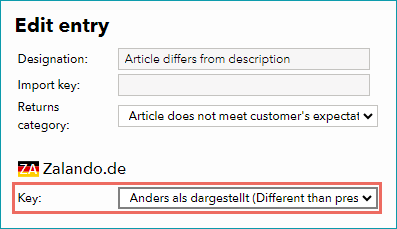
To create return causes and states, go to "Basic data > Returns > Return causes" and "Basic data > Returns > Return states" . BonPrix processes the return causes and states you transmit. Map them to the return causes and states used by the channel by assigning a key. Mapping a return cause The following return causes and states are evaluated by BonPrix, and must therefore be created in TB.One: •Ohne Mängel (no faults) •Rücksendung war unvollständig (return was incomplete) •Totalschaden (total loss) |
|
X-01: Size grid |
BonPrix does not use size grids. |
|
X-02: Base prices |
No base prices are required at BonPrix. |
|
X-03: Categories |
For a complete list of all categories, go to "Basic data > Classification > Typification". To reduce the number of categories available for selection at the product, mark categories that you do not use as "not assignable". Channels change their categories from time to time. Any major changes will be announced in TB.One. Outdated categories are highlighted with a red icon. Move all affected products to valid categories. •At BonPrix you can not create links between your products. |
|
X-04: Value mapping |
Map values at both category and global levels. Mandatory BonPrix properties at global level: •Farbe (bp) - Assign a colour from the value list •Material (bp) - Assign a material from the value list, multiple selection possible •Packagetype (bp) - For packs and sets, assign a value for the package type from the list (e.g. "1er-Pack" (1-pack) or "10-tlg. Set" (10-pcs. set)) •Pattern (bp) - Assign a pattern (e.g. "no pattern" or "flower") •Saisonalität (bp) - Assign a season (e.g. "neutral" or "summer") Mandatory requirements BonPrix category-specific properties: •Category-specific mandatory properties are always mapped at category •Example for "Möbel" (furniture): Consider the property "Handlingsart" (way of handling for the shipping), then mapped the requires values (in this case 1ManHandling / 2ManHandling) in the value mapping on category level. |
|
X-05: Pending orders |
BonPrix does not transmit pending orders. |
|
X-06: Partial deliveries |
Partial cancellations and partial deliveries on article level. |
|
X-07: Commission group |
BonPrix does not use commission groups. |
|
X-08: Service logos |
BonPrix will not display service logos you transfer in the shop. |
|
X-09: Error and status messages |
BonPrix does not provide error and status messages. |
|
X-10: Templates |
At BonPrix you cannot use templates. |
|
X-11: Text configurator |
The text configurator cannot be used for BonPrix. |
|
X-12: Product text profile |
Product text profiles cannot be used for BonPrix. |
|
X-13: Title profile |
You can use title profiles to configure the product titles shown in the channel's shop. For more information on title profiles, click here. Title profiles are optional. |
|
X-14: Cross prices |
BonPrix does not display cross prices. |
SPECIAL REQUIREMENTS
Returns management for BonPrix
BonPrix differentiates returns depending on the handling of the shipments:
1MANHANDLING RETURNS |
2MANHANDLING RETURNS |
|---|---|
•The delivery note and the returns note are included in the delivery •Returns are processed conventionally via the sub-channel BonPrix.de, using the returns label you have created |
•The delivery note and the returns information sheet are included in the delivery •The channel creates a return prompt based on the customer's notification •The channel provides you the return slip for 2ManHandling, and you hand it over to the carrier •Returns for 2ManHandling are processed via the sub-channel %KANAL%>.Retoure Check the image below (see Fig. 4) for a complete overview of the returns process for 2ManHandling. |
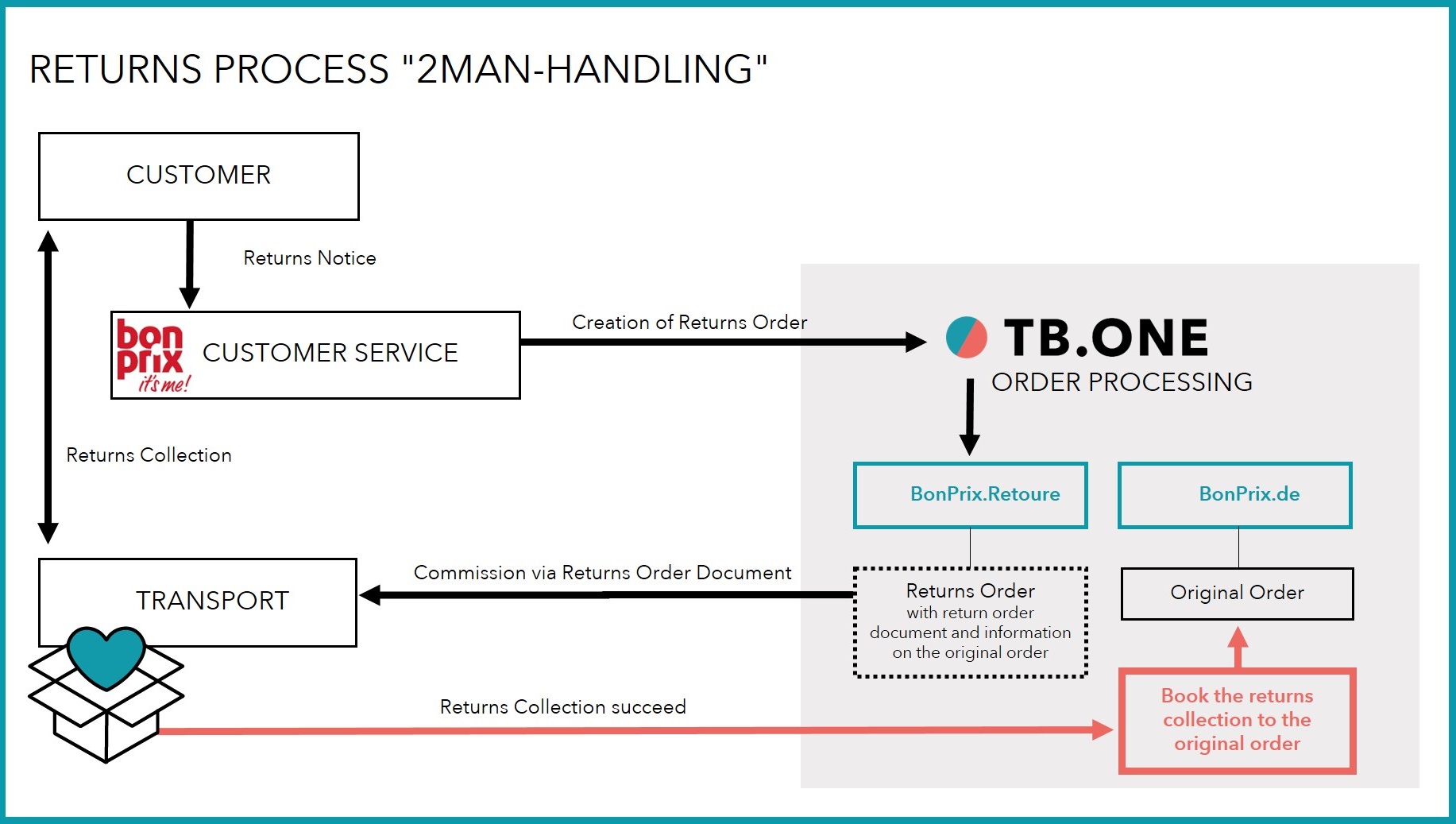
Fig. 4: Overview of the returns process for 2ManHandling
DATA EXCHANGE TIMES
DATA |
TIME/FREQUENCY |
|---|---|
Catalogue (Full) |
Daily, at 02:30 AM and 12:30 PM |
Catalogue (Delta) |
Hourly, from 05:00 to 11:00 AM, and from 01:00 to 10:00 PM |
Stock (Delta) |
Hourly, from 05:00 AM to 10:00 PM |
Media |
With catalogue |
Retrieve and import orders |
Twice per hour, from 04:01 AM till 10:35 PM, at minute 01 and minute 35 |
Order messages |
Hourly, from 04:35 AM till 10:35 PM, at minute 35 |