TIP: This Channel Sheet contains all channel-specific information for Douglas. |
CHANNEL BASICS
The following channels are available for Douglas:
CHANNEL |
SIGN |
ID |
CURRENCY |
|---|---|---|---|
Douglas (main channel) |
doug |
278 |
EUR |
Douglas.de |
dode |
279 |
EUR |
Douglas.at |
doat |
325 |
EUR |
Douglas.it |
doit |
475 |
EUR |
Douglas.nl |
donl |
347 |
EUR |
Douglas.fr |
nofr |
700 |
EUR |
Douglas.pl* |
dopl |
326 |
PLN |
Douglas.ch* |
doch |
714 |
CHF |
Douglas.es |
does |
737 |
EUR |
ATTENTION: Douglas.pl* and Douglas.ch* differ from other channels in some aspects: Douglas.pl •In case of a return the customers send the articles to the channel. The channel collects the returns over a period of time and then ships them to your warehouse. Therefore, you need to add a different version of the return guide to packages for Douglas.pl orders •For Douglas.pl, you can only create the mandatory return guide in TB.One. If you want to add other documents (such as delivery notes, and return labels), please provide them via your system, e.g. your OMS. Douglas.ch •Maintain your texts in French and German for Douglas.ch. The delivery note is bilingual and contains both French and German. |
PRELIMINARY INFORMATION
•New to TB.One? Our webinars help you find your way around the software.
•The channel provides a test system (sandbox). While you're in the integration phase, use it to check how your content will look.
•Send the authorization key generated in the Douglas backend to your Solution Delivery Manager at Tradebyte. To find the key, click on your email address in the top-right corner of the Douglas backend to open the “My User Settings” menu. Then switch to the “API Key” tab to retrieve the key.
•Provide your product data in the language of the channel (Dutch, French, German, Italian or Polish). For Douglas.ch, both French and German texts are required.
•Go to the menu "Basic data > Storage > Warehouse settings" and check your settings for the channel (for more information, click here).
ATTENTION: The sale of products containing perfluoroalkyl and polyfluoroalkyl substances (PFAS) is prohibited in France since the 1st of January of 2026. |
CHANNEL-SPECIFIC SETTINGS, FEATURES, AND PROCESSES
REFERENCE NUMBER |
CHANNEL-SPECIFIC INSTRUCTIONS |
||
|---|---|---|---|
B-01: Payments |
Find your payment methods at "Basic data > Payment > Payment methods". Payments are managed by Douglas. When the channel is activated or, at the latest, when the first order comes in, a payment method with the channel name is created automatically. For the export to an ERP-system, you can freely select an export key. |
||
D-01: Product designation |
The length of the product designation is not limited. To add variants (e.g. color) to titles via the product text configurator, you must use TWIG in the title profile. |
||
D-02: Special text |
Douglas does not use the field "Special text". |
||
D-03: Description |
•The length of the product description is not limited. Please refer to Douglas' Content Guide. •Bullet points: in use. Add them via the product text profile. |
||
D-04: Components |
The following components are mandatory at Douglas: •Variant-forming components (Size or color) •"Inhaltsstoffe" (ingredients), "WEEE Nummer" (WEEE number) and "Anwendung" (application) •Provide short texts describing how the product should be applied for the component "Anwendung". To comply with the General Product Safety Regulation (GPSR) requirements, map the following channel properties: •Company name •Street •Postal code •City •Country •Web Contact Information |
||
D-05: Attributes |
Attributes are optional for Douglas and visible to end customers in the channel's shop. Use the "Set Content" attribute to list the items in a set and separate the individual items in a set with this symbol: "|" (e.g. "Nail polish black (5 ml)| Nail polish navy (5 ml)| Nail polish white (5 ml)"). |
||
E-01: Article numbers |
Provide the following article numbers: •Article number •EAN (13-digit) EAN codes must be absolutely unique. Within one account, multiple identical codes are not permitted. The validity of the EANs provided is checked. |
||
E-02: Shipping information |
Provide the following mandatory shipping information: •Package type •Shipping type •Country of origin and Intrastat category The shipping information below is optional: •Pack sizes (height, length, width in cm) •Number of packing pieces •Weight (in kg) •Delivery time (in days) |
||
E-03: Variant dimensions |
The following requirements apply for variant dimensions: •Variants can be created using only one variant dimension: either color or size. •Within one category, variants for all products have to be created via the same variant dimension (e.g. only via "size"). •Size variants take priority over color variants. More information on variant creation for Douglas can be found here. |
||
F-01: Media |
•Provide images in a commonly used format such as png or jpg. •Number: Min. 3 to max. 5 article images •Size: min. 1,063 x 1,063 px, max. 5MB per image •Resolution: 150 DPI •Images must be square shaped •Additional "color blob image" recommended for products with color variants; a maximum of 5 images + one "color blob image" per article
|
||
G-01: Carrier |
•Ship with DHL in Germany. For other channels, contact Douglas directly to request the list of mandatory carriers per country. •Shipping surcharges are not permitted. |
||
G-02: Delivery note |
You can configure the Douglas delivery notes at "Admin > System settings > Documents" and add custom text. Douglas.ch supports delivery notes in both French and German. |
||
G-03: Invoice |
You don't need to print invoices for Douglas. The channel sends the invoices to the customers. Print invoices for your own records only. |
||
G-04: Proposed return code |
Return codes are not required for Douglas, as they're not processed by the channel. However, in order for Douglas to book returns successfully, a "Payable Balance" must be available in Mirakl. This is the necessary credit balance required by Douglas in order to process returns. |
||
G-05: Delivery documents in package |
•Delivery note, return label and return guide. •For Douglas.pl, only the return guide is mandatory. Return guides can be created in TB.One for this channel only. To add other documents (e.g. delivery notes or return labels), please provide them via your own system (e.g. your OMS). •Shipping labels are mandatory for Douglas. Add those to your packages. These labels can only be generated in TB.One if a number range is maintained. If you generate the labels in TB.One, it is necessary to enter a return address under "Basic data > Returns > Returns addresses". |
||
G-06: Refund deduction |
At Douglas you always reimburse customers for returned articles in full. If you have complaints about the condition of a returned article, consult the channel directly. |
||
G-07: Return causes |
Douglas does not process return causes and states in TB.One. For Douglas.pl, returns are sent directly to the channel by the customer. The channel collects returns over a period of time and then ships them to your warehouse. |
||
X-01: Size grid |
Douglas does not use size grids. |
||
X-02: Base prices |
Provide base prices (price per kg, price per liter, etc.) for all articles that legally require you to do so. Base prices are mandatory for Douglas. Check at "Basic data > Prices > Units" if all units you need are present, and create them if they aren't. Add the related Douglas keys. If you've created new units, don't forget to configure them at "Basic data > Prices > Base prices" so that TB.One can perform valid calculations during export. Possible units for base prices at Douglas include: •"m" (currently not in use) •"pair" (currently not in use) •"kg" •"ml" (e.g. for perfume or lipstick) •"l" •"cm" (currently not in use) •"g" (e.g. for perfume or lipstick) •"pieces" (e.g. for jewelry and accessories) If you use any other units, contact the channel to request them. Export keys for base prices: •Base prices with quantities up to 250g/ml: "100" •Base prices with higher quantities than 250g/ml: "1000" Generally, the channel can understand the export keys "1", "10", "100", and "1000" for base prices. |
||
X-03: Categories |
For a complete list of all categories, go to "Channels > Douglas (DE main channel) > Categories". •Assign your products to a category from the Douglas category tree "Douglas (main channel) productFamily". This assignment is mandatory. •At Douglas you can not create links between your products. |
||
X-04: Value mapping |
Map values at the global level for Douglas. On category level, only exceptions to the global mapping are defined. The following values are mandatory: • "Inhaltsstoffe" (ingredients), "WEEE Nummer" (WEEE number) and "Anwendung" (application) • Standard components/attributes (colour, material, season, target group, gender, ...) It is also mandatory to assign your products to a category from the Douglas category tree "Douglas (main channel) productFamily".
|
||
X-05: Pending orders |
Douglas does not transmit pending orders. |
||
X-06: Partial deliveries |
Partial cancellations and partial deliveries on item level. |
||
X-07: Commission group |
Douglas does not use commission groups. |
||
X-08: Service logos |
Douglas will not display display service logos you transfer in the shop. |
||
X-09: Error and status messages |
Find the channel's error and status messages at "Channels > Douglas (DE main channel) > Article status". |
||
X-10: Templates |
At Douglas you cannot use templates. |
||
X-11: Text configurator |
The text configurator cannot be used for Douglas. |
||
X-12: Product text profile |
You can use the product text profile to customize the product descriptions shown in the channel's shop (you can add information like components and bullet points, and configure the order in which these elements are displayed). ▪Go to "Basic data > Templates > Product text profiles" to create a profile. ▪Click on "Create new product text profile" in the left navigation bar (tab "Pages"). Enter a designation and click "Create". ▪Click on your profile's designation in the list and select which elements should be part of the product description. ▪Go to "Channels > Douglas (DE main channel) > Settings" and switch to the tab "Product texts". ▪Select the option "Use configurable product text". ▪Select an assignment base (for example an attribute). All products containing this attribute will use the product text profile. ▪In the drop-down "Default value" choose the product text profile you want to use. ▪If you want to use different product text profiles for the different values of your assignment base, you can select them in the table below. •You can add a special text via the product text profile •You can add bullet points via the product text profile. If your bullet points are formatted in HTML, they can only be added to the product text profile via TWIG. |
||
X-13: Title profile |
You can use title profiles to configure the product titles shown in the channel's shop. For more information on title profiles, click here. |
||
X-14: Cross prices |
Douglas does not display cross prices. |
SPECIAL REQUIREMENTS
Pricing information for Douglas
TOPIC |
GUIDELINES & REQUIREMENTS |
|---|---|
Minimum and maximum prices configuration |
A minimum price as well as a minimum and/or a maximum price reduction can be maintained via "Channels > Douglas > Settings" if necessary. Please contact Tradebyte if you would like to use this feature. |
Pricing information |
At Douglas, only the retail price is mandatory. Former retail prices and MSRP are optional. Any other pricing information is not required. |
Price data transmission |
Douglas will use your price data transmitted to the channel only for retail price calculation. The channel has sole authority over all retail pricing in the shop to the end customer, including discounts and sales. Therefore, prices shown in TB.One do not reflect the final price displayed by Douglas. For more information, please reach out to the channel directly. |
Price configuration |
Prices have to be configured on the sub-channel level. |
The following requirements apply to variant creations:
•Variants can only be formed using one variant dimension, which must be color or size.
•Within one category, variants for all products have to be created using the same variant dimension (e.g. only via "size").
•Size variants always take priority over color variants. For products which have both, only size variants will be exported to the channel as a variant and different colors will appear as individual products on Douglas' shop.
•If the size is the same for all of a product's articles, the variant dimension mapped to "hexColor" (usually the color) will be used to created variants.
Here are some examples of how this works:
1.In this image (see Fig. 1), the variant used would be "Größe" (size):
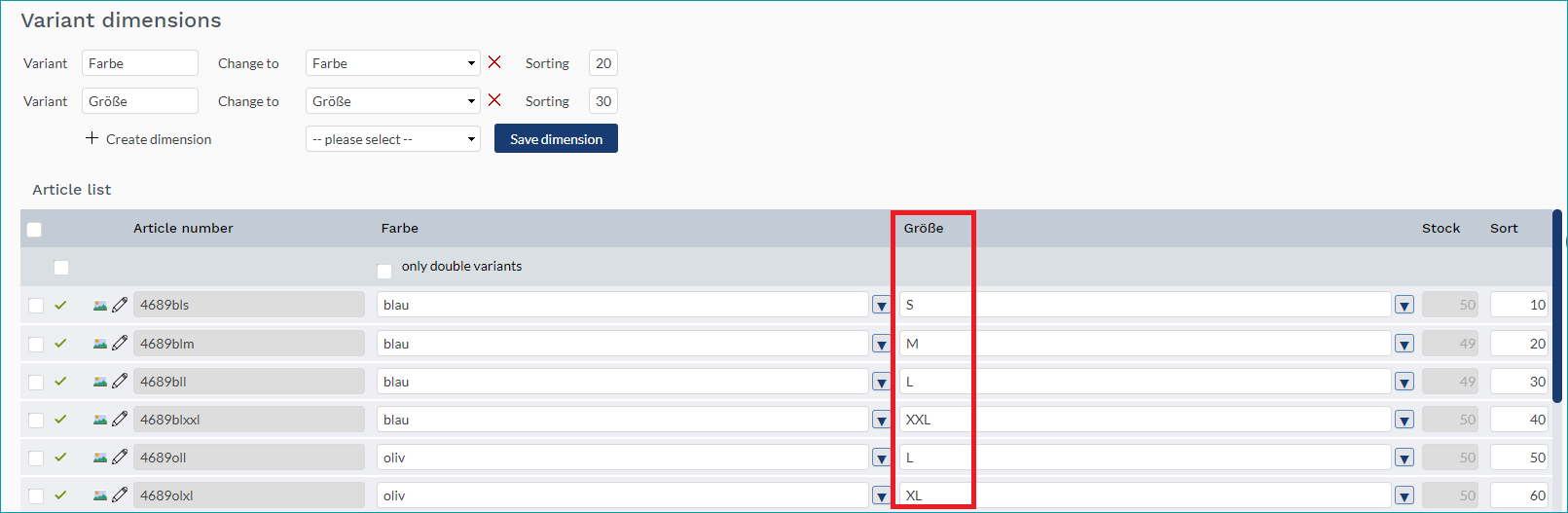
Fig. 1: "Größe" (size) variant
2.Here, the variant is "Farbe" (color) (see Fig. 2). If "Länge" were to be mapped to the size attribute, the variant would still be "Farbe", because "Länge" is is the same for all of the product's articles:
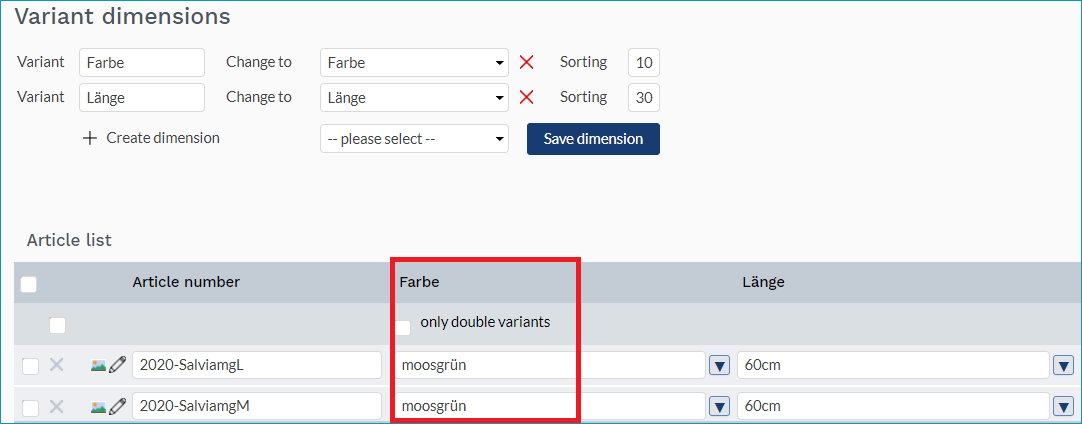
Fig. 2: "Farbe" (color) variant
3.Since the channel only works with one variant dimension, the size ("Größe") would be used as the variant and the colors ("Farbe") would result in different products (see Fig. 3):
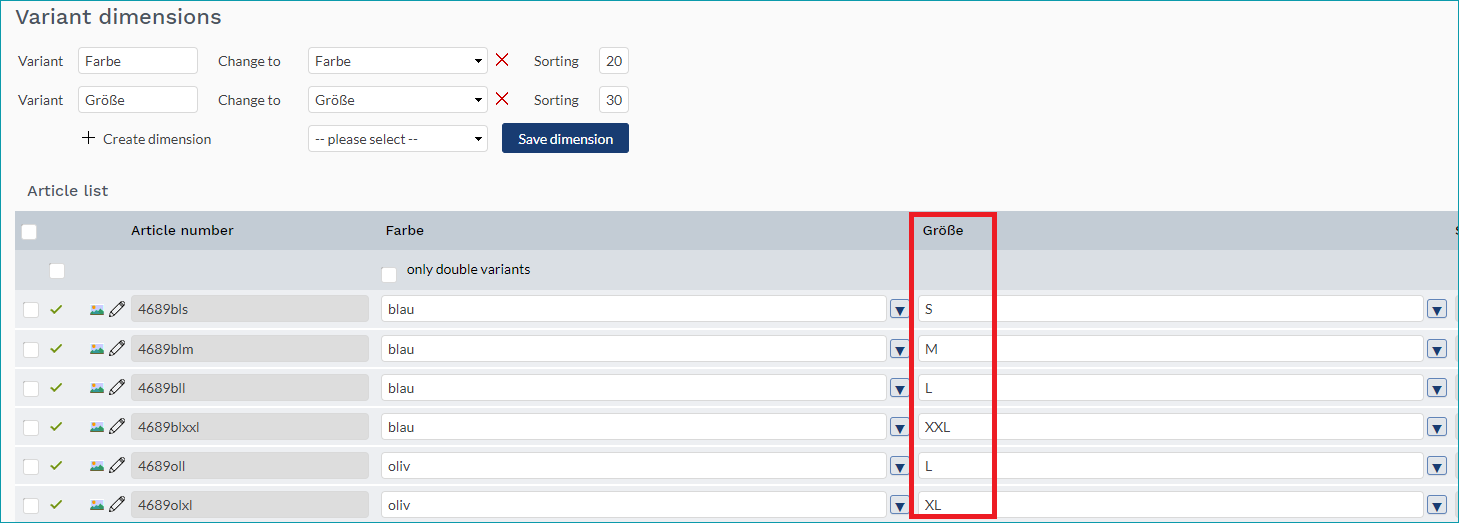
Fig. 3: Multiple products created with the variant "Farbe" (color)
4.Here, "Farbe" (color) is the variant (see Fig. 4). The "Design" cannot be used to create variants. Therefore, each "Design" value will create an individual product:
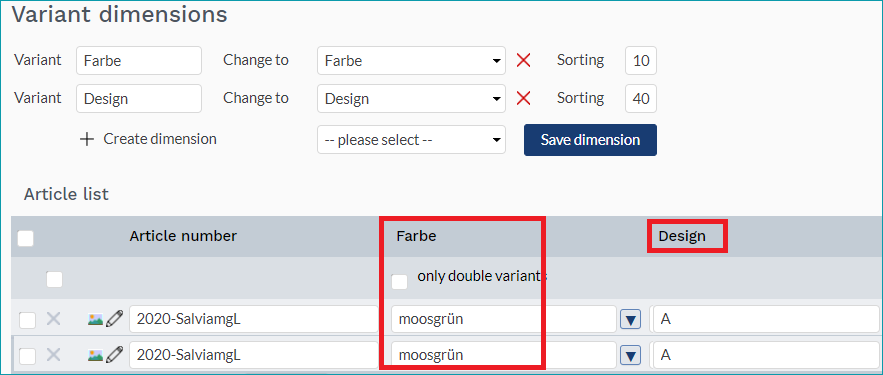
Fig. 4: "Farbe" (color) as variant
ATTENTION: If you update product variants after the export to the channel, an error message will be displayed! |
DATA EXCHANGE TIMES
DATA |
TIME/FREQUENCY |
|---|---|
Catalogue (Full) |
Weekly, Sundays, 05:05 a.m. |
Catalogue (Delta) |
Daily, 05:05 a.m. |
Stock (Delta) |
Every 15 minutes |
Media |
With catalogue |
Retrieve and import orders |
Every 15 minutes |
Order messages |
Hourly |
Error and status messages |
3 times per day 06:00 a.m., 12:00 p.m, 06:00 p.m. |