TIP: This Channel Sheet contains all channel-specific information for Limango. |
CHANNEL BASICS
The following channels are available for Limango:
CHANNEL |
SIGN |
ID |
CURRENCY |
|---|---|---|---|
Limango (old main channel) |
lmde |
189 |
EUR |
Limango.de (old) |
lade |
190 |
EUR |
Limango.de (at) (old) |
laat |
529 |
EUR |
Limango (main channel) - Mirakl |
limc |
890 |
EUR |
Limango.de - Mirakl |
limd |
891 |
EUR |
ATTENTION: The old Limango channels (lmde, lade & laat) are being phased out! In the future, they will be replaced by the following channels: •Limango (main channel, Mirakl) - sign limc, ID 890 •Limango.de (Mirakl) - sign limd, ID 891 For these new channels, you'll need to connect to the channel's account via Mirakl SSO: 1.Go to "Channels > Limango (main channel) > Settings", stay on the tab "System settings", and find the section "Basic settings". 2.Click the button "Login with Mirakl" to open the entry mask. Enter your Mirakl SSO access data and log in. |
PRELIMINARY INFORMATION
•New to TB.One? Our webinars help you find your way around the software.
•For the new Mirakl channels (limc & limd), the channel provides a test system (sandbox). While you're in the integration phase, use it to check how your content will look.
•Provide your product data in German.
•The standard delivery time for Limango is 2-4 days. The contractually agreed delivery time must be met.
•Go to the menu "Basic data > Storage > Warehouse settings" and check your settings for the channel (for more information, click here).
CHANNEL-SPECIFIC SETTINGS, FEATURES, AND PROCESSES
REFERENCE NUMBER |
CHANNEL-SPECIFIC INSTRUCTIONS |
|
|---|---|---|
B-01: Payments |
Find your payment methods at "Basic data > Payment > Payment methods". Payments are managed by Limango. When the channel is activated or, at the latest, when the first order comes in, a payment method with the channel name is created automatically. For the export to an ERP-system, you can freely select an export key. |
|
D-01: Product designation |
Limango lmde, lade & laat (old channels): •The length of the product designation is not limited. Do not include brand, sex, colors or descriptions. •Do not include brand, sex, colors or descriptions. Limango limc & limd (new channels): •The length of the product designation is limited to 150 characters. •The product description should include the title and the variant information. •Do not include brand, sex, color or description in the designation. •Split into common noun and proper name possible. |
|
D-02: Special text |
Limango does not use the field "Special text". |
|
D-03: Description |
Limango lmde, lade & laat (old channels): •The length of the product description is limited to 2.048 characters. •For shoes, information regarding the material must be included in the product description. •Bullet points: optional. We recommend 5 to 8 bullet points per default. Limango limc & limd (new channels): •The length of the product description is limited to 1000 characters. •Bullet points: optional. We recommend 5 to 8 bullet points per default. |
|
D-04: Components |
Limango lmde, lade & laat (old channels): The following components are mandatory at Limango: •Energy efficiency class for products concerned by legal requirements •For all textile products with a textile weight proportion of at least 80%, you must indicate the material as a percentage (according to the Textile Labelling Regulation). •Therefore, always provide the percentage that defines the composition of the material (e.g. 100% cotton). For shoes, always indicate the information about the shoes' material in this given order: •upper material (Obermaterial) •lining (Futter) •cover sole (Laufsohle) •outsole (Laufsohle) •Doing so, you may only use the following four material names: •leather (Leder) •coated leather (beschichtetes Leder) •textile (Textil) •other material (sonstiges Material) The channel recommends maintaining a size reference: •Maintain additional size references for fashion and textile products. This note is displayed across all sizes, so use general phrasing such as "runs larger/smaller" or "order one size larger/smaller •The channel recommends maintaining care instructions for textiles and fashion products Limango limc & limd (new channels): The following components are mandatory at Limango: •Energy efficiency class for products concerned by legal requirements •Limango Color •Size •Gender •Age Group Only mapped components are transferred to the channel. |
|
D-05: Attributes |
Limango lmde, lade & laat (old channels): Use the recommended attributes listed under "Product Properties - Attributes" in the article "Product Description". Limango limc & limd (new channels): Only mapped attributes are transferred to the channel. Use the recommended attributes listed under "Product Properties - Attributes" in the article "Product Description". |
|
E-01: Article numbers |
Provide the following article numbers: •Article number •EAN (13-digit) - EAN codes must be absolutely unique. Within one account, multiple identical codes are not permitted. The validity of the EANs provided is checked. •Channel's article number (assigned automatically) •Manufacturer's article number (optional) |
|
E-02: Shipping information |
Limango lmde, lade & laat (old channels): Provide the following shipping information: •Pack sizes (height, length, width in cm) and weight (in kg) - Only mandatory if you ship from abroad, your warehouses are abroad and you ship to Germany, or if your company's headquarters are abroad and you ship to Germany •Weight •Country of origin and Intrastat category •Number of packing pieces Limango limc & limd (new channels): Provide the shipping information listed below if: •You ship from abroad •Your warehouses are abroad and you ship to Germany •Your company's headquarters are abroad and you ship to Germany Mandatory shipping information: •Weight (in kg) •Number of packing pieces •Pack sizes (height, length, width in cm) |
|
E-03: Variant dimensions |
Limango lmde, lade & laat (old channels): The following requirements apply for variant dimensions: •Size •Color Limango limc & limd (new channels): •Variant creation via color and/or size •Max. 2 variant dimensions (color and size) |
|
F-01: Media |
•Provide images in a commonly used format such as png or jpg. •Number: min. 1 product image, min 1 article image •Size: min. 900 x 700 px •Resolution: min. 72 DPI •File format for datasheets of the energy efficiency class: PDF •For Limango limc & limd (new channels) only: Always export your images as jpg
|
|
G-01: Carrier |
•Use a carrier from the channel's carrier list •Limango provides a predefined list of possible carriers to which you need to assign your shipping types. Go to "Basic data > Shipping > Shipping types". Open a shipping type and scroll down to the main channel's section. Select the carrier from the drop-down menu "Key". •Shipping surcharges are not permitted. |
|
G-02: Delivery note |
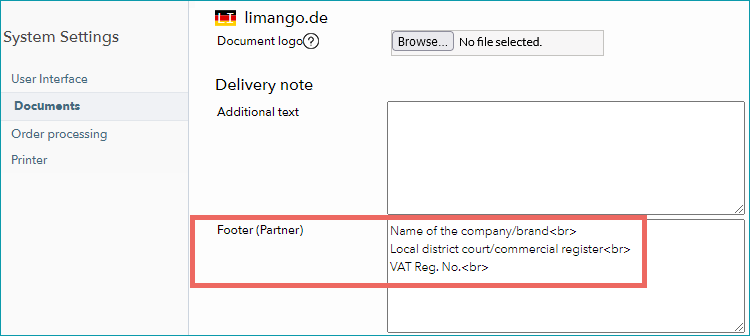
Limango lmde, lade & laat (old channels): You can configure the Limango delivery notes at "Admin > System settings > Documents" and add custom text. Indicate the mandatory information for the delivery note's footer under "Admin > System settings > Documents" in the section "limango.de". Enter the information in the field "Footer (Partner)" - according to this template (see screenshot): Name of the company/brand<br> Local district court/commercial register<br> VAT Reg. No.<br>
Limango limc & limd (new channels): You can configure the Limango delivery notes at "Admin > System settings > Documents" and add custom text. |
|
G-03: Invoice |
You don't need to print invoices for Limango. The channel sends the invoices to the customers. Print invoices for your own records only. |
|
G-04: Proposed return code |
You don't have to send return codes to the channel with your dispatch advices. |
|
G-05: Delivery documents in package |
Delivery note, return label |
|
G-06: Refund deduction |
At Limango you always reimburse customers for returned articles in full. If you have complaints about the condition of a returned article, consult the channel directly. |
|
G-07: Return causes |
Limango does not process return causes and states. |
|
X-01: Size grid |
Limango does not use size grids. |
|
X-02: Base prices |
Limango lmde, lade & laat (old channels): Provide base prices (price per kg, price per liter, etc.) for all articles that legally require you to do so. Limango allows the following units. For the channel keys, refer to the info in brackets: •Millilitre (ml) •Litre (l) •Metre (m) •Gram (g) •Kilogram (kg) •Square metre (square-meter) •Cubic metre (cubic-meter) Limango limc & limd (new channels): No base prices are required at Limango. |
|
X-03: Categories |
•At Limango you can not create links between your products. Limango lmde, lade & laat (old channels): For a complete list of all categories, go to "Channels > Limango (main channel) > Categories". Limango limc & limd (new channels): For a complete list of all categories, go to "Basic data > Classification > Typification". To reduce the number of categories available for selection at the product, mark categories that you do not use as "not assignable". Channels change their categories from time to time. Any major changes will be announced in TB.One. Outdated categories are highlighted with a red icon. Move all affected products to valid categories. |
|
X-04: Value mapping |
Limango lmde, lade & laat (old channels): •Map values at the global level for Limango. •Provide your GPSR information via the value mapping. For more information, read this section. •If your products require energy efficiency class information, map the required components via the value mapping (see this section). Limango limc & limd (new channels): •Map values at the global level for Limango. •Some exceptions may require you to map at category level. •Provide your GPSR information via the value mapping. For more information, read this section. •If your products require energy efficiency class information, map the required components via the value mapping (see this section). |
|
X-05: Pending orders |
Limango lmde, lade & laat (old channels): Limango transmits pending orders. Limango limc & limd (new channels): Limango does not transmit pending orders. |
|
X-06: Partial deliveries |
Partial cancellations and partial deliveries on item level. |
|
X-07: Commission group |
Limango does not use commission groups. |
|
X-08: Service logos |
Limango will not display service logos you transfer in the shop. |
|
X-09: Error and status messages |
Limango lmde, lade & laat (old channels): Limango does not provide error and status messages. Limango limc & limd (new channels): Find the channel's error and status messages at "Channels > Limango (main channel) > Article status". |
|
X-10: Templates |
At Limango you cannot use templates. |
|
X-11: Text configurator |
The text configurator cannot be used for Limango. |
|
X-12: Product text profile |
Limango lmde, lade & laat (old channels): You can use the product text profile to customize the product descriptions shown in the channel's shop (you can add information like components and bullet points, and configure the order in which these elements are displayed). ▪Go to "Basic data > Templates > Product text profiles" to create a profile. ▪Click on "Create new product text profile" in the left navigation bar (tab "Pages"). Enter a designation and click "Create". ▪Click on your profile's designation in the list and select which elements should be part of the product description. ▪Go to "Channels > Limango (main channel) > Settings" and switch to the tab "Product texts". ▪Select the option "Use configurable product text". ▪Select an assignment base (for example an attribute). All products containing this attribute will use the product text profile. ▪In the drop-down "Default value" choose the product text profile you want to use. ▪If you want to use different product text profiles for the different values of your assignment base, you can select them in the table below. Limango limc & limd (new channels): Product text profiles cannot be used for Limango. |
|
X-13: Title profile |
You can use title profiles to configure the product titles shown in the channel's shop. For more information on title profiles, click here. |
|
X-14: Cross prices |
You can indicate cross prices for Limango by filling in the field MSRP. |
SPECIAL REQUIREMENTS
GPSR Information
You must provide manufacturer information for your products to comply with the European General Product Safety Regulation. For Limango map to the following channel properties:
Limango lmde, lade & laat (old channels): |
Limango limc & limd (new channels): |
|---|---|
Manufacturer’s name ▪Map channel property: “EU Verantwortliche Person Name oder Firma” ▪Map channel property: “EU Verantwortliche Person Namenszusatz” Manufacturer’s address ▪Map channel property: “EU Verantwortliche Person Straße” ▪Map channel property: “EU Verantwortliche Person Hausnummer” ▪Map channel property: “EU Verantwortliche Person PLZ” ▪Map channel property: “EU Verantwortliche Person Ort” ▪Map channel property: “EU Verantwortliche Person Adresszusatz” ▪Map channel property: “EU Verantwortliche Person Land” Manufacturer’s email address ▪Map channel property: “EU Verantwortliche Person E-mail” Rücknahme von Elektroaltgeräten (ElektroG) Assign the value "Deutschland" (Germany) provided by the channel to indicate when products include the option of taking back old appliances. |
For manufacturers within the European Union: •EU responsible person - City •EU responsible person - Country •EU responsible person - E-mail •EU responsible person - House number •EU responsible person - Name •EU responsible person - Postal code •EU responsible person - Street For manufacturers outside of the European Union: •Non-EU manufacturer - City •Non-EU manufacturer - Country •Non-EU manufacturer- E-mail •Non-EU manufacturer - House number •Non-EU manufacturer - Name •Non-EU manufacturer - Postal code •Non-EU manufacturer - Street Rücknahme von Elektroaltgeräten (ElektroG) Assign the value "Deutschland" (Germany) provided by the channel to indicate when products include the option of taking back old appliances. |
Information for Energy efficiency class
For some products, you are legally required to display their energy efficiency class in the shop. If you offer products concerned, map the required component to the channel property “Energieeffizienzklassen” (energy efficiency classes) via “Channels > Limango (main channel) > Value mapping”.
With the energy efficiency class, provide the two mandatory files: the energy label (JPG) and the datasheet (PDF). To control the export of these files to the channel, create a media type for each of them under “Basic data > Properties > Media types”.
▪For the energy label, assign the master media type “ENERGY”,
▪and for the datasheet, use the master media type “TECHSPEC
DATA EXCHANGE TIMES
Limango lmde, lade & laat (old channels):
DATA |
TIME/FREQUENCY |
|---|---|
Catalogue (Full) |
daily, 0:30 AM |
Catalogue (Delta) |
every 2-3 hours |
Stock (Full) |
once a day |
Stock (Delta) |
every 15-30 minutes |
Media |
With catalogue |
Retrieve and import orders |
at order creation |
Order messages |
every 2-3 hours |
Limango limc & limd (new channels):
DATA |
TIME/FREQUENCY |
|---|---|
Catalogue (Full) |
Weekly on Sundays |
Catalogue (Delta) |
Daily |
Stock (Delta) |
Every 15 min. |
Media |
With catalogue |
Retrieve and import orders |
At order creation |
Order messages |
Every 30 min. |
Error and status messages |
Daily |