TIP: This Channel Sheet contains all channel-specific information for Zalando. |
CHANNEL BASICS
The following channels are available for Zalando:
CHANNEL |
SIGN |
ID |
CURRENCY |
|---|---|---|---|
Zalando.(main channel) This is the general Zalando-main channel. It is not specific to ZFS. |
zalandomain |
666 |
- |
Zalando.de ZFS |
zafd |
176 |
EUR |
Zalando.at ZFS |
zafa |
194 |
EUR |
Zalando.fr ZFS |
zaff |
195 |
EUR |
Zalando.co.uk ZFS |
zafu |
196 |
GBP |
Zalando.es ZFS |
zafe |
203 |
EUR |
Zalando.nl ZFS |
zafn |
211 |
EUR |
Zalando.be (French) ZFS |
zafb |
212 |
EUR |
Zalando.be (Dutch) ZFS |
zafh |
213 |
EUR |
Zalando.it ZFS |
zazi |
214 |
EUR |
Zalando.se ZFS |
zazfsse |
219 |
SEK |
Zalando.fi ZFS |
zazfsfi |
220 |
EUR |
Zalando.gr ZFS |
zazfsgr |
918 |
EUR |
Zalando.dk ZFS |
zazfsdk |
221 |
DKK |
Zalando.pl ZFS |
zazfspl |
222 |
PLN |
Zalando.pt ZFS |
zazfspt |
920 |
EUR |
Zalando.ch (German) ZFS |
zazfscd |
223 |
CHF |
Zalando.ch (French) ZFS |
zazfscf |
224 |
CHF |
Zalando.cz ZFS |
zazfscz |
284 |
CZK |
Zalando.ie ZFS |
zazfsie |
285 |
EUR |
Zalando.ee ZFS |
zazfsee |
359 |
EUR |
Zalando.hr ZFS |
zazfshr |
360 |
EUR |
Zalando.lt ZFS |
zazfslt |
361 |
EUR |
Zalando.lv ZFS |
zazfslv |
362 |
EUR |
Zalando.si ZFS |
zazfssi |
363 |
EUR |
Zalando.sk ZFS |
zazfssk |
364 |
EUR |
Zalando.hu ZFS |
zazfshu |
432 |
HUF |
Zalando.ro ZFS |
zazfsro |
433 |
RON |
Zalando.lu (French) ZFS |
zazfslf |
813 |
EUR |
Zalando.lu (German) ZFS |
zazfsld |
814 |
EUR |
Zalando.no ZFS |
zazfsno |
914 |
NOK |
PRELIMINARY INFORMATION
•New to TB.One? Our webinars help you find your way around the software.
•Provide your product data in German/English. The channel-specific value mapping ensures that foreign Zalando channels receive important product data in the correct language. Contact Tradebyte to let us know which language you use to transmit your product data.
•Go to the menu "Basic data > Storage > Warehouse settings" and check your settings for the channel (for more information, click here).
•The sale of articles containing perfluoroalkyl and polyfluoroalkyl substances (PFAS) is prohibited in France since the 1st of January of 2026. PFAS is commonly used in waterproof or stain-resistant finishes and cosmetics, please audit any articles you sell on French marketplaces to ensure they are compliant.
•Provide brand-specific information to comply with the GPSR via zDirect.
•There are two language-specific channels each for Switzerland, Belgium, and Luxembourg to ensure correct invoice processing.
•Prepare the contracts with all parties involved.
•Provide all relevant VAT identification numbers in advance.
•During integration, provide data for all products you want to sell.
•To sell in Germany or France, you need an EPR (Extended Producer Responsibility) number. Zalando provides further information on EPR numbers here:
oFor Germany
oFor France
•Zalando ZFS provides reports that detail sales, returns, and stock movements. Here you can find more information about the ZFS reports.
Data for the Zalando main channel
•Categories
•Value mapping
•Size and length assignments
•Brand mapping
•Channel-specific settings
Data for the Zalando country channels
•Price
•Article status
ATTENTION: •You must sell the same articles for all Zalando ZFS channels (you cannot decide to exclude an article form a specific country channel). •Zalando process your product data catalogue at the main channel level. There is only one main channel for ALL Zalando country channels (ZFS and non-ZFS). |
TIP: With Zalando ZFS, you store your articles directly at a Zalando warehouse from where they are shipped to the end customers. Zalando manages order fulfillment, packing, shipping, and returns. Therefore, you don't have to provide data on shipping, delivery times, and stock for Zalando ZFS in TB.One. |
CHANNEL-SPECIFIC SETTINGS, FEATURES, AND PROCESSES
REFERENCE NUMBER |
CHANNEL-SPECIFIC INSTRUCTIONS |
||
|---|---|---|---|
B-01: Payments |
Find your payment methods at "Basic data > Payment > Payment methods". Payments are managed by Zalando. When the channel is activated or, at the latest, when the first order comes in, a payment method with the channel name is created automatically. For the export to an ERP-system, you can freely select an export key. |
||
D-01: Product designation |
The length of the product designation is not limited. The designation must not contain a brand name or product details. The product designation is required for the export to Zalando. The title in the channel shop will, however, not match the designation exactly. The channel creates the final designations based on specific pieces of information from the mapping. Therefore, you cannot directly influence the title shown in the webshop. |
||
D-02: Special text |
Zalando does not use the field "Special text". |
||
D-03: Description |
•Zalando does not use the description text. However, we recommend that you provide a product description, as this is required by most other marketplaces. •Bullet points: optional. |
||
D-04: Components |
The following components are mandatory at Zalando: •Color •Size •Material; for clothing indicate the material in percentages; depending on the category you may indicate the composition of individual components e.g. lining, upper material, etc. •Care instructions •Mandatory labelling and marking of the composition of textile products: component for marking non-textile parts of animal origin •Components mandatory to comply with the GPSR regulation |
||
D-05: Attributes |
The following attributes are mandatory at Zalando: •Age group (Altersgruppe) •Gender (Geschlecht) •Season (Saison) •Size/length grid •Type of sport (for sports categories) |
||
E-01: Article numbers |
Provide the following article numbers: •Article number •EAN •Manufacturer's article number
|
||
E-02: Shipping information |
Zalando ZFS is a fulfillment channel. Therefore, no shipping information is required. |
||
E-03: Variant dimensions |
The following three variant dimensions are possible: •Size •Color •Length Do not change the variant structure after your articles have been exported to the channel! |
||
F-01: Media |
•Provide images in a commonly used format such as png or jpg. •Number: max 7 article images •Size: 1.542 x 2.200 pixels •Resolution: no DPI requirement •Refer to the Zalando Image Guide
|
||
G-01: Carrier |
The order is fulfilled by the channel, therefore you do not need to indicate a carrier in TB.One. Shipping of your stock to the Zalando warehouse is managed between you and Zalando and has no bearing on the processes in TB.One. |
||
G-02: Delivery note |
You do not need to create delivery notes for Zalando ZFS because fulfillment is handled by the channel. |
||
G-03: Invoice |
•Create the invoices for orders via Zalando ZFS with TB.One, either manually or automatically. •In France and Belgium, it is legally binding that invoices have to be promptly provided for customers. Because of this, the created invoices are directly transmitted to a Zalando SFTP-server for these countries. •Zalando sends the invoices you provide to the customers via email.
|
||
G-04: Proposed return code |
You do not need to transfer proposed return codes as shipping and returns are managed by Zalando ZFS. |
||
G-05: Delivery documents in package |
Packages are shipped by Zalando ZFS. |
||
G-06: Refund deduction |
At Zalando you always reimburse customers for returned articles in full. If you have complaints about the condition of a returned article, consult the channel directly. |
||
G-07: Return causes |
Not necessary. Returns are managed by Zalando ZFS. |
||
X-01: Size grid |
For Zalando, you have to map size grids to ensure the correct sizes are shown in the shop. For detailed instructions, click here. |
||
X-02: Base prices |
No base prices are required at Zalando. |
||
X-03: Categories |
For a complete list of all categories, go to "Channels > Zalando.xy ZFS > Categories". •At Zalando you can not create links between your products. |
||
X-04: Value mapping |
Map at the category level for Zalando. The available channel values may differ from category to category. Exception: Size and length grids must be assigned globally. Mandatory mappings: •Standard components and attributes (e.g. colour, material, season, age group, gender) •Size and length grid •Supplier colour (Herstellerfarbbeschreibung) •For sports categories: Type of sport (Sportart)
|
||
X-05: Pending orders |
Zalando transmits pending orders. |
||
X-06: Partial deliveries |
Irrelevant for Zalando ZFS as fulfillment is handled by the marketplace. |
||
X-07: Commission group |
Zalando does not use commission groups. |
||
X-08: Service logos |
Zalando will not display service logos you transfer in the shop. |
||
X-09: Error and status messages |
Find the channel's error and status messages at "Channels > Zalando.xy ZFS > Article status". |
||
X-10: Templates |
At Zalando you cannot use templates. |
||
X-11: Text configurator |
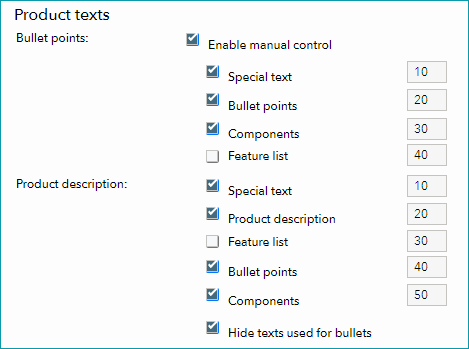
You can use the text configurator to customize the product descriptions shown at the channel (you can add information like components and bullet points, and configure the order in which these elements are displayed). •Go to "Channels > Zalando.xy ZFS > Settings" and switch to the tab "Product texts". •Select the checkbox "Enable manual control". •You can now choose, which elements to include in the bullet points and in the product description. •To define an order in which the elements are displayed, assign a number to each element (the element with the lowest number is displayed first; number the elements in increments of 10, i.e. 10, 20, 30, etc.).
Text Configurator |
||
X-12: Product text profile |
Product text profiles cannot be used for Zalando. |
||
X-13: Title profile |
You can use title profiles to configure the product titles shown in the channel's shop. For more information on title profiles, click here. Configure title profiles at the main channel level. Note that Zalando usually doesn't take over titles 1:1 but uses mapped information for the titles. |
||
X-14: Cross prices |
You can indicate cross prices for Zalando by filling in the field Former RP. |
SPECIAL REQUIREMENTS
ATTENTION: Reach out to your contact at Zalando directly, if you want to change existing product and article data. |
ATTENTION: |
Deletion of customer data
Please note that you are legally obligated to delete customer data (in compliance with the General Data Protection Regulation GDPR). In turn, Zalando is obligated to inform all parties it transfers personal data to about deletion requests made by customers in a secure and binding way. Therefore, Zalando will notify you in TB.One weekly (on Fridays) about any customer data records you must delete. This is an automated process that uses the Zalando Customer Account Deletion API.
TB.One receives the Zalando Data Protection Reports in the form of CSV files. You can access them at "Data exchange > Directories > GDPR Out" or via your interface (SFTP). The reports contain the deletion requests for all Zalando channels connected to your account. You are legally obligated (according to Art. 17 GDPR, Right to erasure) to delete this customer data from all third-party systems immediately. There is no need to delete any data from your TB.One account. The reports are removed automatically from the system after 30 days.
Content Freeze
After Zalando has processed your product and article data, the marketplace performs a so-called “content freeze.” Any changes you make to already exported products/items (e.g., texts, images) will not be transferred by Zalando. Please contact Zalando directly if you want to change existing product or article data.
Price API | Validation & Reporting.
Zalando performs an additional check of your price data using the Price API | Validation & Reporting. This enables you to maintain your price data as error-free as possible. Prices you maintain in TB.One are checked by Zalando's Price Validation API. The Price Reporting API retrieves the status of your prices from Zalando and makes it available in a status report .
Zalando offers a Pricing Management Tool on their zDirect platform. There, you can download an report detailing pricing errors that occurred after the export to Zalando for a more detailed and transparent information. You can use the price lists in TB.One as you are used to, to correct these errors.
Comply with Zalando's pricing rules:
•Price lists must be transferred at least 120 minutes before the prices become valid.
•There must be at least 60 minutes between the starting times of different price lists (regarding their validity).
•For limited-time price lists, each list must be valid for at least 60 minutes.
•Do not provide discounts for newly created articles. Articles must be online for 10 days before they can be discounted.
Zalando Special Description
For Zalando, you automatically transfer the Zalando Special Description that is composed from your product data. It consists of bullet points, special text and product components.
DATA EXCHANGE TIMES
DATA |
TIME/FREQUENCY |
|---|---|
Catalogue (Full) |
Once a day |
Stock (Delta) |
Once a day |
Prices |
Approximately every two hours |
Media |
With catalogue |
Retrieve and import orders |
Approximately every 30 minutes |
Error and status messages |
3 times a day. Check daily ("Channels > [Your Zalando channel] > Article status") |