TB.One > Import & Export > Master Data Import via TB.Cat/XML > TB.Cat - XML Structure > TBCATALOG > PRODUCTDATA > PRODUCT > P_MEDIADATA
P_MEDIADATA
Since TB.One can not only handle images but other file types as well, we refer to the broader term "media" here. Media are generally delivered in the import file in the form of URLs. During the import, TB.One downloads the media from the specified URL and stores them on the Tradebyte servers. The length of each URL must not exceed 255 characters.
Alternatively, you can zip-compress your media and upload it via SFTP to the input directory "/in" (file name: "media_*.zip"; the wildcard "*" usually consists of a timestamp). The file will automatically be extracted to the folder "sync/media". Since this folder is emptied regularly, it is not possible to check which files have already been provided. Therefore, you have to track that information in your system. Any subdirectories in the zip file are ignored. The link to the products/articles is established by specifying "sync/media/file name" in the columns "P_MEDIA" and "A_MEDIA". If you provide images via zip file, do so only once for each image. Usually, the transfer to the distribution channels is done by referencing the Tradebyte servers.
ATTENTION: |
For the import, each piece of media needs to have a media type. If no media type is provided, the type "image" is assumed. Additional media types can be individually created in TB.One as needed.
MEDIA TYPE |
DESCRIPTION |
FILE FORMAT |
|---|---|---|
image |
(Image) |
jpg, png |
color |
Color tile |
jpg |
manual |
User guide |
|
energy |
Energy efficiency information |
pdf, jpg |
Generally, TB.One differentiates between product and article media. Product media might e.g. show a stack of different colored t-shirts. The corresponding article images would then show the colored t-shirts (variants) individually.
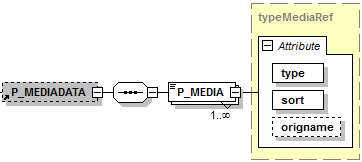
NODE |
REQUIRED |
DESCRIPTION |
|
|---|---|---|---|
P_MEDIADATA |
N |
XML |
Product media |
P_MEDIA |
Y |
CHAR(255) |
Reference to product medium |
P_MEDIA[type] |
Y |
CHAR(50) |
|
P_MEDIA[sort] |
Y |
INT |
Sorting within the product media |
P_MEDIA[origname] |
N |
CHAR(255) |
Original name of the file. Do not use this attribute for media uploaded via SFTP. |
EXAMPLE:
|
TIP: The maximum size for each file is 10 MB. Pictures are restricted to a maximum size of 3000 x 3000 pixels. You should aim to provide images with the highest possible resolution. TB.One scales the images down for each channel according to the required resolution. The Tradebyte server is not an image server. Therefore, images are only stored temporarily. The channel needs to transfer the images to its own servers and provide referencing and processing. |
For further information, see also:
▪Master data import via XML - overview
▪XML structure overview - TB.Cat 1.4
▪XML structure overview - TB.Cat 1.2/1.3
▪Examples: XML for TB.Cat 1.4 or TB.Cat 1.2/1.3