TB.One > Product and Article Data > Translations and Multilinguality > TB.ONE-INTERNAL TRANSLATION OF TEXT MODULES
TB.ONE-INTERNAL TRANSLATION OF TEXT MODULES
When you click on a text module in the text module management menu ("Articles > Translation > Manage text modules"), an editing section opens on the right side of the screen. On the tab "Data", you can control the translations of the record globally. On the tab "Translations", you can enter a translation for each language. On the tab "Usage" you can view the products and articles for which the text module is being used and the data field from which it originates (product text, designation, etc).
1. TAB "DATA"
NUMBER |
DESCRIPTION |
|---|---|
|
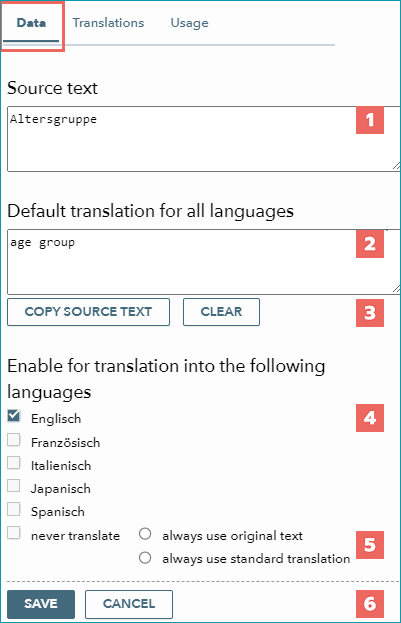
This field contains the original text. |
|
In this field, you can define a default translation that is valid for all languages. |
|
The button "Copy source text" will transfer the original text into the field "Default translation for all languages". |
|
By selecting a language's checkbox, you can release the active text module for translation into the corresponding language. |
|
If you mark the record as "never translate", you need to choose whether you always want to use the original text instead of the translation or use the default translation. |
|
Confirm your settings by clicking on the "Save" button. |


2. TAB "TRANSLATIONS"
NUMBER |
DESCRIPTION |
|---|---|
|
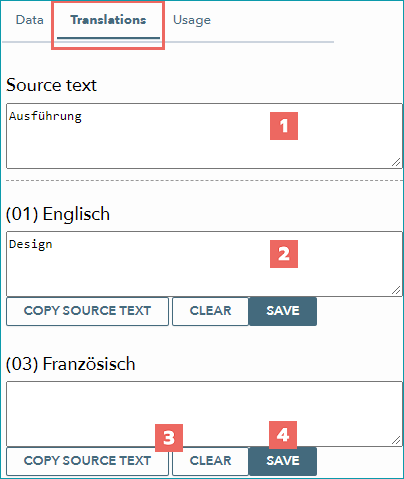
This is the original text. |
|
Here you can enter the translations for the individual languages. |
|
With the button "Copy source text", you can transfer the original text into this field. |
|
Save your translation by clicking on the "Save" button. This needs to be done individually for each language. |
3. TAB "USAGE"
NUMBER |
DESCRIPTION |
|---|---|
|
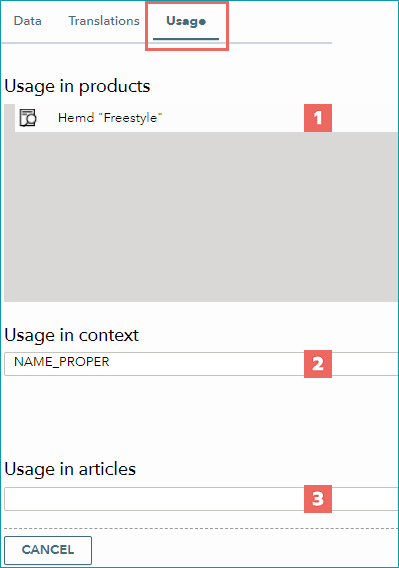
Here you can see the products in which the module is used. Click on the magnifying glass icon in front of the product to display a preview where you will find a tab with all of the product's text modules. |
|
Here, the context of the text module is displayed (description, name, prefix, etc.). The context filter in the menu "Manage text modules" is based on the content of this box. |
|
This field shows for which articles the text module is being used. |
For further information, see also:
•Overview: translations in TB.One