TB.One > Product and Article Data > Translations and Multilinguality > CREATE LANGUAGES
CREATE LANGUAGES
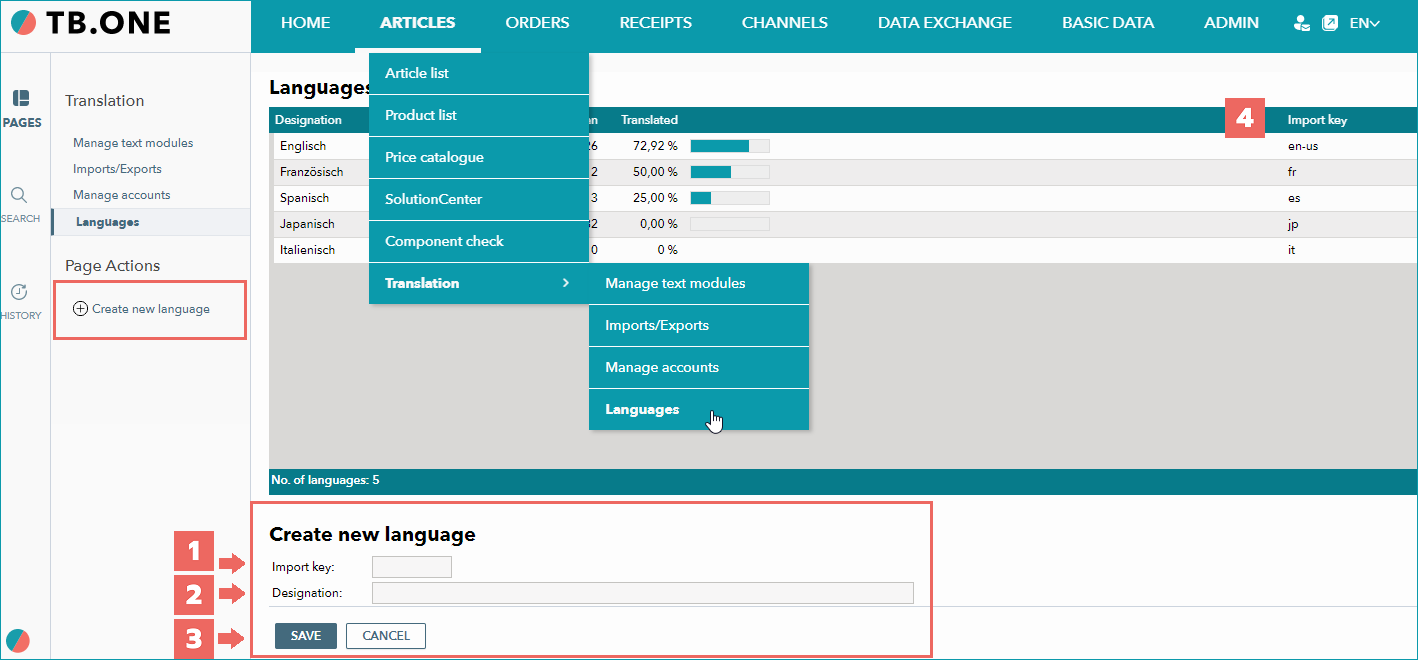
Before you can begin translating, you need to set up the target language(s). Navigate to "Articles > Translation > Languages", select the tab "Pages" in the left navigation bar, and click on "Create new language".
NUMBER |
DESCRIPTION |
|---|---|
|
The field "Import key" is only relevant for the import process. If you are using the translation tools, the field is irrelevant for you. If you export/import text modules, the import key is required. Note that the import key needs to be a language sign in the ISO-639 format. |
|
Enter the name of the new language. |
|
Confirm your entries by clicking "Save". |
|
Your data will appear in the list. Here, you can see the total number of text modules, the number of untranslated and the percentage of translated text modules for each language. Note that this view only regards text modules, not product-specific translations. |


For further information, see also:
•Overview: translations in TB.One