TB.One > Prices > FAQ - Price Data & Price Lists > How to Edit Master Article Prices via Import
How to Edit Master Article Prices via Import
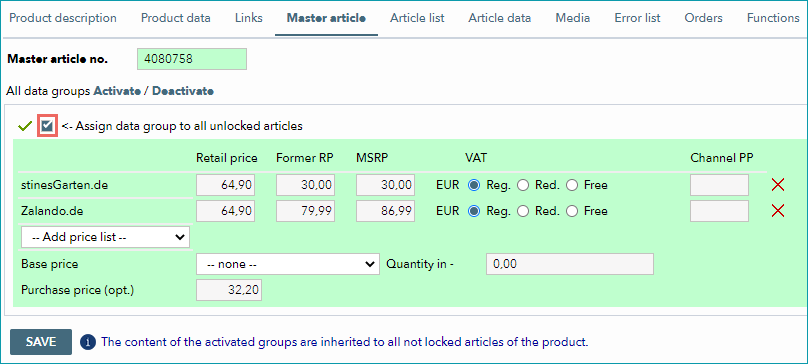
Generally, you should manage your data either manually or via import. The master article is a tool used during manual data maintenance to transfer identical information to all of a product's articles.
In the master article, data is structured in predefined groups that can be activated individually. One of these groups contains the price data. If the price data group is activated in the master article, prices for the corresponding articles can only be changed there (unless you exclude individual articles from this rule). If you maintain your price data manually via master articles, major price changes can be very time-consuming.
You can, however, overwrite master articles via import to save time. Price data will only be changed if the corresponding data group is active in the master article, and the individual articles are not excluded from master article changes. The import will not change the activation status of the "price" data group.

Import files in the CSV format can be validated via the menu "Data exchange > Validators > CSV".
XML import file with master article nodes should be validated against the following XSD:
https://api.core.tradebyte.com/schema/all_in_one/tb-cat_1_4_all_in_one.xsd |
https://api.core.tradebyte.com/schema/all_in_one/tb-cat_1_2_all_in_one.xsd |
IMPORT VIA XML FILE
The following information is required if you want to change the master article:
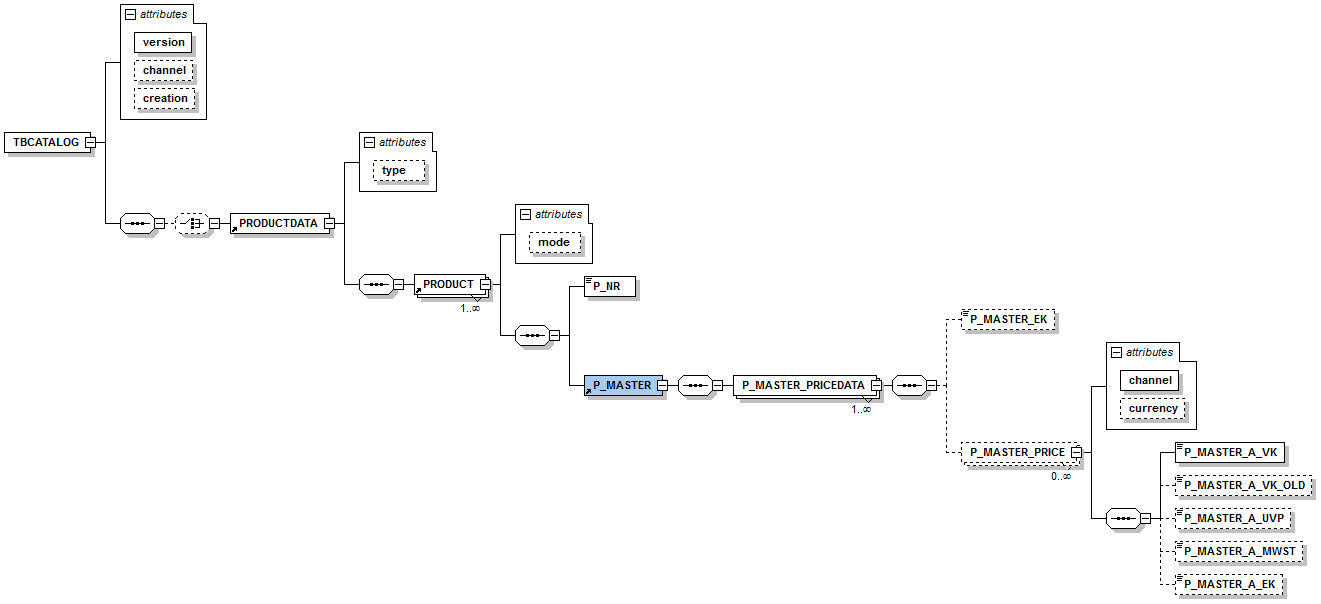
Any other nodes from the TB.Cat scheme are optional. If you provide additional information, please note that optional nodes may contain mandatory nodes (i.e. if the optional node is provided, the contained mandatory nodes must also be included in the import file).
Provide the node <P_MASTER_PRICE> and indicate the channel for which you want to provide master article price data with the corresponding channel sign. Save the file as "TBCAT_{timestamp}.xml" or "TBCAT_prices_{timestamp}.xml" or similar.
Example:
<?xml version="1.0" encoding="UTF-8"?> <TBCATALOG version="1.2" xmlns:xsi="http://www.w3.org/2001/XMLSchema-instance" xsi:noNamespaceSchemaLocation="http://api.core.tradebyte.com/schema/all_in_one/tb-cat_1_2_all_in_one.xsd"> <PRODUCTDATA> <PRODUCT> <P_NR>8712</P_NR> <P_MASTER> <P_MASTER_PRICEDATA> <P_MASTER_EK>199.00</P_MASTER_EK> <P_MASTER_PRICE channel="ebde" currency="EUR"> <P_MASTER_A_VK>399.99</P_MASTER_A_VK> <P_MASTER_A_VK_OLD>429.00</P_MASTER_A_VK_OLD> <P_MASTER_A_UVP>479.00</P_MASTER_A_UVP> <P_MASTER_A_MWST>2</P_MASTER_A_MWST> <P_MASTER_A_EK>299.00</P_MASTER_A_EK> </P_MASTER_PRICE> </P_MASTER_PRICEDATA> </P_MASTER> </PRODUCT> </PRODUCTDATA> </TBCATALOG> |
IMPORT VIA CSV FILE
The master article price data can also be overwritten via CSV imports. Provide a CSV file configured according to the settings at "Admin > Import > Settings". At minimum, the CSV file must contain the following columns:
FIELD NAME |
REQ. |
DATA TYPE |
DESCRIPTION |
|---|---|---|---|
p_nr |
Y |
CHAR(50) |
|
p_master_ek |
N |
FLOAT |
Wholesale price (for internal purposes only) |
p_master_vk_old[kanal] |
N |
FLOAT |
|
p_master_uvp[kanal] |
N |
FLOAT |
|
p_master_mwst[kanal] |
N |
INT |
VAT rate for the channel. Possible values are: |
p_master_ch_ek[kanal] |
N |
FLOAT |
Net channel purchase price |
Replace "kanal" with the respective channel sign. You need to provide the columns for each channel, for which you want to change the master article price data.
For further information, see also:
•Manual master data creation
•Master data maintenance via CSV
•Master data maintenance via XML
•Bulk processing via the master article