TB.One > Product and Article Data > Manual Master Data Creation > Bulk Processing > Master Article
Master Article
In order to save time when providing information that applies to all (or most) variants of a product, you can use the master article. This feature can be found on the tab "Master article" in the product detail view.
The information which can be edited in the master article menu is grouped thematically. Each of the groups can be activated individually by checking the box in its title bar. Above the groups, there are two buttons which allow you to activate or deactivate all of them simultaneously. Data groups which are currently inactive are marked with the words "Not active" in red letters. Active data groups are highlighted in green.
With the master article you can configure the following information for all of a product's articles:
•Price and VAT, including base price details
•Price lists
•Commision group and sales unit
•Order quantity requirements, order increment and shipment
•Replaceability, replacement time and delivery time
•Package details, such as pack size and weight, as well as the country of origin and intrastat category
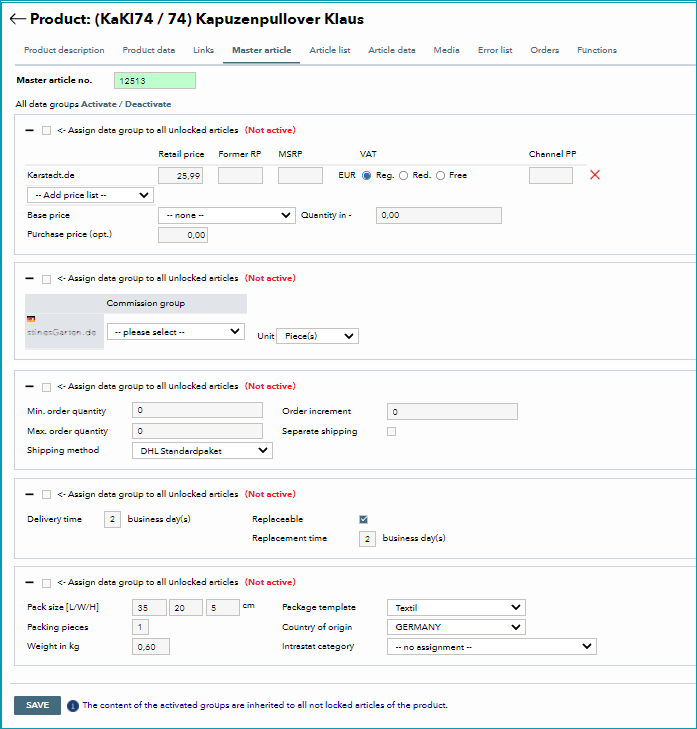
Prices can be defined for a single channel or for several channels at once. Above the price data table, there is a row of input fields where you can enter price data. By clicking the blue arrow next to a box, you can assign prices to all channels (or remove them). Also, using the master article makes it easier to assign prices and price lists to all of a product's articles. Activate the checkbox for the data group. Once it is activated, the menu section is highlighted in green. Add price lists via the drop-down selection and enter prices in the corresponding free text fields. Any individual prices which were entered beforehand will not be affected by this.
Do not forget to click "Save" after you have completed your configurations.
ATTENTION: Individual variants can be excluded from master article edits, so that the individual article information will be retained even when the master article is in use (indicated by the "lock icon" in the article menu). In this case, the data configured via the master article would be overwritten during import. If required, it is also possible to edit the price data of the master article via import. In this case, the master article data would be changed, but individual articles locked for the master article would not. Therefore, you should choose one way of creating master data and stick to it whenever possible. |
For further information, see also:
•Manual master data creation - overview
•Bulk processing via list articles