TB.One > Prices > Prices and Price Lists > THE INTERACTION OF PRICE LIST AND CHANNEL
THE INTERACTION OF PRICE LIST AND CHANNEL
WHERE TO ASSIGN PRICE LISTS TO A CHANNEL?
You can access the price lists assigned to a specific channel via its channel menu ("Channels > [Channel name] > Price catalogue"). Here, you can assign multiple price lists to the channel and prioritize them. You can assign an unlimited number of price lists to any channel.
HOW TO ASSIGN AND PRIORITIZE PRICE LISTS?
The channel-specific price catalogue menu (see above) contains two main sections: "Default price list" and "More price lists".
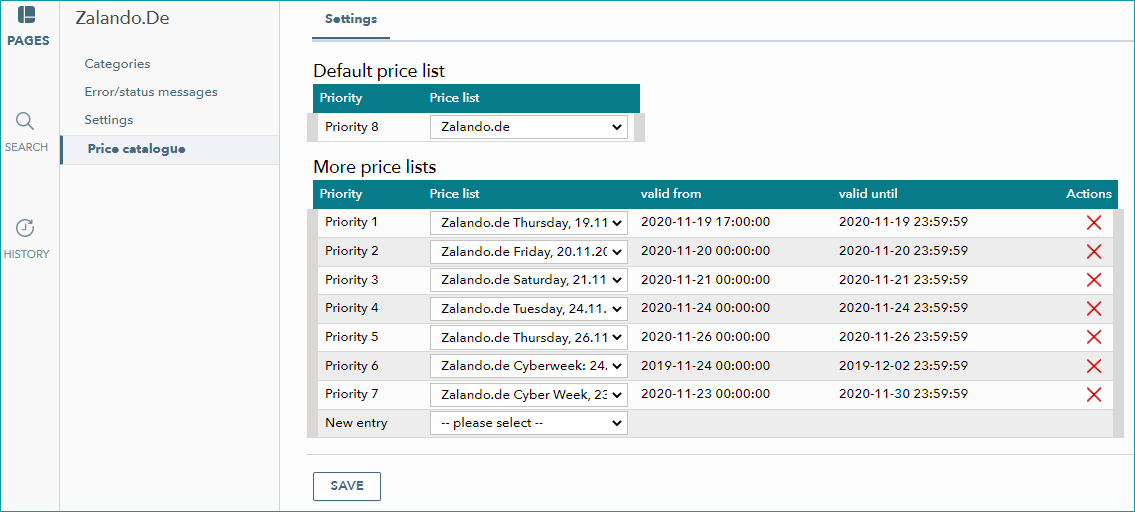
Use the drop-down "Default price list" to define a specific price list as the standard for the channel.
TIP: |
ATTENTION: |
Under "More price lists", you can assign additional price lists that will override the prices in the default list during their period of validity. If multiple price lists would be valid at the same time, the value in the column "Priority" decides which prices are used ("Priority 1" is the highest). By prioritizing your price lists, you can control the order in which your prices become valid. If you want to change a price list's priority, use drag & drop to reorder the list.
Remember to save your settings when you have assigned and prioritized the price lists.
WHEN ARE THE PRICES EXPORTED TO THE CHANNEL?
Price data is transmitted to the channels together with all other data in the catalogue (full/delta). Usually, this regular data exchange process takes place daily. The exact times, types and frequencies depend on the channel. You can find them on the respective channel overview page in this knowledge base or in the channel-specific manual.
For special sales campaigns, we offer the option to transfer the price lists via an API at midnight before the campaign starts. This way, we ensure that the discounted prices will be displayed in the shop on time. Please contact your Success Manager for the respective channel if you have any questions regarding specific sales campaigns.
For further information, see also:
•Price catalogue and price lists - overview