TIP: This Channel Sheet contains all channel-specific information for AboutYou. |
CHANNEL BASICS
The following channels are available for AboutYou:
AboutYou Dropshipment
CHANNEL ABOUTYOU DROPSHIPMENT |
SIGN |
ID |
CURRENCY |
|---|---|---|---|
AboutYou (Main Channel) |
ande |
75 |
--- |
AboutYou.at |
ayat |
102 |
EUR |
AboutYou.be |
aybe |
204 |
EUR |
AboutYou.de |
ayde |
101 |
EUR |
AboutYou.dk |
aydk |
404 |
DKK |
AboutYou.es |
ayes |
527 |
EUR |
AboutYou.fi |
ayfi |
406 |
EUR |
AboutYou.fr |
ayfr |
339 |
EUR |
AboutYou.it |
ayit |
452 |
EUR |
AboutYou.nl |
aynl |
191 |
EUR |
AboutYou.pt |
aypt |
528 |
EUR |
AboutYou.se |
ayse |
405 |
SKK |
AboutYou.cz |
aycz |
229 |
CZK |
AboutYou.pl |
aypl |
207 |
PLN |
AboutYou FbAY
CHANNEL ABOUTYOU FBAY |
SIGN |
ID |
CURRENCY |
|---|---|---|---|
AboutYou.de FbAY (CP) |
fbcde |
380 |
EUR |
AboutYou.at FbAY (CP) |
fbcat |
373 |
EUR |
AboutYou.ch FbAY (CP) |
fbccd |
374 |
CHF |
AboutYou.nl FbAY (CP) |
fbcnl |
375 |
EUR |
AboutYou.pl FbAY (CP) |
fbcpl |
376 |
PLN |
AboutYou.cz FbAY (CP) |
fbccz |
377 |
CZK |
AboutYou.be FbAY (CP) |
fbcbn |
378 |
EUR |
AboutYou.sk FbAY (CP) |
fbcsk |
382 |
EUR |
AboutYou.hu FbAY (CP) |
fbchu |
383 |
HUF |
AboutYou.ro FbAY (CP) |
fbcro |
384 |
RON |
AboutYou.si FbAY (CP) |
fbcsi |
385 |
EUR |
AboutYou.lv FbAY (CP) |
fbclv |
386 |
EUR |
AboutYou.lt FbAY (CP) |
fbclt |
387 |
EUR |
AboutYou.ee FbAY (CP) |
fbcee |
388 |
EUR |
AboutYou.hr FbAY (CP) |
fbchr |
389 |
EUR |
AboutYou.bg FbAY (CP) |
fbcbg |
390 |
EUR |
AboutYou.dk FbAY (CP) |
fbcdk |
391 |
DKK |
AboutYou.se FbAY (CP) |
fbcse |
392 |
SEK |
AboutYou.fi FbAY (CP) |
fbcfi |
393 |
EUR |
AboutYou.ie FbAY (CP) |
fbcie |
394 |
EUR |
AboutYou.fr FbAY (CP) |
fbcfr |
395 |
EUR |
AboutYou.es FbAY (CP) |
fbces |
396 |
EUR |
AboutYou.it FbAY (CP) |
fbcit |
398 |
EUR |
AboutYou.pt FbAY (CP) |
fbcpt |
399 |
EUR |
AboutYou.gr FbAY (CP) |
fbcgr |
397 |
EUR |
AboutYou.no FbAY (CP) |
fbcno |
400 |
NOK |
AboutYou.com (Global) FbAY (CP) |
fbcze |
412 |
USD |
AboutYou.sa FbAY (CP) |
fbcsa |
460 |
SAR |
AboutYou.co.il FbAY (CP) |
fbcil |
461 |
ILS |
AboutYou.cy FbAY (CP) |
fbccy |
490 |
EUR |
AboutYou.lu FbAY (CP) |
fbclu |
523 |
EUR |
AboutYou Marketplace
CHANNEL ABOUTYOU MARKETPLACE |
SIGN |
ID |
CURRENCY |
|---|---|---|---|
AboutYou Marketplace (Main channel) |
aymp |
545 |
EUR |
AboutYou.at Marketplace |
aympat |
548 |
EUR |
AboutYou.be Marketplace |
aympbe |
789 |
EUR |
AboutYou.cz Marketplace |
aympcz |
549 |
CZK |
AboutYou.de Marketplace |
aympde |
546 |
EUR |
AboutYou.dk Marketplace |
aympdk |
557 |
DKK |
AboutYou.es Marketplace |
aympes |
550 |
EUR |
AboutYou.fi Marketplace |
aympfi |
551 |
EUR |
AboutYou.fr Marketplace |
aympfr |
547 |
EUR |
AboutYou.it Marketplace |
aympit |
552 |
EUR |
AboutYou.nl Marketplace |
aympnl |
553 |
EUR |
AboutYou.pl Marketplace |
aymppl |
554 |
PLN |
AboutYou.pt Marketplace |
aymppt |
555 |
EUR |
AboutYou.se Marketplace |
aympse |
556 |
SKK |
AboutYou Seller Center
CHANNEL ABOUTYOU SELLER CENTER |
SIGN |
ID |
CURRENCY |
|---|---|---|---|
AboutYou SC (Main channel) |
ayscmc |
825 |
-- |
AboutYou SC Germany |
ayscde |
826 |
EUR |
AboutYou SC Austria |
ayscat |
839 |
EUR |
AboutYou SC Spain |
aysces |
854 |
EUR |
AboutYou SC Italy |
ayscit |
855 |
EUR |
AboutYou SC Finland |
ayscfi |
856 |
EUR |
AboutYou SC Sweden |
ayscse |
857 |
SKK |
AboutYou SC Denmark |
ayscdk |
858 |
DKK |
AboutYou SC France |
ayscfr |
859 |
EUR |
AboutYou SC Poland |
ayscpl |
860 |
PLN |
AboutYou SC Belgium |
ayscbe |
861 |
EUR |
AboutYou SC Netherlands |
ayscnl |
862 |
EUR |
PRELIMINARY INFORMATION
•New to TB.One? Our webinars help you find your way around the software.
•Provide your product data in German. English is also acceptable, but the title and track listing must be provided in German. Exceptions are only possible upon consultation with AboutYou.
•Go to the menu "Basic data > Storage > Warehouse settings" and check your settings for the channel (for more information, click here).
•The warehouse must be placed at the level of the main channel.
ATTENTION: |
CHANNEL-SPECIFIC SETTINGS, FEATURES, AND PROCESSES
REFERENCE NUMBER |
CHANNEL-SPECIFIC INSTRUCTIONS |
|||
|---|---|---|---|---|
B-01: Payments |
Find your payment methods at "Basic data > Payment > Payment methods". Payments are managed by AboutYou. When the channel is activated or, at the latest, when the first order comes in, a payment method with the channel name is created automatically. For the export to an ERP-system, you can freely select an export key. |
|||
D-01: Product designation |
•The length of the product designation is not limited.
|
|||
D-02: Special text |
AboutYou does not use the field "Special text". |
|||
D-03: Description |
The length of the product description is limited to 2,500 characters.
Aufzählungspunkte: In Verwendung.
|
|||
D-04: Components |
Use the recommended components listed under "Product Properties - Components" in the article "Product Description". •An export key must be specified for the variant-defining components. Products containing perfluoroalkyl and polyfluoroalkyl substances (PFAS) are banned in Denmark and France. If you are connected to the Danish and French country channels of <%CHANNEL%>, you are required to specify whether your products contain these substances or not. Create a new component for PFAS information and assign it to all products you sell through these channels. This component must be assigned via the value mapping of the channel property “PFAS Information” with the following values: •“PFAS-free” – Does not contain PFAS substances •“Contains PFAS” – Contains PFAS substances |
|||
D-05: Attributes |
Use the recommended components listed under "Product Properties - Attributes" in the article "Product Description". •Category-specific properties, e.g., cup size, length in inches, fit, model size, care instructions, pattern/texture, collar/neckline shape. •Material: Required; percentage. Multiple materials must be separated by commas; multiple material types (e.g., outer material and lining) are separated by a semicolon. •Note that you must provide your values for AboutYou in German: |
|||
E-01: Article numbers |
Provide the following article numbers: •Article number •EAN •Manufacturer's article number (Optional for AboutYou FbAY) |
|||
E-02: Shipping information |
Provide the following shipping information: •Pack sizes (height, length, width in cm) •Weight •Country of origin and Intrastat category
|
|||
E-03: Variant dimensions |
•AboutYou does not limit the number or type of variant dimensions. •Size and/or color are recommended |
|||
F-01: Media |
•Provide images in a commonly used format such as png or jpg. •Number: min. 1 bust image •Size: min. 1.500 x 2.000 px, 2:4 aspect ratio •Resolution: 96 DPI •Stack images are not permitted •1 bust images (frontal, crop-out) is mandatory •1-2 bust images, 2-4 model images, and 1-2 detail images •Consult the AboutYou image guide for further information.
|
|||
G-01: Carrier |
•Ship with DHL or Hermes in Germany, or use another carrier from the list in other countries •You can define surcharges for your AboutYou shipping types at "Basic data > Prices > Surcharges/Discounts". |
|||
G-02: Delivery note |
You cannot configure the delivery notes for AboutYou. |
|||
G-03: Invoice |
You don't need to print invoices for AboutYou. The channel sends the invoices to the customers. Print invoices for your own records only. |
|||
G-04: Proposed return code |
Dispatch advices you forward to the channel must include a proposed return code for the return shipment label. To that end, do one of the following: a)configure a number range in TB.One. b)if you manage orders outside TB.One, configure your system so that it forwards the return code to TB.One (CSV/XML: "IDCODE_RETURN_PROPOSAL"). c)manually enter return codes during order processing. |
|||
G-05: Delivery documents in package |
Delivery note, invoice, return label
|
|||
G-06: Refund deduction |
At AboutYou you always reimburse customers for returned articles in full. If you have complaints about the condition of a returned article, consult the channel directly. |
|||
G-07: Return causes |
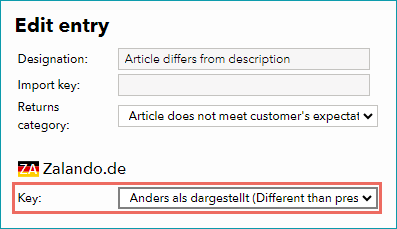
To create return causes and states, go to "Basic data > Returns > Return causes" and "Basic data > Returns > Return states" . AboutYou processes the return causes and states you transmit. Map them to the return causes and states used by the channel by assigning a key. Mapping a return cause |
|||
X-01: Size grid |
For AboutYou, you have to map size grids to ensure the correct sizes are shown in the shop. For detailed instructions, click here. |
|||
X-02: Base prices |
Provide base prices (price per kg, price per liter, etc.) for all articles that legally require you to do so. |
|||
X-03: Categories |
•For a complete list of all categories, go to "Channels > [Your AboutYou channel] > Categories". •For AboutYou, categories are always assigned at the lowest level of the categorization hierarchy. You can ensure this by marking unauthorized categories as “Unassignable” under “Channels >AboutYou Main Channel > Categories.” •At AboutYou you can not create links between your products. |
|||
X-04: Value mapping |
Map at the category level for AboutYou. The available channel values may differ from category to category.
|
|||
X-05: Pending orders |
AboutYou transmits pending orders. |
|||
X-06: Partial deliveries |
Partial cancellations and partial deliveries on article level. |
|||
X-07: Commission group |
AboutYou does not use commission groups. |
|||
X-08: Service logos |
AboutYou will not display service logos you transfer in the shop. |
|||
X-09: Error and status messages |
AboutYou does not provide error and status messages. |
|||
X-10: Templates |
At AboutYou you cannot use templates. |
|||
X-11: Text configurator |
The text configurator cannot be used for AboutYou. |
|||
X-12: Product text profile |
Product text profiles cannot be used for AboutYou. |
|||
X-13: Title profile |
You can use title profiles to configure the product titles shown in the channel's shop. For more information on title profiles, click here.
|
|||
X-14: Cross prices |
You can indicate cross prices for AboutYou by filling in the field MSRP.
|
SPECIAL REQUIREMENTS
Specifying Brands on AboutYou
For each brand you want to offer onAboutYou, you must enter a channel-specific export key and a description here. To do this, enter the brand name exactly as you want it to appear in the shop in the “Key” and “Description” fields. Only enter this information for brands that you actually plan to sell on AboutYou.
AboutYou Assortment Steering
The AboutYou assortment steering
•helps you control your assortment for each individual AboutYou SC country channel.
•allows you to define what part of your assortment goes live on which country channels by selectively de-/activating products and articles.
For AboutYou , there are some best practices for your product deactivation. Decide between the complete deactivation of an article on all AboutYou country channels, or country-specific deactivation.
Prerequisite: •Newly created articles: Control them by default via product/article activation. •Existing articles: Deactivate your products/articles on a channel-specific basis, or remove the corresponding prices on a AboutYou country channel. |
•Channel-specific product/article deactivation
Deactivate all country channels on product/article level.
•Country channel-specific deactivation
Deactivate a specific country channel on the product/article.
•Deactivation via prices
If you remove all prices for all country channels, this will lead to a complete deactivation. Remove the prices for a specific country channel to steer the assortment country-specific.
•Deactivation via stock: You can deactivate an article for all country channels, when you set the stock to "0" for AboutYou.
DATA EXCHANGE TIMES
AboutYou Dropship / AboutYou Marketplace
DATA |
TIME/FREQUENCY |
|---|---|
Catalog (Full) |
1x a week |
Catalog (Delta) |
1x a day |
Stock (Delta) |
every 15 minutes |
Media |
with catalog |
Prices |
daily |
Retrieve and import orders |
real time |
Order messages |
real time |
AboutYou FBAY
DATA |
TIME/FREQUENCY |
|---|---|
Catalog (Full) |
1x a day |
Stock Report |
daily |
Media |
with catalog |
Prices |
daily |
Sales-/Return report |
daily |
Warehouse report |
daily |
AboutYou Seller Center
DATA |
TIME/FREQUENCY |
|---|---|
Catalog (Full) |
1x a day, around 11:00 a.m. |
Stock (Delta) |
2x an hour |
Prices (Delta) |
every 4 hours |
Media |
with catalog |
Retrieve and import orders |
2x an hour |
Order messages |
2x an hour |