TB.One > Order Data and Order Processing > Order Processing in TB.One > Pick Lists and Pick Codes
Pick Lists and Pick Codes
Should you opt to manage your warehouse via TB.One (depending on your edition), you can print pick lists. Pick lists are useful for compiling packages. They allow for the integration of product images and product numbers and can be sorted by either bin location/storage area or by article number. You can also specify whether you would like to print the pick code on other documents (e.g. the delivery note, order data sheet, shipping labels and invoices). The configuration is done at "Admin > System settings > Documents" in the section "Pick list and pick code".
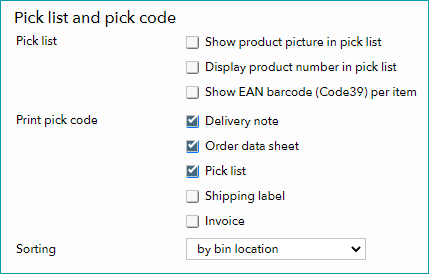
The orders printed on the pick list are sorted alphabetically (by article number or bin location/storage area) and show the number of articles to be picked. Depending on the configuration, the pick code will also be printed on the delivery note and order data sheet to make it easier to check whether the package was compiled correctly.
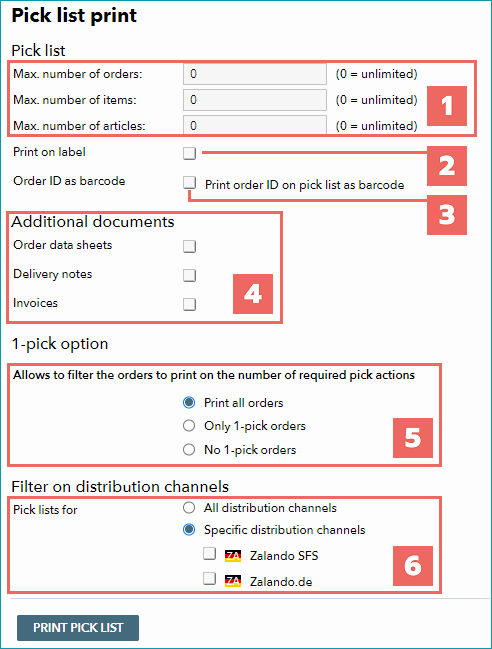
More options are available during pick list printout at "Orders > Pick lists". Here, employees can compile and print their own pick lists.
The settings are cumulative:
NUMBER |
DESCRIPTION |
|---|---|
|
Limits the print job to a specific number of unprocessed orders, items and/or articles. If you enter a number in multiple fields, the one which is reached first will be applied. These numbers also apply for the 1-pick option (see number 5). |
|
Prints the results of the boxes under 1 as labels (if you are using TB.Print). |
|
Adds the order ID to the pick list as a barcode, so employees can use barcode scanners to process orders. |
|
Define which related documents to print along with the pick list. |
|
The 1-pick option is a filter. It is based on whether or not orders can be completed by picking only one item from the shelves, i.e. if they contain only one article. •Print all orders: disables the 1-pick option (default setting) •Only 1-pick orders: Prints the number of orders specified under 1, ignoring orders that contain more than one article •No 1-pick orders: Prints the number of orders specified under 1, ignoring orders that contain only one article |
|
This option lets you filter for orders generated by specific channels. |


For further information, see also:
•Assigning storage areas/bin locations manually
•Assigning storage areas/bin locations via CSV
•Assigning storage areas/bin locations via XML (TB.Cat 1.2, TB.Cat 1.4)