TB.One > Setup, Configuration & User Accounts > Order-Related Basic Data > Number Range for "DHL Kleinpaket"
Number Range for "DHL Kleinpaket"
With the new DHL package type "DHL Kleinpaket", you can send ship small packages cheaply. It is valid for packages with the following specifications:
•Weight up to 1kg.
•Size 35.3 x 25 x 8 cm or smaller.
ATTENTION: |
How to Configure a DHL Kleinpaket Number Range
1.Go to "Basic data > Shipping > Number ranges" and select "New number range" in the left sidebar.
2.Name the new number range and assign the type "DHL Parcel Shipping" (see Fig.1).
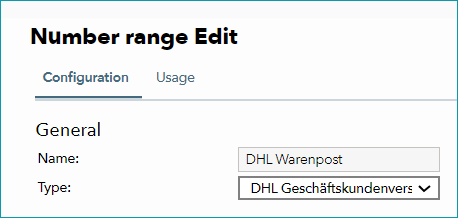
Fig.1: Number range type "DHL Parcel Shipping"
3.Select either "DHL Kleinpaket (V62KP)" or "Warenpost international (V66WPI)" from the drop-down menu in the section “Type specific” for "DHL package type".
TIP: "Warenpost international (V66WPI)" creates shipping labels for international shipping. |
4.In the "Fallback number range" section, select the number range that will be used if your parcel exceeds the 1kg limit. This can be an existing number range.
5.Under "Settings", activate the “Box Check” function to check whether orders with up to three items fit into a single Warenpost parcel. Orders with four or more items then automatically use the fallback number range.
6.Assign the channel that should use the number range and save your settings.
Preventing Individual Articles from Using this Number Range
If you sell articles that meet the requirements for "DHL Kleinpaket" shipping (size, weight), but you do not want to ship them with this method, you can exclude them.
1.Go to “Basic data > Properties > Attributes” and create a new attribute. Call it “DHL Kleinpaket exclusion” or similar. Alternatively, you can use an existing attribute.
2.Switch to the tab “Attribute values” and create a new value. Give this value a name like “Excluded”.
3.Save your settings.
4.Add the attribute (“DHL Kleinpaket exclusion”) with the newly created value (“Excluded”) to any articles you want to exclude from Warenpost shipping.
ATTENTION: |
5.Go to “Basic data > Shipping > Number ranges” and select your "DHL Kleinpaket" number range.
6.Enter the newly created attribute and its value under “Do not use Warenpost for articles with the attribute:” (see Fig.2).
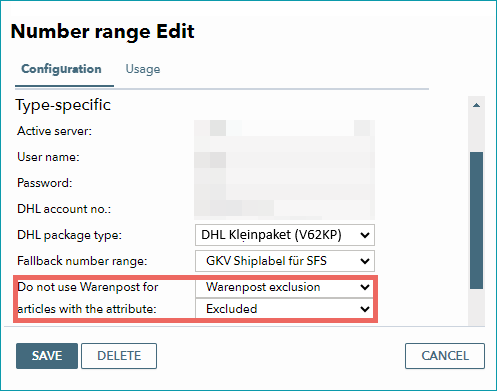
Fig.2: Exclude articles with the attribute
7.Save your settings.
When the configuration is complete, any order containing articles that are excluded from DHL Kleinpaket shipping will automatically use the fallback number range.